

The following example shows how to use a VACL to filter the traffic that is captured in a VLAN.
The example filters out non-TCP traffic, which is useful when capturing data for Application Delivery Analysis. Using ACLs, you can limit traffic to specific ports or IP addresses.
Note: If the second ACL is configured improperly, production traffic that does not meet the first ACL is dropped. We recommend that multiple people review VACL configurations. The review helps to prevent a misconfiguration that can result in dropped traffic. We also recommend that you test a VACL in a lab environment before applying it to a production environment.
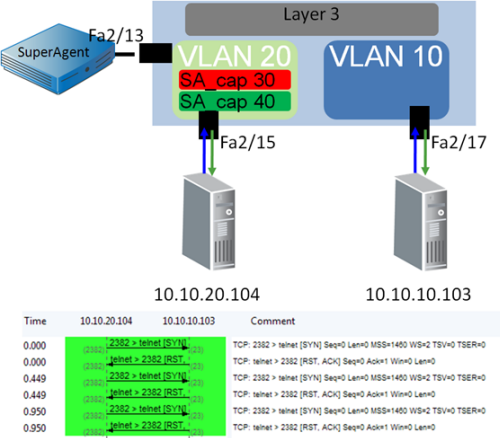
The following commands represent the configuration in the illustration:
(config)# access-list 101 permit tcp any any
!
(config)# access-list 102 permit ip any any
!
(config)# vlan access-map sa_cap 30
(config)# match ip address 101
(config)# action forward capture
!
(config)# vlan access-map sa_cap 40
(config)# match ip address 102
(config)# action forward
!
(config)#vlan filter sa_cap vlan-list 10
!
(config)#interface gig2/13
(config)#switchport capture
|
Copyright © 2015 CA Technologies.
All rights reserved.
|
|