

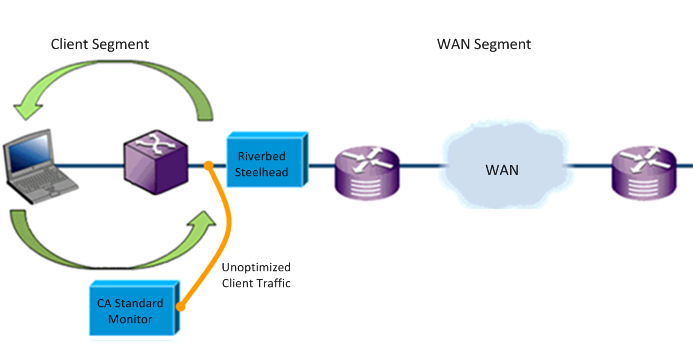
To report the Client network segment, the CA Standard Monitor in the branch office must receive the unoptimized TCP traffic between the client computers and the branch Riverbed Steelhead appliance.
Use a network tap or mirror traffic from the branch switch to the Monitor NIC on the monitoring device.
We recommend that you deploy a branch monitoring device to the remote locations where you require visibility into the list of optimized applications at a branch location. If you do not monitor the Client segment at a branch location, the CA Application Delivery Analysis user can still view a list of all applications on the WAN network segment. From this list, she can drill into the Performance Detail reports for the WAN and Server network segments.
Alternatively, in CA PC or CA NPC, create a group that contains any application with "WAN" or "Server" in it, and then filter an Engineering page report on that group and a particular client network.
Mirror the unoptimized traffic between the client computers and the branch Steelhead appliance to the monitor NIC on the monitoring device. In the Steelhead Physical In-Path configuration below, client traffic between the client computers and the branch Steelhead appliance is mirrored to the CA Standard Monitor.
|
Copyright © 2014 CA Technologies.
All rights reserved.
|
|