

The CA GigaStor captures all packets that are passively copied to it, for example, from a SPAN or mirror port, or from a network tap, and captures the entire packet for complete conversation analysis and reconstruction.
The CA GigaStor Connector on the CA GigaStor polls the management console for a list of server subnets, client networks, and port exclusions. While the packets are in memory on the CA GigaStor, and before they are written to disk, the CA GigaStor Connector copies matching TCP header data into packet digest files and sends the digest files to its assigned monitoring device. If necessary, you can assign a CA GigaStor to more than one monitoring device. We do not recommend assigning a CA GigaStor to the CA Application Delivery Analysis Manager.
The CA GigaStor Connector sends packet digest files to its assigned CA Standard Monitor or CA Multi-Port Monitor for processing and calculation of response time metrics for each application, server, and network combination. The CA GigaStor Connector does not calculate response time metrics.
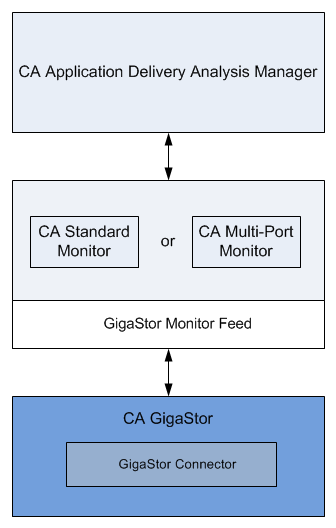
The packet digest files are received by the GigaStor monitor feed on the monitoring device. The management console then evaluates the response time metrics from all monitoring devices to assign the best monitor feed to each server, and to monitor the busiest TCP applications on each server.
You can also define the applications you want the management console to monitor and load this configuration on the CA GigaStor.
|
Copyright © 2014 CA Technologies.
All rights reserved.
|
|