

To monitor the intra-VM traffic on the VMware vSwitch, create a dedicated Monitor port group with promiscuous mode enabled, and assign the Monitor NIC on the CA Virtual Systems Monitor to the Monitor port group.
The CA Virtual Systems Monitor is designed to monitor virtual server-to-virtual server communication "inside" the virtual environment. If you:
To enable the Management network adapter on the CA Virtual Systems Monitor to communicate with the management console which is outside the ESX Host, configure the CA Virtual Systems Monitor to use an existing virtual network adapter or create a new Management port group. You do not need to enable promiscuous mode on the Management port group. For more information about promiscuous mode, see your VMware product documentation.
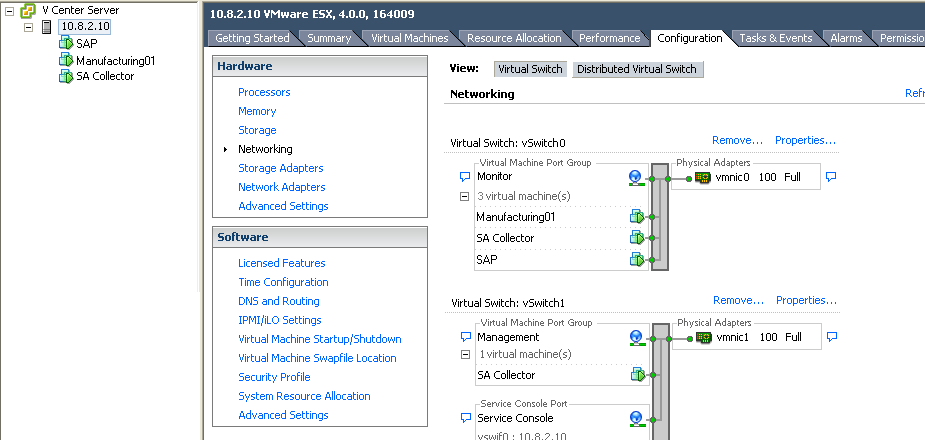
In the following example, the management console virtual machine (SA Collector) is configured to use the Monitor and Management networks. The ESX Host, 10.8.2.10, is configured with:
The vmnic0 network adapter is the uplink port that enables client traffic from outside the virtual switch to communicate with a server on the virtual switch, such as an externally-facing Web server that sends client requests to the SAP application on the back-end SAP server.
To monitor front-end Web server traffic to external, physical clients (not shown), use a physical monitor, such as a CA Multi-Port Monitor, to monitor mirrored server traffic from the physical switch.
Follow these steps:
Name the network Monitor. Later, when you configure the virtual machine, you can easily identify the network adapter with the mirrored application traffic.
Specify the VLAN ID with the application traffic you want to monitor or choose All. Leave this field blank if VLAN tags are not being used.
If you are on an ESX 3.5 Server and you want to monitor all VLANs, specify the VLAN ID as 4095.
If the virtual machine has an AMD adapter, you must configure the guest operating system to use the Intel E1000 driver. For more information, see http://kb.vmware.com/kb/1004252.
Configure the security policy to Accept promiscuous mode, which lets the Monitor port group to see all traffic on the VMware vSwitch.
If promiscuous mode is not enabled on the VMware vSwitch configure the security policy on the VMware vSwitch to accept promiscuous mode.
If necessary, create a port group named "Management" to identify the network adapter that is not receiving the mirrored switch traffic.
|
Copyright © 2014 CA Technologies.
All rights reserved.
|
|