

The Response Time CA Virtual Systems Monitor (CA Virtual Systems Monitor) serves as a type of monitoring device for CA Application Delivery Analysis. Use the CA Virtual Systems Monitor to monitor IPv4-based TCP traffic between virtual servers on the same VMware ESX Host. The CA Virtual Systems Monitor monitors the server-to-server traffic between VMs on the same ESX Host, and minimizes the load on the CA Virtual Systems Monitor and by extension, maximizes the available resources on the ESX Host.
To monitor traffic from outside the virtual environment, for example, from another ESX Host or a remote subnet communicating with a virtual server inside the ESX Host, mirror the server traffic from the physical server switch to a physical monitoring device, such as a CA Multi-Port Monitor.
The CA Virtual Systems Monitor is only designed to monitor virtual server-to-virtual server communication "inside" the VMware ESX Host. Do not use the CA Virtual Systems Monitor to monitor traffic between physical (external) devices and a virtual server. To monitor physical-to-physical and physical-to-virtual communication, use a physical monitoring device, such as a CA Multi-Port Monitor.
As shown in the example below, the CA Virtual Systems Monitor monitors the server-to-server traffic between VMs on the same ESX Host, while physical monitoring devices take SPAN data from physical switches.
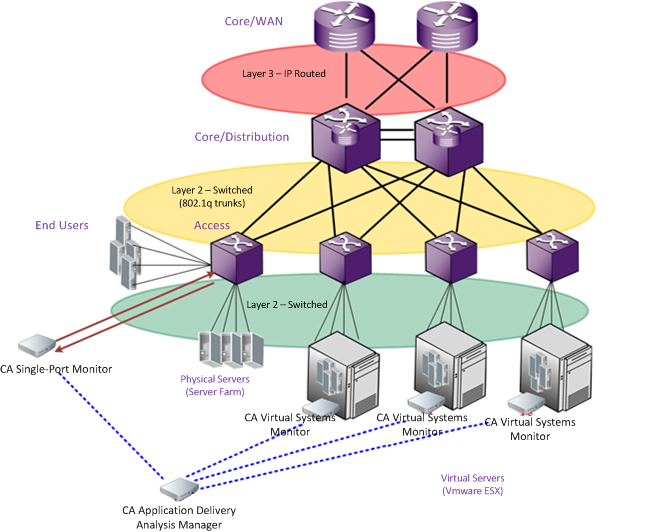
The CA Virtual Systems Monitor is similar to the CA Standard Monitor, but you install it on a VMware virtual machine rather than on a physical appliance. Like the CA Standard Monitor, the CA Virtual Systems Monitor passively gathers data from a mirrored port, inspects packet headers for performance-related information, and passes relevant performance metrics to the management console for reporting and display.
Unlike a CA Standard Monitor, a CA Virtual Systems Monitor does not receive digest files from Cisco WAE devices or a CA GigaStor.
The CA Virtual Systems Monitor supports SPAN (port mirroring) via the Cisco Nexus 1000V. If you are using the VMware vSwitch, the CA Virtual Systems Monitor requires a promiscuous port group to see mirrored traffic on the virtual switch.
|
Copyright © 2014 CA Technologies.
All rights reserved.
|
|