

Managing Application Performance OLAs › Establish Operational Levels from Historical Data
Establish Operational Levels from Historical Data
Use the historical report data as a starting point for configuring a new operational level agreement. We recommend that you wait a month to allow the management console to collect enough data to determine normal behavior for the application.
Follow these steps:
- Click the Engineering page.
- Click Settings on the Show Me menu.
The Settings dialog box opens.
- Select an application.
- Select a server.
- Select a network.
- Set the time frame to display a monthly report and click OK.
- Find the operational level metric you want in the Components Report, such as the Network Round Trip Time report which, in the example below, contains response time data for the Los Angeles network and all the servers that host the Exchange application.
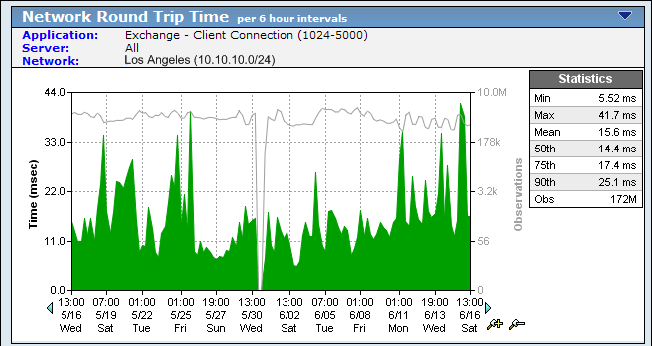
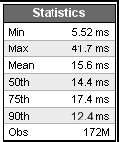
- In Statistics, make a note of the 90th and Max values. In the example below, the 90th percentile is 12.4 ms and the maximum value is 41.7 ms.
Note When reporting on a monthly time frame, the management console aggregates reporting statistics into 6-hour increments. For more information, see the User Guide.
- Repeat these steps to gather the 90th and Max percentile for each of the operational level metrics, including Network Round Trip Time and Server Response Time. For Transaction Time, sum and average the 90th and Max percentile of Network Round Trip Time, Server Response Time, Retransmission Delay, and Data Transfer Time.
- To determine the initial operational levels, double the value of the historic monthly 90th and 98th percentiles. Based on the Statistics example above, doubling the 90th and 98th percentiles would equate to a Network Round Trip Time 90th percentile of 25 milliseconds and a 98th percentile of 81 milliseconds.
- Monitor the OLA as it runs over the first reporting period; do not be discouraged if it does not meet OLA at first. Wait for a full reporting period to complete before tuning. Because the management console measures operational level compliance on an hourly basis, there can be up to an hour lag before an OLA shows a compliance violation.
- Tune the thresholds after a reporting period completes to set thresholds that are achievable. The results enable you to make a more educated assessment of the thresholds.
More information:
Create an Application Performance OLA for a Group of Networks
Copyright © 2014 CA Technologies.
All rights reserved.
|
|