

It is common for address ranges to expand over time. Creating a "catch all" network ensures that once that expansion occurs CA Application Delivery Analysis will have calculations for it. If you see client IP traffic show up in the broad superset network, use the QoS Users report to see the /24 client networks that are showing traffic and then explicitly define those subset networks.
Follow these steps:
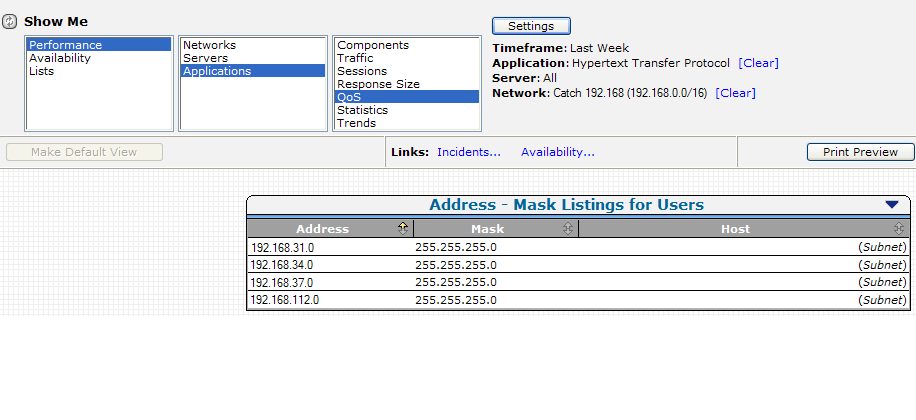
 ) in the QoS Users report and click List Users to filter the observed traffic on the client network into smaller subnets that are 8 bits more specific. For example, when reporting on a /16 network, such as a 192.168.0.0/16 "catch all" network, the Users list displays the corresponding /24 networks where the management console has observed client IP traffic. In the example below, the /24 networks are expected to be in the range of 30-39, but the management console sees unexpected client IPs in the 192.168.112.0/24 client network.
To see the actual client IPs in the 192.168.112.0/24 client network, create a 192.168.112.0/24 client network and use the QoS Users report to list the IP addresses of the /32 users.
CA Application Delivery Analysis includes the following default entries for catch all default client networks:
|
Copyright © 2014 CA Technologies.
All rights reserved.
|
|