

Getting Ready › Overview Guide › Grid Planning Chart
Grid Planning Chart
Use the following chart to plan your grid deployment:
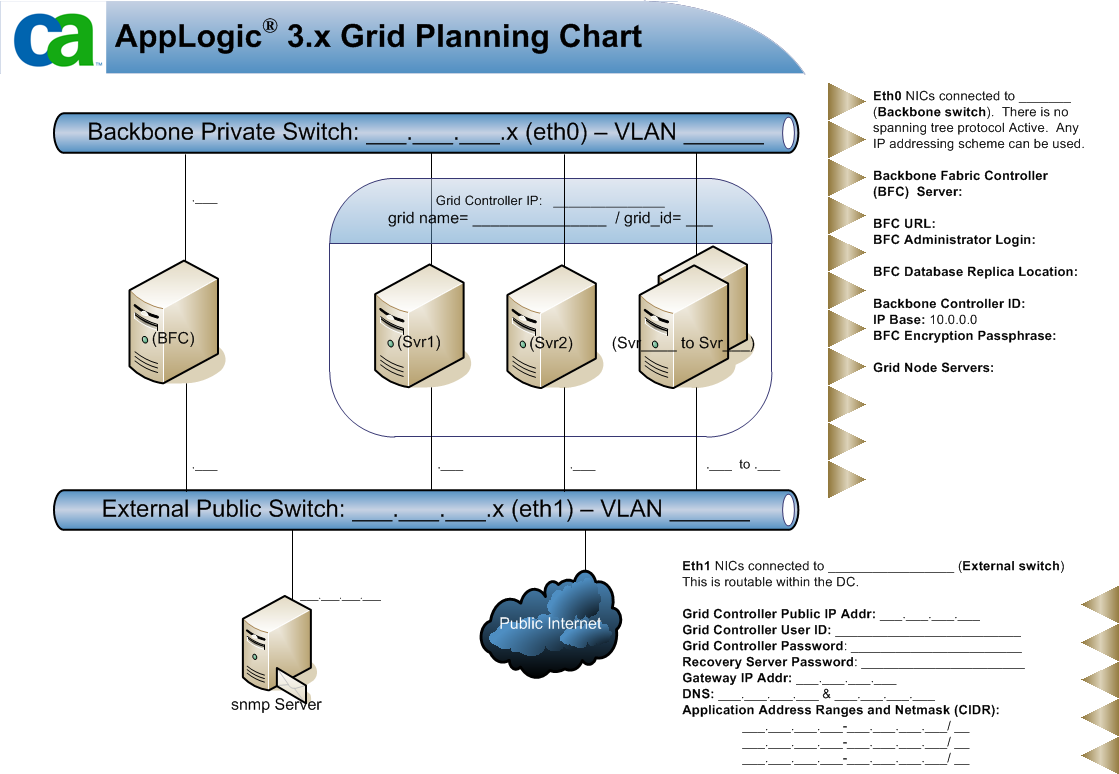
The following list describes example values that you can enter in the chart:
- Backbone Private Switch: 192.168.50.0/24 (etho0) - VLAN
- BFC URL: nnn.nnn.200.2
- Grid Controller IP: nnn.nnn.200.3
- Grid Name: gridname
- Grid_ID: 1
- Server 1 (Svr1) IP: nnn.nnn.200.4
- Server 2 (Svr2) IP: nnn.nnn.200.5
- Svr3 to Svr5 IPs: nnn.nnn.200.6, nnn.nnn.200.7, and nnn.nnn.200.7
- Eth0 NICs connected to Brocade VDX 6720-40 Backbone switch. There is no spanning tree protocol active. Any IP addressing scheme can be used.
- Backbone Fabric Controller (BFC) Server: Dell Desktop
- Hostname: bfc
- root / ************
- bfcuser / *********
- BFC URL: nnn.nnn.200.2
- BFC Administrator Login: admin / **************
- BFC Database Replica Location:/var/applogic/BFC_DB_Replica (on BFC)
- Backbone Controller ID: 1
- IP Base: 10.0.0.0
- BFC Encryption Passphrase: **********
- Grid Node Servers: x4 Dell model-xyz each with 2x hexcore CPU, 72GB RAM, 4x 600GB SAS internal drives
- External Public Switch nnn.nnn.200.1/28 (eth1) - VLAN
- snmp Server: x.x.x.x
- Eth1 NICs connected to Brocade VDX 6720-40 External switch. This is routable within the DC.
- Grid Controller Public IP Address: nnn.nnn.200.3
- Grid Controller User ID: firstname.lastname@myco.com
- Grid Controller Password: *************
- Recovery Server Password: ************
- Gateway IP Address: nnn.nnn.200.1
- DNS: 8.8.8.8 and 8.8.4.4. (Google's DNS)
- Application Address Ranges and Netmask (CIDR): nnn.nnn.200.8 - nnn.nnn.200.14/28
Copyright © 2013 CA Technologies.
All rights reserved.
|
|