

|
At a Glance |
|
|
Catalog |
system_ms |
|
Category |
Web Servers |
|
User volumes |
yes |
|
Min. memory |
256 MB (x86), 768 MB (x64) |
|
OS |
Windows |
|
Constraints |
no |
IIS is a web server appliance based on the Microsoft Internet Information Server software (see http://www.iis.net).
IIS serves static web content and executes scripts from a user-configurable read-only content volume. The paths to the documents and scripts are configurable, so that the same volume can be shared between multiple web servers and/or other appliances serving different content.
IIS has three generic output terminals intended for accessing external services from scripts on the content volume. The db terminal is for accessing a database; the fs terminal is for accessing shared file storage (using CIFS); and the aux terminal is for sending e-mail messages to an SMTP server.
The log terminal can be used to connect IIS to a shared file system on which IIS can store its logs.
The configuration of the IIS server is provided through properties. The properties are designed to cover most uses in an easily configurable way. Typically, only a few need to be set to non-default values.
If the features provided by the IIS appliance do not meet your needs, contact our TechnicalSupport to discuss the possible options. We may be able to extend the catalog by providing appliances that cover your needs.
Important! IIS03y and IIS08y are not distributed with CA AppLogic. See the installation reference for instructions on creating these appliances from base windows server appliances.
|
Name |
Latest Version |
OS |
IIS |
VB |
ASP.NET |
Notes |
|
IIS03W |
1.1.1-1 |
Windows Server 2003 "Web" SP2 (x86) |
6 |
6 |
3.5 SP1 |
|
|
IIS03S |
1.1.1-1 |
Windows Server 2003 "Standard" R2 (x64) |
6 |
6 |
3.5 SP1 |
|
|
IIS03E |
1.1.1-1 |
Windows Server 2003 "Enterprise" R2 (x64) |
6 |
6 |
3.5 SP1 |
|
|
IIS03DC |
1.1.1-1 |
Windows Server 2003 "Datacenter" R2 (x64) |
6 |
6 |
3.5 SP1 |
|
|
IIS08W |
1.1.1-1 |
Windows Server 2008 "Web" R2 (x64) |
7.5 |
6 |
4.0 |
|
|
IIS08S |
1.1.1-1 |
Windows Server 2008 "Standard" R2 (x64) |
7.5 |
6 |
4.0 |
|
|
IIS08E |
1.1.1-1 |
Windows Server 2008 "Enterprise" R2 (x64) |
7.5 |
6 |
4.0 |
|
|
IIS08DC |
1.1.1-1 |
Windows Server 2008 "Datacenter" R2 (x64) |
7.5 |
6 |
4.0 |
|
IIS03y
|
Resource |
Minimum |
IIS03W |
IIS03S |
IIS03E |
IIS03DC |
Default |
|
CPU |
0.10 |
2 |
4 |
8 |
32 |
0.25 |
|
MEM |
256M |
2G |
4G |
64G |
64G |
512M |
|
BW |
1M |
2G |
2G |
2G |
2G |
250M |
IIS08y
|
Resource |
Minimum |
Max for IIS08W |
Max for IIS08S |
Max for IIS08E |
Max for IIS08DC |
Default |
|
CPU |
0.25 |
4 |
4 |
8 |
32 |
1 |
|
MEM |
768M |
32G |
32G |
64G |
64G |
2G |
|
BW |
1M |
2G |
2G |
2G |
2G |
1M |
|
Name |
Direction |
Protocol |
Description |
|
in |
in |
Any |
Serves HTTP requests coming from web clients. Serves the HTTP/1.1 and 1.0 protocols. |
|
db |
out |
Any |
Access to a database server. Usage is defined by whatever scripts reside on the content volume (if any). This terminal may be left unconnected if it is not used. |
|
fs |
out |
Any |
Access to a network file system for shared file storage, providing anonymous logins and a read/write share named share. Usage is defined by whatever scripts reside on the content volume (if any). Software on the content volume 'sees' the remote file system as \\fs\share in the appliance's filesystem space. This terminal may be left unconnected if it is not used. |
|
log |
out |
Any |
Access to a CIFS-based network file system for storing IIS logs. This terminal may be left unconnected if it is not used. The connected server must allow anonymous logins and have a read/write share named share. |
|
aux |
out |
Any |
Access to an SMTP server for sending outgoing e-mail. Usage is defined by whatever scripts reside on the content volume (if any). Note that 'IIS SMTP' is not configured on the appliance; any application that needs to send mail should simply use SMTP directly, using 'aux' as the target hostname. |
|
net |
out |
Any |
Gateway output for subnet access. |
|
mon |
out |
CCE |
Sends performance and resource usage statistics. |
The default interface is enabled. The default interface is used by the appliance to report to CA AppLogic that it has booted successfully. It can also be used to log in over secure shell to the appliance from the CA AppLogic controller, primarily for diagnostic and troubleshooting purposes.
|
Volume |
Description |
|
content |
Read/write volume providing the web content (documents, media and scripts) to be served by IIS. |
The volume may provide static and/or dynamic content.
|
Property name |
Type |
Description |
|
content_on_fs |
String |
Specifies whether the content is relative to the file system at the fs terminal or is on the content volume. Allowed values are on and off. If set to on, all content is relative to the file system at the fs terminal. If set to off, the content is on the content volume. |
|
docs_dir |
String |
Root directory on the content or remote NAS volume where the documents to be served are located. For example, it may be /mydocs. This property is convenient to use when more than one IIS server shares the content volume and each server needs its own documents. If docs_dir is set to /, the root directory of the content volume is used. |
|
logs_enabled |
String |
Controls whether IIS logging is enabled. Allowed values are on and off. If set to on and the log terminal is connected, then logs will be stored on the remote NAS appliance, on the cifs share. If set to on and the log terminal is not connected, then logs will be stored on the Windows boot drive, in the default location (C:\WINDOWS\system32\LogFiles\W3SVC1\*). If this is set to off, logs are completely disabled. Default: off |
|
logs_base_dir |
String |
Directory where IIS's logs are stored. This property has no effect if logs_enabled is set to 'off' or log terminal is not connected. Default: / |
Important! All enumerated string properties are not case sensitive (lowercase). All other string properties are case sensitive.
These are additional properties that should typically not need to be configured. They can be used to tune up IIS in non-standard circumstances.
|
Property name |
Type |
Description |
|
index_files |
String |
Ordered, space separated list of files to use as a directory index page in case the client requests a URL that refers to a directory name. |
|
max_connections |
Integer |
Maximum number of concurrent active connections that IIS can handle (0 means unlimited). The actual number of concurrent connections may be limited to less than the value set for this property if there is not enough system memory. See the Memory Usage section. |
|
idle_timeout_sec |
Integer |
Timeout, in seconds, for keeping a client connection open if there is no request or response going through. Keeping this timeout short helps drop forgotten connections quickly. Default: 15 |
|
data_timeout_sec |
Integer |
Timeout, in seconds, for receiving or sending more data if a data transfer has started but is not completed. This timeout allows IIS to drop connections that have been forgotten while still allowing delays during the transfer. Default: 300 |
Important! All enumerated string properties are not case sensitive (lowercase). All other string properties are case sensitive.
The IIS appliance reports the following custom counters through the mon terminal.
The following counters belong to the W3SVC counter group:
|
Counter name |
Description |
|
Total hits |
Total number of hits |
|
Total bytes |
Total number of bytes |
|
Total NotFound requests |
Total number of NotFound responses generated by IIS |
|
Active requests |
Number of active requests |
Important! The counter's pace in the appliance is set to 10 seconds.
The following messages may appear in the appliance log file and the system log of the grid controller when the appliance fails to start:
|
Error message |
Description |
|
Error: content_on_fs is off but the local content volume is missing |
The content_on_fs is set to off, specifying that the data volume must be mounted locally, but IIS cannot mount content volume. The probable cause is that the content volume is not formatted, or is not present in the IIS configuration. |
|
Error: content_on_fs is on but the fs terminal is not connected |
The content_on_fs is set to on, specifying that a remote file system must be used for web content, but IIS cannot access the content share. The probable cause is that another appliance which exposes such a share is not connected to the IIS fs terminal. |
|
Error: Failed to access fs share |
IIS cannot access cifs share. The probable cause is that fs is not connected or IIS was started before the appliance which is connected to the fs terminal (for example, a NAS appliance). |
|
Error: docs directory docs_dir does not exist on content volume |
docs_dir folder, defined in IIS configuration, couldn't be found on the content volume. |
You can review the appliance log file at the following location:
/var/log/appliance/log
Files on the content volume should have 'read' permission for Everyone, to be eligible for serving through HTTP.
To serve dynamic content from the remote file system share, IIS0Ny appliance in the application must be configured.
To configure IIS03y appliance in the application
      x86: C:\Windows\Microsoft.NET\Framework\v2.0.50727\CasPol.exe -m -ag 1 -url "file:////\\fs\share\*" FullTrust -exclusive on

      or

      x64: C:\Windows\Microsoft.NET\Framework64\v2.0.50727\CasPol.exe -m -ag 1 -url "file:////\\fs\share\*" FullTrust -exclusive on
Important! Replace "file:////\\fs\share\*" with a correct path if required (repeat the command for multiple folders)
IS0Ny appliances are configured with the following Web Service Extension settings, which can be modified in the IIS manager:
|
Extension |
Setting |
||
|
All Unknown CGI Extensions |
Prohibited |
||
|
All Unknown ISAPI Extensions |
Prohibited |
||
|
Active Server Pages |
Allowed |
||
|
ASP .NET v2.0.50727 |
Allowed |
||
|
Internet Data Connector |
Prohibited |
|
|
|
RPC Proxy Server Extension |
Allowed |
|
|
|
Server Side Includes |
Prohibited |
|
|
|
WebDAV |
Prohibited |
|
|
The 'IIS SMTP' system is not configured on IIS. Do not use it for sending e-mail from this appliance. In all cases, your SMTP mailer should be set up to use aux as the hostname of the SMTP server. See the use cases for examples on how to use IIS0Ny with email.
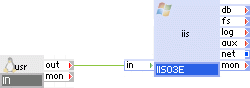
Appliances in use:
input gateway for user requests
Web server with static and/or dynamic content (for example, ASP.NET scripts)
Client requests arrive on the usr gateway. The gateway forwards the requests to the iis web server.
Example property configuration:
|
Property name |
Value |
Notes |
|
content_on_fs |
off |
Using local volume. |
|
docs_dir |
/ |
Website files are located in the root of the content volume. |
|
logs_enabled |
off |
We do not need log files. |
|
logs_base_dir |
/ |
We do not need log files. |
|
index_files |
default.htm default.asp default.aspx index.html |
Most popular index files. |
|
max_connections |
0 |
Do not use artificial limit. |
|
idle_timeout_sec |
15 |
Default timeout for idle connections. |
|
data_timeout_sec |
300 |
Default timeout. |
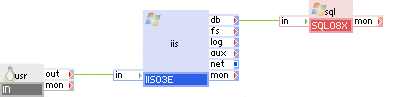
Appliances in use:
Client requests arrive on the usr gateway. The gateway forwards the requests to the iis web server. The web server accesses the sql database.
Example property configuration:
|
Property name |
Value |
Notes |
|
content_on_fs |
off |
Using local volume. |
|
docs_dir |
/ |
Website files are located in the root of the content volume. |
|
logs_enabled |
off |
We do not need log files. |
|
logs_base_dir |
/ |
We do not need log files. |
|
index_files |
default.htm default.asp default.aspx index.html |
Most popular index files. |
|
max_connections |
20 |
Use at most 20 simultaneous connections. |
|
idle_timeout_sec |
15 |
Default timeout for idle connections. |
|
data_timeout_sec |
300 |
Default timeout. |

Appliances in use:
Client requests arrive on the usr gateway. The gateway forwards the requests to the iis web server. The web server accesses the db database. iis and db both write their logs to the logs appliance through their log terminals.
Example property configuration:
|
Property name |
Value |
Notes |
|
content_on_fs |
off |
Using local volume. |
|
docs_dir |
/ |
Website files are located in the root of the content volume. |
|
logs_enabled |
on |
Preserve log files. |
|
logs_base_dir |
/iis_logs |
Put log files into /iis_logs subdirectory. |
|
index_files |
default.htm default.asp default.aspx index.html |
Most popular index files. |
|
max_connections |
20 |
Use at most 20 simultaneous connections. |
|
idle_timeout_sec |
15 |
Default timeout for idle connections. |
|
data_timeout_sec |
300 |
Default timeout. |
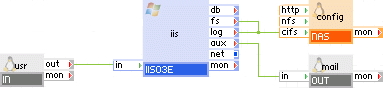
Appliances in use:
Client requests arrive on the usr gateway. The gateway forwards the requests to the iis web server. The web server's content is located on config and is being accessed from iis though the fs terminal. iis writes its logs to the config appliance through the log terminal.
The web application is able to send outbound e-mails through the aux terminal of iis via the mail gateway.
Example property configuration:
|
Property name |
Value |
Notes |
|
content_on_fs |
on |
Content is located on mounted NAS volume. |
|
docs_dir |
/website |
Website files are located in the /website directory of the content volume. |
|
logs_enabled |
on |
Preserve log files. |
|
logs_base_dir |
/iis_logs |
Keep log files in the /iis_logs directory. |
|
index_files |
default.htm default.asp default.aspx index.html |
Most popular index files. |
|
max_connections |
0 |
Do not use artificial limit. |
|
idle_timeout_sec |
15 |
Default timeout for idle connections. |
|
data_timeout_sec |
300 |
Default timeout. |
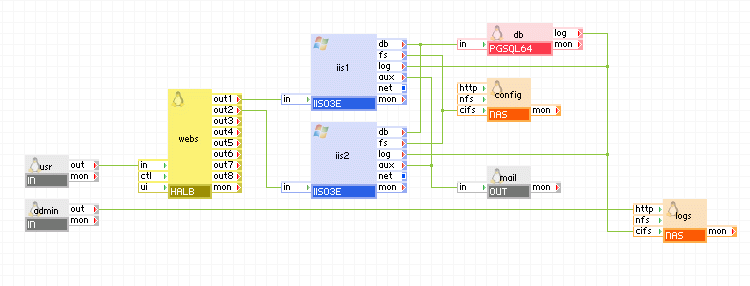
Appliances in use:
Client requests arrive on the usr gateway. The gateway forwards the requests to the webs load balancer, which directs the request to one of the web servers iis1 or iis2. The web servers access the db database. The web servers' content is located on the shared config appliance and is being accessed though the fs terminals. Both web servers write their logs to the logs appliance through their log terminals.
The web application is able to send outbound e-mails through the aux terminal of iisy via the mail gateway.
In addition, an administrator can log in through the admin gateway to the logs appliance and view log files.
Example property configuration:
|
Property name |
Value |
Notes |
|
content_on_fs |
on |
Content is located on mounted NAS volume. |
|
docs_dir |
/website_files |
Website files are located in the /website_files directory of the content volume. |
|
logs_enabled |
on |
Preserve log files. |
|
logs_base_dir |
/website_logs |
Keep log files in the /website_logs directory. |
|
index_files |
default.htm default.asp default.aspx index.html |
Most popular index files. |
|
max_connections |
0 |
Do not use artificial limit. |
|
idle_timeout_sec |
15 |
Default timeout for idle connections. |
|
data_timeout_sec |
300 |
Default timeout. |
The appliance hostname (set to appliance instance name) cannot be longer than 15 characters. Setting the appliance instance name to more than 15 characters will result in a hostname truncated to the 15th character.
Open source and 3rd party software used inside of the appliance
IIS0Ny uses the following 3rd party open source packages in addition to the 3rd party open source packages used by its base class WIN0Ny.
|
Software |
Version |
Modified |
License |
Notes |
|
F5XForwardedFor |
1.0.0 |
No |
iControl EULA |
http://devcentral.f5.com/downloads/codeshare/F5XForwardedFor.zip |
|
KB942589 |
N/A |
No |
eula_KB942589 |
http://support.microsoft.com/kb/942589; for x64 only. |
|
dotnetfx |
3.5 |
No |
eula_dotnetfx |
.NET Framework 3.5 full package |
|
mysql-connector-odbc |
5.1.5 |
No |
GPLv2 |
download page on MySQL website |
|
psqlodbc |
08.03.0400 |
No |
LGPLv2.0 |
download page on PgFoundry |
|
perl-libwin32 |
0.27-1 |
No |
GPLv2 |
download page |
|
Copyright © 2013 CA Technologies.
All rights reserved.
|
|