

Latest version: 1.0.3-1
|
At a Glance |
|
|
Catalog |
System |
|
Category |
Gateways |
|
User volumes |
no |
|
Min. memory |
96MB |
|
OS |
Linux |
|
Constraints |
no |
|
Questions/Comments |
|
OUT2 is an output gateway that provides access to a network host located outside of an application. OUT2 accepts traffic from the application on its in terminal and forwards it through its out terminal to the remote host.
OUT2 has a firewall that allows only outgoing traffic (connections and datagrams); it drops incoming traffic that is not for an already established connection or related to a datagram request.
OUT2 passes all traffic to the remote host specified by the remote_host property. The remote host can be specified either as a DNS host name (e.g., www.CA.com) or as an IP address in "dots" notation (e.g., 192.168.1.1). If the remote host is configured using a DNS name, the OUT2 gateway will ensure that if the name-to-IP mapping changes, the gateway will redirect its traffic to the new IP address.
OUT2 is used to access services outside of the application, such as an external database, web service or document repository. OUT2 is the only appliance in an application that needs to be configured with the name or IP address of the remote host; the remaining application components can access that host simply by being connected to the OUT2 appliance input.
Resources
|
Resource |
Minimum |
Maximum |
Default |
|
CPU |
0.05 |
4 |
0.05 |
|
Memory |
96 MB |
2 GB |
96 MB |
|
Bandwidth |
1 Mbps |
2000 Mbps |
200 Mbps |
Terminals
|
Name |
Direction |
Protocol |
Description |
|
in |
in |
any |
Accepts traffic to be sent out the remote host |
|
out |
out |
any |
Sends traffic to the remote host |
|
mon |
out |
cce |
Sends performance and resource usage statistics |
The out terminal is used for outbound traffic. This terminal is configured via the Interfaces tab of Application Configuration Editor.
The default interface is enabled. It is used for maintenance (incoming ssh connections).
User Volumes
None
Properties
|
Name |
Type |
Description |
|
remote_host |
String |
Defines the remote host to forward all traffic to. This can be the DNS name of the host or its IP address in "dots" notation. This property is mandatory. |
|
dns_poll |
Integer |
The poll interval, in seconds, that OUT2 will use when checking the mapping of the DNS name of remote_host to IP address (used only if remote_host is specified as a DNS name). Set to 0 to disable polling and not try to detect changes. Default is 3600 seconds (1 hour). |
|
dns1 |
IP address |
Defines the primary DNS server. It can be left blank if the remote host is specified by its IP address; must be specified otherwise. Default is blank. |
|
dns2 |
IP address |
Defines the secondary DNS server, which will be used if the primary DNS server does not respond. Default is blank (not used). |
Error Messages
The following messages may appear in either the appliance log file or the system log of the grid controller when the appliance fails to start:
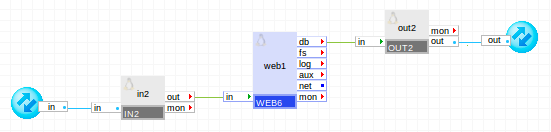
The following diagram shows a typical usage of OUT2 for a simple web server application that accesses external database while serving user requests:
Summary of Parts
in2 passes client web requests arriving from outside the application to the web1 server. web1 serves static content by itself; for dynamic content, scripts that run in web1 access an external database through the out2 gateway. The out2 gateway is configured with the host name of the server that provides the external database. The following sections describe the configuration of OUT2 in several typical use cases:
OUT2 with a remote host by DNS name
This mode is used when the remote host has a valid entry in the DNS server. In this mode, OUT2 can resolve the DNS name and monitors for changes to the DNS entry for the remote host.
OUT2 will resolve remote_host using the DNS servers configured as properties. In this mode, at least dns1 must be set.
Example:
A valid IP address has to be configured for out terminal from the pool of available IP addresses provided by the Grid Controller. Netmask and Gateway for out terminal will be taken automatically from the Grid Controller.
|
Property Name |
Value |
Description |
|
remote_host |
in www.google.com |
Receives all incoming traffic for assigned IPs |
|
dns_poll |
3600 |
The poll interval for the DNS name, in seconds. |
|
dns1 |
192.168.1.1 |
Address of a DNS server to use to resolve remote_host. |
|
dns2 |
192.168.1.2 |
Address of a backup DNS server (used if the first one is not available). |
OUT2 with a remote host by IP address
This mode is used when the IP address of remote_host is fixed or has no DNS records. In this mode the dns_poll property is ignored.
Example:
A valid IP address has to be configured for out terminal from the pool of available IP addresses provided by the Grid Controller. Netmask and Gateway for out terminal will be taken automatically from the Grid Controller
|
Property Name |
Value |
Description |
|
remote_host |
66.102.7.104 |
DNS name or the IP address of the remote host to forward all traffic to. |
Open source and 3rd party software used inside of the appliance
OUT2 uses the following 3rd party open source packages in addition to the 3rd party open source packages used by its base class LUX6 .
|
Software |
Version |
Modified |
License |
Notes |
|
iptables |
1.4.7-5.1.el6_2 |
No |
homepage |
|
Copyright © 2013 CA Technologies.
All rights reserved.
|
|