

Latest version: 1.0.3-1
|
At a Glance |
|
|
Catalog |
System |
|
Category |
Gateways |
|
User volumes |
yes |
|
Min. memory |
192MB |
|
OS |
Linux |
|
Constraints |
no |
|
Questions/Comments |
|
IN2 is an input gateway that provides a firewalled entry point for network traffic into an application.
IN2 accepts all allowed incoming traffic on its external interface and passes it through its out terminal. IN2 forwards only the traffic that is explicitly allowed through configuration of its firewall properties. IN2 discards all disallowed traffic.
IN2 supports up to four incoming interfaces (protocol/pair combinations), such as http and ssh. By default, IN2 allows only TCP port 80 (http).
IN2 is used to accept all network traffic for applications. All external traffic must pass through an IN2 gateway to access any resources or services within an application.
Resources
|
Resource |
Minimum |
Maximum |
Default |
|
CPU |
0.05 |
4 |
0.05 |
|
Memory |
96 MB |
2 GB |
96MB |
|
Bandwidth |
1 Mbps |
2 Gbps |
200 Mbps |
Terminals
|
Name |
Direction |
Protocol |
Description |
|
in |
in |
Any |
Receives all incoming traffic for assigned IPs |
|
out |
out |
Any |
Sends all traffic out to the destination address and receives the responses |
|
mon |
out |
CCE |
Sends performance and resource usage statistics |
The in terminal is used for inbound traffic. This terminal is configured via the Interfaces tab of Application Configuration Editor.
The default interface is enabled. It is used for maintenance (incoming ssh connections).
User Volumes
None
Firewall Configuration
The following property group defines the firewall settings for the gateway. There are two filters that can be used together: by source IP address (allowed_hosts and denied_hosts) and by protocol/port (ifaceX). Up to four protocol/port pairs (interfaces) can be configured.
If all parameters are left to their defaults, no traffic will be allowed. To allow traffic in, configure at least the iface1_protocol and iface1_port values.
|
Name |
Type |
Description |
|
allowed_hosts |
String |
List of hosts and/or subnets allowed to connect. Separate multiple entries with spaces or commas. Supported format example: 192.168.1.2 192.168.1.0/24 192.168.2.0/255.255.255.0. Default: 0.0.0.0/0 (all allowed) |
|
denied_hosts |
String |
List of hosts and/or subnets to be denied connection. The format is the same as for allowed_hosts. Default: (empty) (none denied) |
|
iface1_protocol |
String |
Protocol to allow. Options: none, tcp (default), udp |
|
iface1_port |
String |
Port numbers or port ranges to allow. Accepts a string of comma or space-separated values. Port ranges must be specified as lower_port:higher_port with colon or dash as a separator (e.g., 80,81,82:85 86-90). Default: 80 (http) |
|
iface2_protocol |
String |
Protocol to allow. Options: none (default), Tcp, Udp |
|
iface2_port |
String |
Port numbers or port ranges to allow. Accepts a string of comma or space-separated values. Port ranges must be specified as lower_port:higher_port with colon or dash as a separator (e.g., 80,81,82:85 86-90). Default: 0 (disabled) |
|
iface3_protocol |
String |
Protocol to allow. Options: none (default), tcp, udp |
|
iface3_port |
String |
Port numbers or port ranges to allow. Accepts a string of comma or space-separated values. Port ranges must be specified as lower_port:higher_port with colon or dash as a separator (e.g., 80,81,82:85 86-90). Default: 0 (disabled) |
|
iface4_protocol |
Integer |
IP Protocol number to allow (e.g., 6 for TCP, 47 for GRE). Default: 0 (disabled) |
|
iface4_port |
String |
Port numbers or port ranges to allow. Accepts a string of comma or space-separated values. Port ranges must be specified as lower_port:higher_port with colon or dash as a separator (e.g., 80,81,82:85 86-90). Used only if the selected IP protocol has port numbers (e.g., udp and tcp); must be set to 0 for all other protocols. Setting this property to 0 for tcp or udp protocols will allow all ports. Default: 0 |
Notes:
The following messages may appear in either the appliance log file or the system log of the grid controller when the appliance fails to start:
Simple Input Firewall
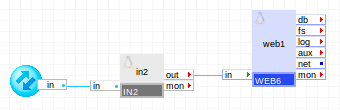
The following diagram shows a typical usage of IN2 for a simple web server application:
Summary of Parts
in2 accepts HTTP requests on its in terminal and passes them to web1 through its out terminal.
Example:
A valid IP address has to be configured for in teminal from the pool of available IP addresses provided by the Grid Controller. Netmask and Gateway for in terminal will be taken automatically from the Grid Controller.
|
Property Name |
Value |
Notes |
|
iface1_protocol |
tcp |
Allow TCP traffic... |
|
iface1_port |
80 |
...only on port 80 (http) |
Advanced Firewall
In this example, the gateway is configured to allow the HTTP and HTTPS protocols, as well as the PPTP protocol (used by MS Windows VPN).
Example:
A valid IP address has to be configured for in teminal from the pool of available IP addresses provided by the Grid Controller. Netmask and Gateway for in terminal will be taken automatically from the Grid Controller.
|
Property name |
Value |
Notes |
|
iface1_protocol |
tcp |
Allow TCP traffic... |
|
iface1_port |
80 |
...on port 80 (http) |
|
iface2_protocol |
tcp |
Allow TCP traffic... |
|
iface2_port |
443 |
...on port 443 (https) |
|
iface3_protocol |
tcp |
Allow TCP traffic for the PPTP control connection... |
|
iface3_port |
1723 |
...on port 1723 (VPN) |
|
iface4_protocol |
47 |
Allow GRE traffic for the PPTP encapsulation |
|
iface4_port |
0 |
(not used) |
In this example, note the use of iface4 for the GRE protocol. It is OK to fill iface4 even if lower-numbered interfaces are not filled in.
Open source and 3rd party software used inside of the appliance
IN2 uses the following 3rd party open source packages in addition to the 3rd party open source packages used by its base class LUX6.
|
Software |
Version |
Modified |
License |
Notes |
|
iptables |
1.4.7-5.1.el6_2 |
No |
homepage |
|
Copyright © 2013 CA Technologies.
All rights reserved.
|
|