

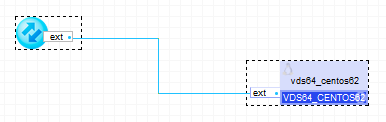
VDS64_CentOS63 and VDS_CentOS63 are dedicated virtual server applications. They are designed to be deployed as standalone applications with no catalog parts. VDS applications are provided to allow hosting providers a quick and easy way to offer a dedicated server offering on the AppLogic grid.
VDS applications can scale from approximately one twentieth of a physical server to a full physical server depending on the resource needs of the end user.
VDS applications include a basic build environment with GCC (if available).
With CentOS based VDSs, any of the other CentOS packages can be installed by the end user, simply by running yum -y install <package> while running as root user.
VDS applications configure themselves through properties on first boot. The initial user is created and the root password is placed in a file, /home/<user>/su.txt. VDS applications can be reset to their default properties by deleting /appliance/passwd.stamp from the appliance and restarting the application.
|
Application |
Latest Version |
OS |
|
VDS64_CentOS63 |
3.0.1-1 |
CentOS 6.3 (64 bit) |
|
VDS_CentOS63 |
3.0.1-1 |
CentOS 6.3 |
VDS_CentOS63
|
Resource |
Minimum |
Maximum |
Default |
|
CPU |
0.05 |
16 |
0.25 |
|
Memory |
160 MB |
32 GB |
512 M |
|
Bandwidth |
1 Mbps |
2 Gbps |
1 Mbps |
VDS64_CentOS63
|
Resource |
Minimum |
Maximum |
Default |
|
CPU |
0.05 |
16 |
0.25 |
|
Bandwidth |
1 Mbps |
2 Gbps |
1 Mbps |
|
Memory |
160 |
32 GB |
512 M |
|
Name |
Dir |
Protocol |
Description |
|
ext |
in |
any |
Receives all incoming traffic for assigned IPs . |
The ext terminal is used for inbound traffic. This terminal is configured via the Interfaces tab of Application Configuration Editor.
The default interface is enabled. It is used for maintenance (incoming ssh connections from the controller).
None
|
Property Name |
Type |
Description |
|
hostname |
String |
Defines the hostname to assign. This property is mandatory. |
|
user |
String |
Defines the user to be created on provisioning of the application. This property is mandatory |
|
user_pw |
String |
Defines the user to be created on provisioning of the application. This property is mandatory. |
|
root_pw |
String |
Defines the password of the root account. It will be set on the first boot and written to the /home/<user>/su.txt file. This property is mandatory. |
|
dns1 |
IP |
Defines the primary nameserver (v4 or v6). This property is mandatory. |
|
dns2 |
IP |
Defines the secondary server (v4 or v6). Default: (empty). |
|
dns3 |
IP |
Defines the third server (v4 or v6). Default: (empty). |
The following shows the typical usage of the VDS_CentOS63 application
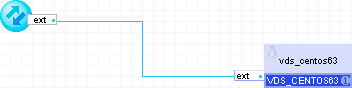
VDS_CentOS63 is to be used by hosting providers in order to offer dedicated servers using AppLogic without the need for any other 3rd party software or licenses.
VDS_CentOS63 is distributed only as an application containing a single instance of the appliance and does not reside in any catalogs.
By way of example, provisioning VDS_CentOS63 can be done by running a single command that can be automated from the providers portal.
A valid IP address has to be picked up for ext terminal from the pool of available IP addresses provided by the Grid Controller. Netmask and Gateway for ext terminal will be taken automatically from the Grid Controller.
app provision VDS_CentOS63_r10 ExampleClient \
user=Exampleuser user_pw=abcd1234 root_pw=acbde12345 \
iface.ext='fe80::1/64,209.100.100.12' hostname=mydomain.com dns1=fe80::5 dns2=209.101.1.2 \
cpu.dflt=0.50 mem.dflt=1G VDS_CENTOS63.boot.size=10G
The /appliance directory MUST be left intact. Any changes to any files in this directory can cause the appliance to stop working.
Preventing vmad or vme from the /appliance directory from running on start will cause the appliance to stop working (on next restart).
Kernel updates and replacements should be based on CA AppLogic®-provided kernel sources.
The /root/.ssh/authorized_keys file should not be modified; it will be overwritten by the build system at runtime.
In case of application startup failure, the following errors may be logged to the system log:
|
Error Message |
Description |
|
Pv4 DNS must be defined if IPv4-only networking is used |
At least one IPv4 DNS server must be defined. |
|
IPv6 DNS must be defined if IPv6-only networking is used |
At least one IPv6 DNS server must be defined. |
|
Failed to set hostname |
VDS failed to setup appliance hostname. |
VDS64_CentOS63 and VDS_CentOS63 do not use any open source packages in addition to those of their base OS CentOS 6.3 (64 bit) and CentOS 6.3 (32bit) respectively.
|
Copyright © 2013 CA Technologies.
All rights reserved.
|
|