

The Metering Gateway Application - MGT - provides a gateway through which grids running within a particular datacenter can report their license and metering data to 3Tera's metering system BMS (that is, the metering server).
MGT provides an input interface through which grids within the datacenter can report their metering data over SSH. In addition, MGT implements an output interface through which it reports metering data to CA's metering system over HTTPS though port #443.
MGT reports any metering data it has received to 3Tera's metering system once a day at a specific time parametrized through a property. If MGT fails to report the metering data at the specified time, MGT retries to send the data each hour and logs a message to the grid dashboard.
Once MGT has successfully reported its metering data to CA's metering system, it archives the metering data and retains it for a parametrized amount of time. When the age of the metering data has exceeded the parametrized time, MGT permanently deletes the metering data.
MGT serves a single metering account; if multiple accounts need to be operated within the same datacenter, multiple MGTs need to be run.
MGT is configured with the account name and the SSH public key required for grids to report their data to it. MGT provides a simple menu-driven interface through which user's may manage the SSL certificate used for communicating with 3Tera's metering system. The menu-driven interface is accessed by logging into the running application.
|
Property Name |
Type |
Description |
|
in_ip |
IP |
This is the IP address at which the application provides services to grids within the datacenter. This property is mandatory. |
|
in_netmask |
IP |
Netmask for the network on which in_ip resides. Default: 255.255.255.0 |
|
in_gateway |
IP |
Address of the IP gateway to be used to route traffic. This property must be specified to access the MGT application from hosts outside of the IP network on which MGT is running (that is, most cases). Use 0.0.0.0 to disable. Default: 0.0.0.0 |
|
in_allowed_hosts |
String |
List of hosts or subnets allowed to connect. Separate multiple entries with spaces or commas. Supported format example: 192.168.1.2 192.168.1.0/24 192.168.2.0/255.255.255.0. Default: 0.0.0.0/0 (all allowed) |
|
out_ip |
IP |
IP address of the public interface of the MGT application. This property is mandatory. |
|
out_netmask |
IP |
Netmask of the public interface of the MGT application. Default: 255.255.255.0 |
|
out_gateway |
IP |
The default network gateway for the public interface. This property is mandatory. |
|
dns1 |
IP |
IP address of a DNS server for host name resolutions. Used to resolve the metering server name. This property is mandatory |
|
dns2 |
IP |
IP address of a backup DNS server for host name resolutions. Used to resolve the metering server name. Default: 0.0.0.0 |
|
datacenter_name |
String |
Customer datacenter name. This property is mandatory. |
|
account_name |
String |
Customer account name. This property is mandatory. |
|
account_pub_key |
String |
Customer public SSH key. This property is mandatory. |
|
report_hour |
Integer |
Hour at which MGT is to report its metering data to 3Tera's metering system. The value may be 0 through 23. Default is 12 (12 noon). |
|
retention_days |
Integer |
Number of days MGT is to retain archived metering data. Once the number of days has expired, the metering data is permanently deleted provided that it has been successfully reported to 3Tera's metering system. If set to 0, no metering data is not retained and is permanently deleted once it has been successfully reported to 3Tera's metering system. Default is 30. |
The IP addresses configured in the in_ip and out_ip properties must be IP addresses available on your AppLogic grid. You can find them, together with the netmask, gateway and DNS servers on the dashboard of your grid. 3tera is working to make it possible for AppLogic to provide these addresses automatically.
|
Resource |
Minimum |
Maximum |
Default |
|
CPU |
0.3 |
28 |
1.3 |
|
Memory |
320M |
40 GB |
896 MB |
|
Bandwidth |
4 Mbps |
8 Gbps |
900 Mbps |
The application uses a single data volume that is used to store and retain the metering data received from grids that report to MGT. The data volume is part of the application and is already configured into the appliance instance that uses it. However, the volume should be resized before the application is started for the first time such that the volume can hold at least 30 days of metering data for all grids that report their metering data to MGT (approximately 4 MB per grid).
MGT may log the following messages to the dashboard of the grid on which it is running. In addition, a message is logged to the system log of the grid controller and the system log of the Metering Gateway appliance (MGT:main.mgt).
|
Message |
Description |
|
Grid metering data could not be sent to CA. Contact support for immediate assistance. |
MGT has been unable to report the grid's metering data to 3Tera for at least the past 72 hours. |
|
Grid metering data could not be sent to 3tera due to internal error, contact support for assistance. |
An error occurred in MGT when attempting to send metering data to CA. |
|
Account account is disabled. No new grids may be installed or upgraded. Contact support for immediate assistance. |
The user's account has been disabled by CA. |
|
Verification of account failed. Contact support for assistance. |
3Tera cannot verify the specified account, may be caused by one of the following reasons: incorrect account name, invalid SSL certificate |
|
Metering Gateway's data volume is low on disk space. |
There is less than 10 MB of available disk space on MGT's data volume. The data volume needs to be resized. |
|
This is a test message from the Metering Gateway for account. |
This message is logged by MGT to verify if can post a message to the grid's dashboard. |
This is a reference design for the Metering Gateway Application
It has the following components:
The application infrastructure is shown below:
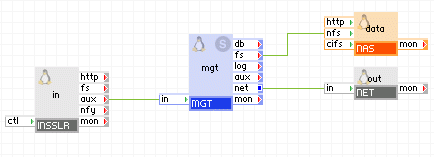
The MGT application has the following volumes:
|
Volume |
Description |
|
data |
Shared file system holding metering data. This volume is configured as the data volume of the NAS appliance. |
Notes:
MGT is designed to run on CA AppLogic 2.4.x+.
|
Copyright © 2013 CA Technologies.
All rights reserved.
|
|