

Installing and Maintaining CA AppLogic › BFC User Guide › Installing the BFC › Hardware Requirements
Hardware Requirements
Review the Hardware Requirements on the CA AppLogic bookshelf to verify that your servers meet the minimum requirements and that you understand the required network topology. In particular, review the BFC Control Node Requirements section of the Hardware Requirements guide.
This section contains the following topics:
Network Hardware Example
Setup The Network Hardware
Setup Grid Server Hardware
Configuration Requirements for Cisco UCS
Network Hardware Example
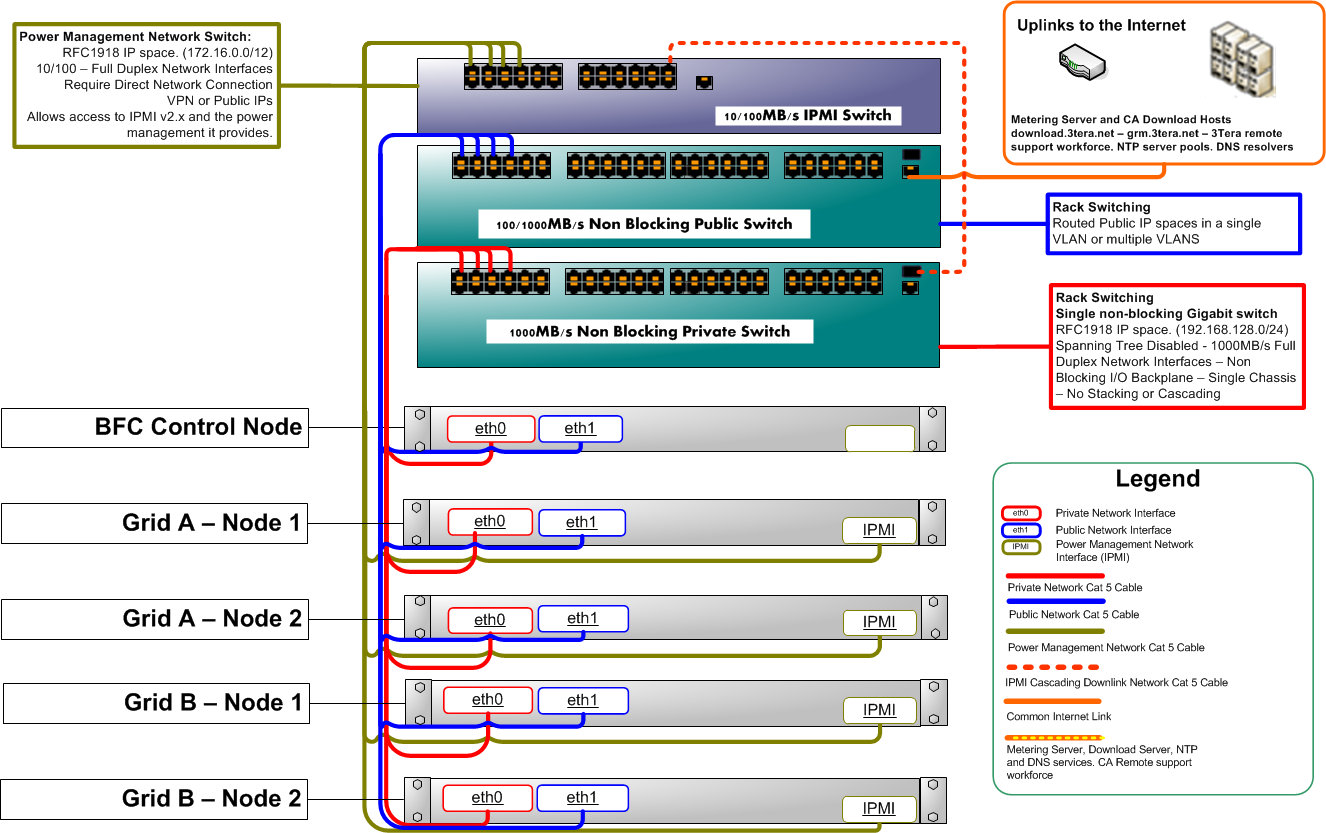
The following is an example of the network hardware connected.
Setup The Network Hardware
To set up the network hardware
- Connect the lowest-numbered Gigabit Ethernet adapters (the ones which will appear as eth0 in the Linux device list) of each server to the Gigabit switch, which will serve as the grid Backbone.
A multi-port switch with the following can be shared between several grids:
- At least gigabit throughput
- Have the ability to create VLANs
- Verify that the Spanning Tree Protocol (STP) is disabled on the backbone switch.
- Connect the second Ethernet adapter of each server to the network that has access to the Internet.
Strict observance of the order in which network adapters are connected is not required, but consistent wiring will help when configuring IP addresses.
- Only configure the NIC connected to the backbone network to PXE boot.
Note: Do not physically connect the backbone switch to the one used for public Internet access, the two networks must remain separate.
Setup Grid Server Hardware
Verify the following in the BIOS for each server that will be used within the backbone (you do not need to do this for the BFC node):
- ac power recovery ON.
- backbone NIC set to PXE boot.
- Set the backbone NIC from the previous step to be first in the boot order.
- Make sure there is a hard disk in the boot order.
- In the IPMI interface (usually post the BIOS but prior to boot) verify ipmi over lan = ON.
- If you are using servers with processors that support HyperThread capability (some manufacturers may refer to this as a Logical Processor), you must disable the HyperThread feature in your servers’ BIOS parameters. This will help ensure that both Hypervisors (Xen and VMware ESX) display the correct number of cores.
Configuration Requirements for Cisco UCS
Before you install CA AppLogic on a Cisco UCS system, review the following prerequisites and configuration requirements. This process assumes that you are working with an installed and functioning UCS system. In the following process you first complete the configuration requirements for your Cisco UCS hardware, then proceed with the installation of the BFC and post-installation tasks.
Prerequisites
To complete the configuration tasks, you must have the following:
- Cisco UCS system
- Cisco UCS Manager, version 1.3(1)
- Appropriate administrative privileges for the relevant servers
Configuration Requirements
Note: For more information about using features in the UCS Manager, refer to your copy of the Cisco UCS Manager GUI Configuration Guide, Release 1.3(1).
- Create the backbone and external networks.
- AppLogic requires two distinct networks: backbone and public.
- Use one or two VLANs, assigned in the Service Profile to appropriate vNICs, to create these distinct networks. Whether you use one or two VLANs, they should be configured to meet the following restrictions:
- The public network must have the external connectivity required of the applications that will be running on the grid.
- Backbone vNICs must, specifically, NOT be able to communicate directly to public network vNICs.
- vNICs assigned to the backbone network may only communicate with 1) other backbone vNICs for this grid, 2) backbone vNICs for other grids, and 3) this grid’s BFC which is typically shared with other grids.
- Assign or create NIC/vHBA Placement Policies so that all of the vNICs for the backbone network are connected to the same Fabric.
- Configure the power/management network.
Configure your power networks per UCS requirements. Note the IP addresses which you will use later for server discovery in the BFC.
- Create a boot policy.
When you are ready to install the Backbone Fabric Controller or to make a server available for BFC to discover at any time, assign a boot policy of “PXE then Local Disk” to the server. Note the following:
- In your boot policy, indicate LAN (Network) as the first item in the Boot Order followed by Local Disk.
- After you create the boot policy, assign it to all servers that you plan to be part of your grids.
- Create an IPMI Profile.
This step is required if you have configured power/management network in the earlier step. Create a UCS IPMI profile indicating a username and password and choose 'admin' as the role.
Finally, associate all the Cisco UCS policies you created to Service Profiles for the servers being prepared for grids.
- You can now begin the BFC installation process. You can use either of the following install options:
- Download the BFC and install on an existing CentOS system
- Use the Bare Metal Installation to install from ISO images
- Perform post-installation setup tasks after you complete the installation process.
- Specify IPMI authentication information.
After installation, complete the following step to specify power network settings.
- Enter the login credentials on the BFC tab of the Administration page. Work with the Backup IPMI Authentication option to specify the same IPMI username/password that was used during the creation of IPMI Profile in UCS Manager.
- Alternatively, you can assign a specific IPMI user name and password for each server discovered by the BFC. On the Servers page, click the server you want to work with. On the Power tab, select the server, then click the Power Action drop-down menu and select Set Password. You are prompted to set User ID and Password credentials. Note that the server-specific IPMI username/password should match with the credentials of IPMI Profile associated to the respective server in UCS Manager.
Copyright © 2013 CA Technologies.
All rights reserved.
|
|