

Latest version: 5.1.2-1
|
At a Glance |
|
|
Catalog |
System |
|
Category |
Misc. Appliances |
|
User volumes |
yes |
|
Min. memory |
96 MB |
|
OS |
Linux |
|
Constraints |
no |
|
Questions/Comments |
|
The NAS appliance is a shared file storage appliance. It provides file storage accessible over HTTP, NFS, and CIFS file protocols.
The NAS appliance serves files contained within a configured (pluggable) data volume thus providing the ability for the content served by the appliance to be changed easily as well as the ability for the volume to have varied sizes. For example, if NAS is being used to store log files, the data volume does not need to be as large as what may be needed to store content for an Apache server.
The root directory of the volume is shared and the HTTP, NFS, and CIFS (samba) servers see the same volume, at the same root. The NFS server exposes the volume as a shared named /mnt/data. The CIFS server exposes the volume as a share named share. The root directory of the volume is accessible for read-only access by the HTTP server and for read/write access by the NFS and CIFS (samba) server.
The security for HTTP access may be open (no user/pwd), fixed single user/pwd (from property) or from .htpasswd file stored within the root directory of the data volume.
The CIFS access is anonymous. It is assumed that only appliances that are allowed to access the volume are connected to the cifs terminal. This eliminates the need to configure complex security settings on the client and server and makes it possible to simply connect appliances that need file access to the cifs input.
There are three key use cases for the NAS appliance:
|
Resource |
Minimum |
Maximum |
Default |
|
CPU |
0.1 |
16 |
0.2 |
|
Memory |
96 MB |
32 GB |
256 MB |
|
Bandwidth |
1 Mbps |
2 Gbps |
250 Mbps |
|
Name |
Dir |
Protocol |
Description |
|
http |
in |
HTTP |
Terminal on which HTTP requests are received. This terminal is used to access NAS's data volume using the HTTP/1.1 protocol. HTTP requests are served by HTTP server version 2.2.15-15. |
|
nfs |
in |
NFS |
Terminal on which NFS requests are received. This terminal is used to access NAS's data volume using the NFS/3.0 protocol. |
|
cifs |
in |
CIFS |
Terminal on which CIFS requests are received. This terminal is used to access NAS's data volume using the CIFS/1.0 protocol. CIFS requests are served by Samba server version 3.5.10-125. |
|
mon |
out |
CCE |
Sends performance and resource usage statistics. |
The default interface is enabled. This provides the ability for administrators to log into the appliance using the '3t ssh comp' command to perform maintenance or to troubleshoot problems. One possible maintenance activity might be to add/remove users from the .htpasswd file stored on the data volume.
|
Volume |
Description |
|
data |
Read/write volume providing storage for the files to be served by the appliance |
The following file may reside within the root directory on the volume:
|
File |
Description |
|
.htpasswd |
HTTP Password File. If present, this file is inaccessible from the http interface but will be accessible through the cifs interface (so that new users can be added/passwords changed) |
|
Property name |
Type |
Description |
|
http_url_prefix |
String |
Root path (URL) at which the web server should expose the file system. Default: / |
|
http_dir_enabled |
String |
Enable/disable displaying of directory listing when a directory does not contain an index.html file (yes or no). Default: no |
|
http_sec_mode |
String |
HTTP security mode (none, single, or htpasswd). Default: none |
|
http_sec_realm |
String |
HTTP security realm in case http_sec_mode is single or htpasswd. Default: Restricted Area |
|
http_user |
String |
User name for HTTP access in case http_sec_mode is single. Default: (empty) |
|
http_pwd |
String |
Password for HTTP access in case http_sec_mode is single. This property may be left empty (no password) in the case when http_user is set to a valid user. Default: (empty) |
|
cifs_read_only |
String |
Restrict CIFS access to read-only (yes or no). Default: no |
|
cifs_case_sensitive |
String |
Enable/disable case sensitive file paths (yes or no). Default: no |
|
nfs_read_only |
String |
Restrict NFS access to read-only (yes or no). Default: no |
|
log_dir |
String |
Directory beginning from the root directory of the data volume where the HTTP and samba server log files are to be stored. For example, if this property is set to /, the log files will be stored within the root directory of the data volume. If this property is empty then no logs are written to. Default: / |
|
timezone |
String |
Specifies the time zone used in the appliance. If this property is empty, the timezone is not modified and left as-is. A list of supported time zones is available.
Default: empty |
The following messages may appear in either the appliance log file or the system log of the grid controller when the appliance fails to start:
The following diagram shows a typical usage of NAS for a simple web server application:
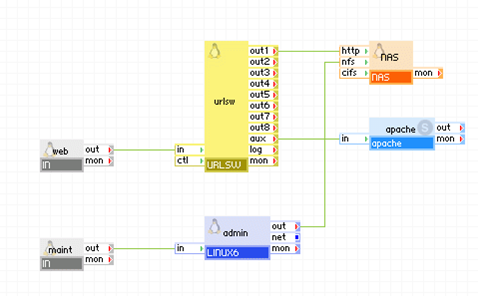
Appliances in use:
The nas appliance in this example is used to serve the static content of the web site (for example, images) as it is simple to configure and less resource-demanding, while a separate apache server is set up to serve the dynamic content (for example, forms interface, and so on)
The admin appliance in this example is used to authenticate users and provide access to the cifs terminal of the nas appliance so that an administrator may update the set of files exposed by nas through its http terminal.
Note: The urlsw appliance in this example is not shipped with CA AppLogic, but can be built using Apache and pound. The Apache appliance in this example is not shipped with CA AppLogic. However, CA AppLogic does provide a similar appliance named WEB6.
HTTP Access:
web accepts HTTP requests coming to the application and passes them to urlsw through its out terminal. urlsw sends HTTP file requests for dynamic content through its out1 terminal to be served by nas1 on its http terminal. urlsw forwards all other HTTP requests through its aux terminal to be served by Apache.
CIFS Access:
When an administrator needs to modify the set of files made available for HTTP access by nas, the administrator connects and logs into the admin appliance through the maint appliance. The user then mounts the CIFS share exposed by nas (if it is not already mounted) and modifies the files as needed.
Example:
|
Property name |
Value |
Notes |
|
data |
mydata |
Data volume holding the files to be served by the web server |
|
http_url_prefix |
/images |
Root path at which the web server should expose the file system. |
|
http_dir_enabled |
no |
Directory listing is disabled. |
|
http_sec_mode |
none |
No security is enabled for HTTP access. |
|
cifs_read_only |
no |
The CIFS share is exposed for read/write access. |
|
cifs_case_sensitive |
yes |
Enable case sensitive file paths. |
The following diagram shows a typical usage of NAS as shared storage for multiple application servers.
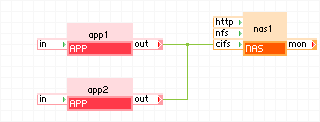
Appliances in use:
The nas1 appliance in this example is used as shared storage for app1 and app2. Both application servers have read/write access to the directories and files served by nas1.
app1 and app2 issue CIFS requests through their out terminals to the cifs terminal of nas1 to access files stored on the volume shared by nas1. Any changes made by one application server are seen by the other application server.
Example:
|
Property name |
Value |
Notes |
|
data |
mydata |
Data volume holding the files to be shared between the applications |
|
cifs_read_only |
no |
The CIFS share is exposed for read/write access. |
|
cifs_case_sensitive |
yes |
Enable case sensitive file paths. |
The following diagram shows a typical usage of NAS as a log server.
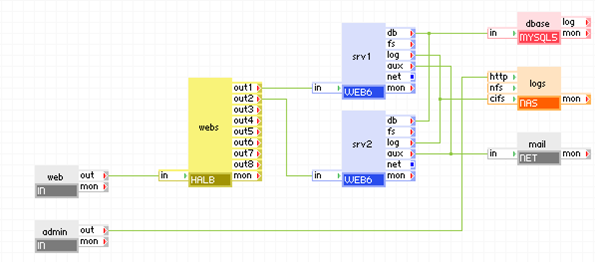
Appliances in use:
The logs appliance in this example is used to store the log files for the two web servers and the database server and makes those files available through its http terminal.
The log terminals for the web servers (web1 and web2) and the database server (dbase) are all connected to the cifs terminal of logs so that when they write to their log files, the files are stored on the logdata volume that is configured on logs.
When an administrator needs to inspect the log files, he connects via the admin gateway to the http terminal of the logs appliance. He logs in with the configured administrator user name and password and is shown a listing of the root directory of the logdata volume from which the administrator is free to view the log files he is interested in.
Example:
|
Property name |
Value |
Notes |
|
data |
logdata |
Data volume holding the log files |
|
http_url_prefix |
/logs |
URL root path where log files can be accessed. |
|
http_dir_enabled |
yes |
Directory listing is enabled. |
|
http_sec_mode |
single |
HTTP security mode is single user. |
|
http_user |
admin |
User name for HTTP access. |
|
http_pwd |
admin123 |
User password for HTTP access. |
|
cifs_read_only |
yes |
The CIFS share is exposed for read-only access. |
|
cifs_case_sensitive |
yes |
Enable case sensitive file paths. |
The features of the http and samba servers are limited and only those features that properties support are exported.
To change the size of the data volume used by NAS
NAS uses the following 3rd party open source packages in addition to the 3rd party open source packages used by its base class LUX6.
|
Software |
Version |
Modified |
License |
Notes |
|
apr |
1.3.9-5.el6_2 |
No |
Apache 2.0 |
N/A |
|
apr-util |
1.3.9-3.el6_0.1 |
No |
Apache 2.0 |
N/A |
|
cups-libs |
1.4.2-48 |
No |
GPLv2 |
N/A |
|
curl |
7.19.7-26.el6_2.4 |
No |
MIT |
N/A |
|
gnutls |
2.8.5-4.el6_2.2 |
No |
LGPLv2.1 |
N/A |
|
httpd |
2.2.15-15 |
NO |
Apache 2.0 |
N/A |
|
libgcrypt |
1.4.5-9.el6_2.2 |
No |
LGPLv2.1 |
N/A |
|
libgpg-error |
1.7-4 |
No |
LGPLv2.1 |
N/A |
|
libidn |
1.18-2 |
No |
LGPLv2.1 |
N/A |
|
libjpeg |
6b-46 |
No |
IJG |
N/A |
|
libpng |
1.2.49-1.el6_2 |
No |
zlib |
N/A |
|
libtiff |
3.9.4-6.el6_3 |
No |
MIT |
N/A |
|
mailcap |
2.1.31-2 |
No |
ISC |
N/A |
|
quota |
3.17-16 |
No |
BSD |
N/A |
|
samba |
3.0.33-3.37.ca |
No |
GPLv2 |
N/A |
|
samba-winbind-clients |
3.0.33-3.37.ca |
No |
GPLv2 |
N/A |
|
samba-common |
3.0.33-3.37.ca |
No |
GPLv2 |
N/A |
|
Copyright © 2013 CA Technologies.
All rights reserved.
|
|