

Latest version: 3.1.2-1

|
At a Glance |
|
|
Catalog |
System |
|
Category |
Misc. Appliances |
|
User volumes |
yes |
|
Min. memory |
160 MB |
|
OS |
Linux |
|
Constraints |
no |
|
Questions/Comments |
|
LOAD is a load generator which generates HTTP requests on its out terminal.
Load generation is controlled through a simple web interface (GUI) exposed by LOAD. The GUI is accessed through the ctl terminal. The GUI also displays historical results of load generation.
|
Resource |
Minimum |
Maximum |
Default |
|
CPU |
0.1 |
2.0 |
0.3 |
|
Memory |
160 MB |
1 GB |
160 MB |
|
Bandwidth |
1 Mbps |
2 Gbps |
1 Gbps |
|
name |
dir |
prot. |
description |
|
ctl |
in |
HTTP |
Exposes a web interface (GUI) for controlling load generation. |
|
out |
out |
Any |
Output for making HTTP requests. |
|
mon |
out |
CCE |
Used for performance and resource usage statistics. This terminal can be left unconnected. |
|
Volume |
Description |
|
config |
Read/write volume for configuration data. |
This volume stores configuration data and temporary files. It should be 5 MB in size.
|
name |
type |
description |
|
max_rate |
int |
Maximum rate of requests per seconds. This is the maximum rate which the GUI will allow to be selected. Default: 100 |
|
username |
string |
User name for web-based authentication. If empty, no authentication is performed. Default: empty |
|
password |
string |
Password for web-based authentication. This property is not used if username is empty. Default: empty |
LOAD is capable of generating a maximum of 4000 requests per second. As a reference for determining resource allocation for LOAD, the following results were obtained generating requests against static targets on a WEB appliance with 2.0 CPU's and 2 GB of memory.
|
LOAD CPU |
LOAD memory |
Target size |
Sustainable rate |
|
0.3 |
160 MB |
69 Bytes |
1,200 requests per second |
|
0.3 |
160 MB |
60 Kb |
600 |
|
0.3 |
160 MB |
230 Kb |
300 |
|
1.0 |
160 MB |
69 Bytes |
3,000 |
|
1.0 |
160 MB |
60 Kb |
1,500 |
|
1.0 |
160 MB |
230 Kb |
900 |
The following messages may appear in either the appliance log file or the system log of the grid controller when the appliance fails to start:
LOAD exposes a web interface which can be used to control its operation. This GUI is accessed through the ctl terminal.
The slider controls the number of requests per second which LOAD generates through its out terminal. Load is repeatedly generated in 5 second spurts and the most recent results are reported in the GUI:
The graph shows results from the last 72.5 minutes of load generation and includes:
The edit button allows the list of target URL's to be edited. If more than one URL is listed, LOAD selects from the list randomly for each request. URL's are listed in a format which depends on whether the out terminal is connected to a gateway:
The red and green stop and start buttons stop or start load generation. Load generation can also be stopped by setting the rate of requests per second to zero.
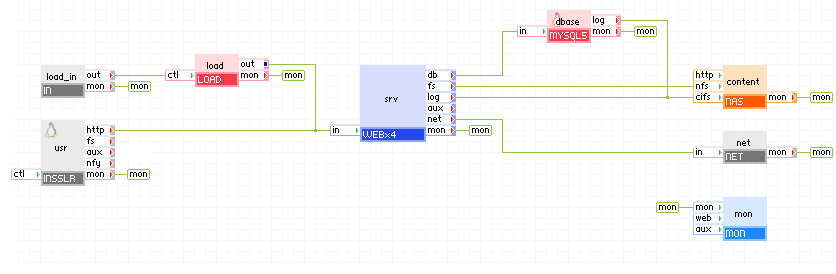
The diagram below shows how LOAD can be connected to the LampX4 reference application. Pointing a browser at the load_in gateway brings up the web interface for LOAD.
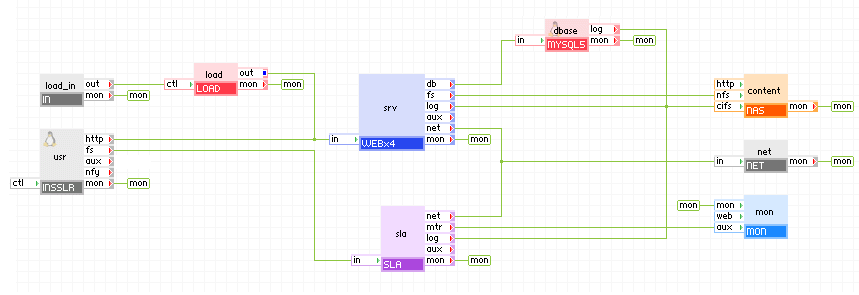
The diagram below shows how LOAD can be connected to a LampX4 reference application which also includes the SLA appliance. Pointing a browser at the load_in gateway brings up the web interface for LOAD. The SLA appliance automatically starts and stops individual web servers within WEBx4 in response to changes in the amount of load processed by WEBx4. See SLA for details.
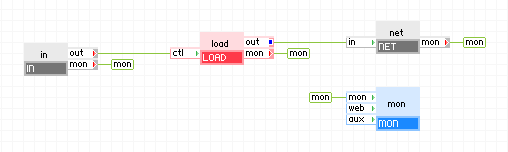
The diagram below shows a simple application which generates load through its net gateway.
It is good practice to set the username and password properties of LOAD to prevent unauthorized access.
Closing the browser session to the LOAD GUI does NOT stop load generation. To stop load generation, use the stop button, or select 0 requests per second, or re-start the appliance.
Open source and 3rd party software used inside of the appliance
LOAD uses the following 3rd party/open source packages in addition to the 3rd party/open source packages used by its base class WEB6.
|
Software |
Version |
Modified |
License |
Notes |
|
http_load |
12Mar2006 |
No |
BSD |
Download page |
|
JS Slider |
1.4 |
No |
Attribution-ShareAlike 2.5 |
homepage |
|
Copyright © 2013 CA Technologies.
All rights reserved.
|
|