

The Infrastructure Editor is a visual tool that makes it easy to create, assemble and troubleshoot infrastructure for applications. The interface is interactive and is modeled after Visio. You assemble your infrastructure by dragging components on to the canvas, then configuring and connecting the components.
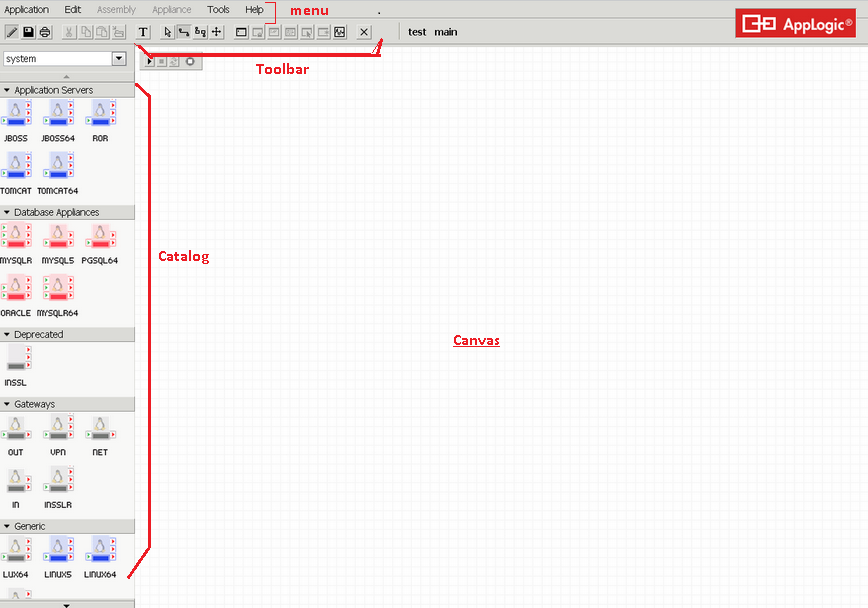
The editor main layout includes a palette with appliance catalogs on the left and a drawing canvas on the right.
You can reach the Infrastructure editor by first logging in and then selecting an application to edit.
The application as a whole is an assembly -- a composite appliance with a well-defined boundary, built as a structure of connected appliance instances (subordinates). In addition to the application assembly main, which is created automatically by CA AppLogic®, you can create additional assemblies that you can use to build up your application.
So, to restate, the infrastructure editor allows you to visually edit the interior structure of an assembly: To define the subordinate instances, their configurations and connections.
The editor provides a drawing canvas, where you build structures of connected appliances. The editor further provides a number of property sheets for configuring various aspects of the application and its appliances.
Note: We have designed the editor to be intuitive and use the palette-and-canvas layout familiar from a number of drawing applications. Instead of reading the following sections that describe with text how to do visual operations, feel free to simply try the editor. Drag things left and right; double-click and right-click on various items and see what happens.
|
Copyright © 2012 CA.
All rights reserved.
|
|