

Latest Version: 1.0.7-1
The WS_API_SAMPLE application provides an example of how to build a simple portal application that accesses the CA AppLogic® Web Service API application that is, WS_API. This application is provided to guide developers of portals and applications which issue Web API requests to an instance of the WS_API application running on a CA AppLogic® grid.
Important! The IP addresses configured in the vpn_out_ip, in_usr_ip, and net_out_ip properties must be IP addresses available on your grid. You can locate your IP addresses, netmask, gateway and DNS servers on the dashboard of your grid.
|
Property Name |
Type |
Description |
|
in_usr_ip |
IP |
IP address at which a user can access the WS_API_SAMPLE portal. This property is mandatory. |
|
net_out_ip |
IP |
IP address used by the WS_API_SAMPLE application to issue HTTP or HTTPS based requests to the WS_API application. This property is mandatory . |
|
vpn_out_ip |
IP |
IP address used by the WS_API_SAMPLE application to issue HTTP based requests to the WS_API application over a secure VPN tunnel. If VPN tunnel is used to access the WS_API application, this property is mandatory. |
|
vpn_remote |
IP |
IP address of the remote VPN server used to issue HTTP based requests to the WS_API application over a secure VPN tunnel. If VPN tunnel is used to access the WS_API application, this property is mandatory. |
|
netmask |
IP |
Network mask for the network on which vpn_out_ip, in_usr_ip and net_out_ip reside. This property is mandatory. |
|
gateway |
IP |
Address of IP gateway used to route traffic. This property is mandatory and must be specified to access the WS_API application. |
|
dns1 |
IP |
IP address of a DNS server for host name resolutions. This property is mandatory. |
|
dns2 |
IP |
IP address of a backup DNS server for host name resolutions. Default: 0.0.0.0. |
|
api_ports |
String |
Comma-separated list of ports on which WS_API_SAMPLE application can be accessed. Default: empty |
|
allowed_hosts |
String |
Allowed IP address or range of IP address's in CIDR format that can access the WS_API_SAMPLE. Default: 0.0.0.0/0; (allow all) |
|
Resources |
Min |
Max |
Default |
|
CPU |
0.45 |
72 |
1.05 |
|
Memory |
704 MB |
132 GB |
1.343 GB |
|
Bandwidth |
6 Mbps |
12 Gbps |
1.151 Gbps |
The BackupHelper application has the following volume:
|
Volume |
Description |
|
content |
File system containing scripts, logs and web interface. This volume should not be modified. |
The WS_API_SAMPLE application must be configured to access the instance of WS_API running on a grid. Before starting this application, start an instance of WS_API application, then configure the WS_API_SAMPLE in the instance of WS_API application.
To configure the WS_API_SAMPLE
# EDIT VDC info here
<p>
<label for="location">Select Location: </label>
<select name="location">
<option value="mygrid1">Dallas, TX, USA</option>
<option value="mygrid2">San Diego, CA, USA</option>
</select>
</p>
The WS_API_SAMPLE can be configured to work in one of the following modes:
In this mode, the portal uses regular HTTP based interface to issue API requests to the instance of WS_API application.
For example, curl "http://usr_ip/api/v1/app/list?vdc=mygrid1".
In this mode, the portal uses secure HTTP based interface that is, HTTPS to issue API requests to the instance of WS_API application. For this to work, the api_client.pem key should be copied to the keys sub-directory on the portal volume of the WS_API_SAMPLE application.
For example, curl -k -E /mnt/fs/keys/api_client.pem "https://usr_ip/api/v1/app/list?vdc=mygrid1".
In this mode, the portal uses a regular HTTP based interface to issue API requests to the instance of WS_API application through a secure VPN tunnel. To create the tunnel, simple copy the client.xxxxxxxxxxxxxxxxxxxxxxxxx.key, client.xxxxxxxxxxxxxxxxxxxxxxxxxxxxxxxxx.crt and ca.crt generated on the server sub-directory of the vpn_key volume of the instance of WS_API application to the client sub-directory of the vpn_key volume of the WS_API_SAMPLE application. A secure tunnel is created once the out_vpn component is started.
For example, curl "http://aux/api/v1/app/list?vdc=mygrid1".
Note: The VPN component needs to be activated by opening the UI and unchecking the "Standby" option.
To access the portal through a web browser, point the browser to http://in_usr_ip/api/portal.
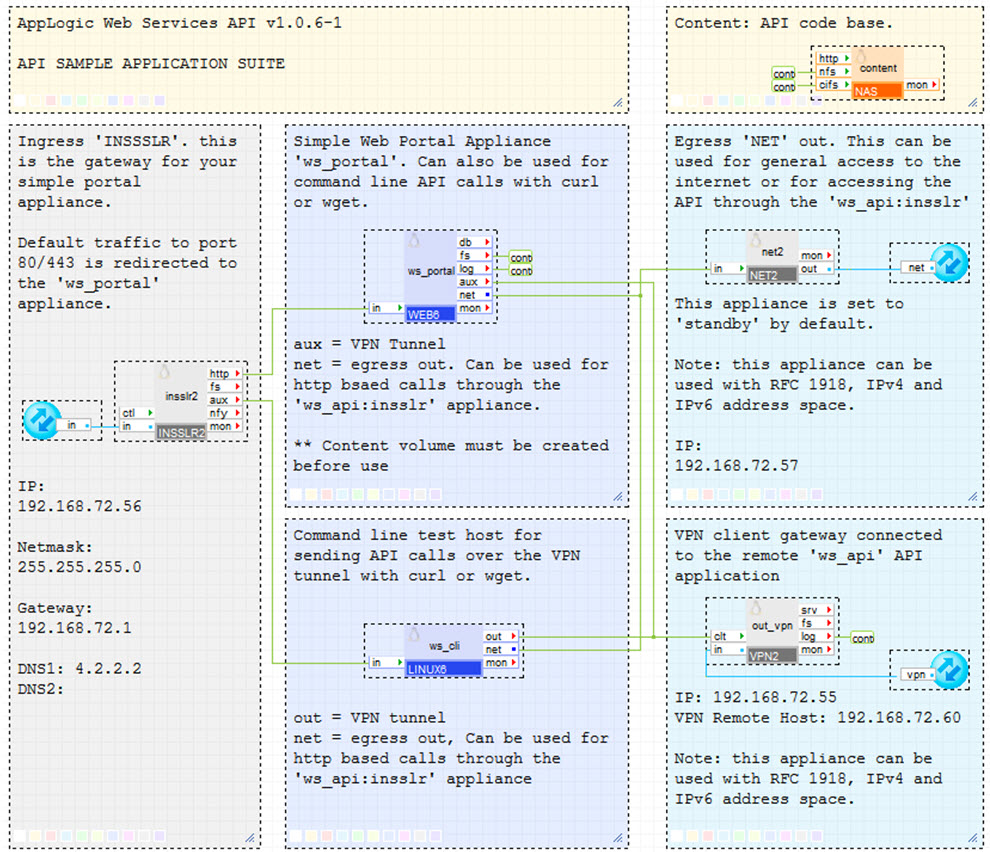
CA AppLogic® Web Services 'WS_API_SAMPLE' application infrastructure is show below:
It has the following components:
Open source and third-party software used
The following open source third-party software is installed on the portal volume.
|
Software |
Version |
Modified |
License |
Notes |
|
JSON |
2.15 |
No |
Artistic |
N/A |
|
IPC-Run |
0.80 |
No |
GPLv2 |
N/A |
|
XML-Simple |
2.18 |
No |
Artistic |
N/A |
|
Sort-Naturally |
1.02 |
No |
Artistic |
N/A |
|
Copyright © 2012 CA.
All rights reserved.
|
|