

Latest Version: 1.2.12-1
Latest Version: 1.2.12-1
The Lamp and LampX4 reference applications are simple 2-tier Web applications that make it easy for a user to port their applications onto CA AppLogic®. These reference applications drastically reduce the entry barrier for using CA AppLogic® grids.
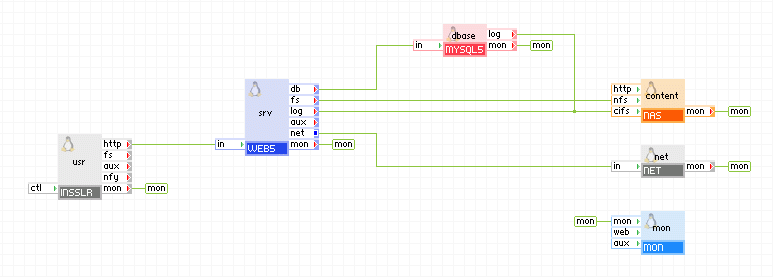
The Lamp application consists of a single web server, a database server, a file server, a gateway for external network access and an input gateway for user access. In addition, the application contains a monitor which allows the administrator to monitor various aspects of the application (for example, CPU/memory usage, hit rate on a website, and so on).
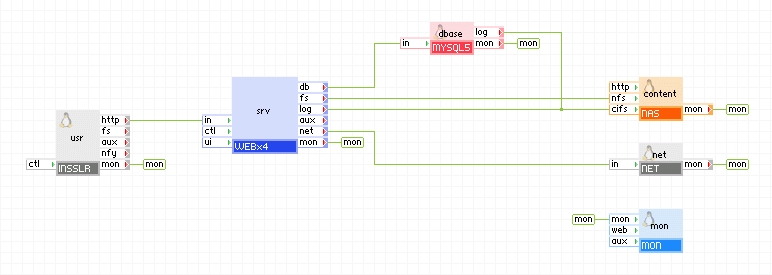
LampX4 is the same as Lamp except it provides a load-balanced web tier; a load balancer plus 4 web servers. LampX4 is designed for applications that incur heavy traffic load (that is, may be accessed by hundreds of users).
With these Lamp applications, in only a few simple steps, the user can port their application onto CA AppLogic® with ease. Simply provision one of the Lamp applications, SSH into the web server (via the CA AppLogic® web shell), install the necessary software and the application is ready for production.
Lamp and LampX4 are made for simple applications that do not require:
For applications that do not fit within these requirements, the LampCluster reference application should be used instead.
Properties
|
Property Name |
Type |
Description |
|
hostname |
String |
Host name under which the Lamp application is accessible. This is the name that users point their browsers at: http://hostname/. This name should resolve to the IP address specified in in_ip. Default: (empty; no hostname is used). |
|
in_ip |
IP |
This is the IP address at which the Lamp application provides services to users. If the hostname property is not empty, it should resolve to in_ip. This property is mandatory. |
|
out_ip |
IP |
This is the IP address that is used by the Lamp application to access an external network that resides outside of the application (that is, the internet). This property is mandatory. |
|
netmask |
IP |
Network mask for the network on which in_ip and out_ip reside. This property is mandatory. |
|
gateway |
IP |
Defines the IP network gateway (router) that is used for all outgoing traffic to the external network via in_ip and out_ip. This property is mandatory. |
|
dns1 |
IP |
IP address of the primary DNS server used for host name resolutions. This property is mandatory. |
|
dns2 |
IP |
IP address of the backup DNS server used for host name resolutions. Default: (empty; not used). |
|
timezone |
String |
Specifies the time zone used in the application. If this property is empty, the timezone is not modified and left as-is. A list of supported time zones is available here. Default: empty |
|
mon_standby |
Int |
Determines whether application monitoring is disabled upon application start for the Lamp application. If non-zero, monitoring is disabled, otherwise monitoring is enabled. The monitoring can be enabled at runtime by manually starting the mon appliance. Default: 1 (monitoring is disabled). |
|
srv2_standby |
Int |
Specifies whether the second WEB server is in standby mode. If non-zero, the second WEB server is in standby mode, otherwise it is not in standby mode. This property is valid only for the LampX4 application. Default: 1 (standby mode). |
|
srv3_standby |
Int |
Specifies whether the third WEB server is in standby mode. If non-zero, the third WEB server is in standby mode, otherwise it is not in standby mode. This property is valid only for the LampX4 application. Default: 1 (standby mode). |
|
srv4_standby |
Int |
Specifies whether the fourth WEB server is in standby mode. If non-zero, the fourth WEB server is in standby mode, otherwise it is not in standby mode. This property is valid only for the LampX4 application. Default: 1 (standby mode). |
Important! The IP addresses configured in the in_ip and out_ip properties must be IP addresses available on your CA AppLogic® grid. You can find them, together with the netmask, gateway and DNS servers on the dashboard of your grid. We are working to make it possible for CA AppLogic® to provide these addresses automatically
Resources
|
Resource |
Minimum |
Maximum |
Default |
|
CPU |
0.45 |
60 |
1.15 |
|
Memory |
960 MB |
102 GB |
1.781 GB |
|
Bandwidth |
6 Mbps |
10.5 Gbps |
950 Mbps |
|
Resource |
Minimum |
Maximum |
Default |
|
CPU |
0.85 |
124 |
2.85 |
|
Memory |
1.5 GB |
230 GB |
3.28 GB |
|
Bandwidth |
10 Mbps |
18.5 Gbps |
1.4 Gbps |
Application Volumes
Application Volumes
The application itself uses several volumes. They are part of the application and are already configured into the appliance instances.
|
Volume |
Description |
|
mysql |
Volume for the database data storage. This volume is assigned to the MYSQL appliance. By default, an empty volume named mysql is supplied for the application to use. |
|
fs |
This volume is used to store the Lamp application's web pages, code and scripts (plus anything else that is needed by the application). It is also used to store the web server and database logs. This volume is assigned to the NAS appliance. By default, an empty volume named fs is supplied for the application to use. |
|
mon |
This volume is used to store monitoring data for the application. There is no reason for the user to access/modify this volume; this volume is used internally by the MON appliance. By default, a volume named mon is supplied to store the application monitoring data. |
This section describes how to use and operate the Lamp applications. It is geared towards both administrators and regular CA AppLogic® users. The initial setup and maintenance of the Lamp applications requires access to a CA AppLogic® grid.
Lamp and LampX4 are designed to allow the user to quickly port their application over to CA AppLogic®. Lamp and LampX4 are both used in the same way. All instructions in this section apply to both Lamp applications.
Initial Application Setup
Use the following steps to get your own Lamp application up and running on a CA AppLogic® grid. This example creates a scalable Lamp application based on LampX4 named mylampapp.
To create a scalable Lamp application
This command provisions a new Lamp application named mylampapp based on the LampX4 reference application. All properties are set to their appropriate values (IPs, DNS servers, and so on). All 4 web servers are enabled to accommodate for possible heavy traffic loads. Also, the sizes of the fs and mysql volumes are increased to 250MB.
app provision LampX4 mylampapp hostname=www.myapp.com in_ip=1.2.3.4 out_ip=1.2.3.5 netmask=255.255.255.0 gateway=1.2.3.1 dns1=1.2.3.50 dns2=1.2.3.51 mon_standby=0 srv2_standby=0 srv3_standby=0 srv4_standby=0 fs.size=250MB mysql.size=250MB
CA AppLogic® will provision the mylampapp application and start it on the grid.
You can now access your application using a browser.
You now have a running Lamp application on your grid.
Your application will be ready to go.
Install Your Application
Lamp and LampX4 applications are designed to allow you to quickly port your existing applications to a CA AppLogic® grid.
To install your own software on your Lamp application, SSH into the web appliance from within the CA AppLogic® shell: ssh mylampapp:main.srv.srv1
Note: After all of your software is installed and configured, there is no need to restart the application (unless the software you installed requires a reboot).
You should now be able to access your application by using the configured hostname or IP address (in_ip).
Monitor Your Application
After your application has started, you can monitor the application by using the monitor GUI accessible through the CA AppLogic® GUI. To monitor your application, do one of the following:
If you started your application with the monitor in standby state, you can manually start it at runtime: comp start mylampapp:main.mon. The monitor must be started before you can access it through the CA AppLogic® GUI.
After the monitor has started, you may now access the monitoring GUI to monitor your application. This is used to monitor CPU/memory usage, number of hits your website is getting, traffic load, and so on.
The web servers used in the Lamp applications do not have a GCC build environment or a writable usr directory tree. If either of these are needed, it is recommended to use the LampCluster reference application instead of the Lamp/LampX4 applications.
|
Copyright © 2012 CA.
All rights reserved.
|
|