

As a Backbone Administrator, you want to perform administrative tasks and advanced operations on a grid. These operations include retrieving server information, checking the network health, and reviewing grid failures. BFC Maintainers can perform these tasks regularly.
The following diagram shows how to maintain a grid in a typical environment:
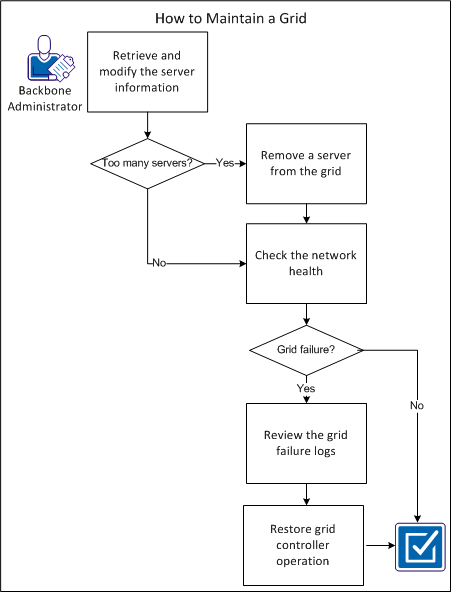
For example, you want to change the minimum number of required servers from 5 to 4 because of underutilized resources.
The 3tsrv utility resides in dom0 of each server. Only grid administrators have access to this utility. Use this utility to retrieve and modify server information and perform functions such as log collection for failure analysis.
Follow these steps:
3tsrv command [ prop[=val] ]* [ --batch ][ --force ]
Specifies the command that you want to execute.
Specifies additional command-specific arguments. If you do not specify val, the product assumes a Boolean property with a value of TRUE.
Specifies that the utility executes from a script and should not display lengthy error messages. This variable also displays output in UDL format.
Forces the specified operation.
Retrieves detailed server information.
Sets server information.
Reboots the server.
Shuts down the server.
Activates the product on the server.
Deactivates the product on the server.
Starts the product on the server.
Stops the product on the server.
Enables disk failure detection on the server.
Disables disk failure detection on the server.
Lists the active block devices used by the product on the server
Displays the contents of the server data file
Updates the server data file
Collects server logs and information
Displays help for the utility.
For example, you want to view details information about the server.
Execute the following command:
3tsrv info [ --batch ]
You can remove a server from a grid using Server Actions in the Grid Properties page.
You may need to decrement the minimum server value if you indicated an equal value for the minimum number and target number. For example, your grid has five servers with the values set to 5/5/5 for minimum/target/maximum. You want to set the minimum value to 4 because svr5 is underutilized.
Note: If the minimum server value is less than the target value, you do not have to adjust the minimum value first. For example, if you indicated 5/7/7 for minimum/target/maximum, you can remove two servers without adjusting the minimum value.
Follow these steps:
3t srv disable srv<n>
The server number that you want to remove from the grid.
Note: This step is optional if you select the Force Removal check box in Step 5d.
The 3tnetha utility lets you script various network and switch-related checks. The products invoke the 3tnetha script periodically as part of its periodic health checks.
Follow these steps:
/var/applogic/scripts
By default, the script does nothing except for exit 0.
The following example shows a sample format of the dashboard message:
A problem has been detected with the grid's network: STDOUT from 3tnetha. Contact technical support for assistance.
You can troubleshoot the failures based on the behavior of the grid. Report any unexpected grid failures to CA Support. However, before you submit a bug report, review the Release Notes to verify that your problem is unknown.
Follow these steps:
Note: The product can report this behavior on the dashboard of the grid.
Note: The product can report this behavior on the dashboard of the grid.
In this example, you cannot verify your problem as a known issue. You decide to file a bug report.
You want to collect all the logs from the grid, including the backups. For example, xxxx.1, xxxx.2, and so on.
The grid and servers logs require administrator access. You send these logs to CA Support.
Note: You can use the 3tsrv utility on each server to collect the server specific logs and information.
Contains the output of any grid commands that the BFC issues. This log also contains output from the user-identifiable actions that the BFC takes. We recommend that you consider this log as the most useful for troubleshooting.
Contains useful data when diagnosing issues about discovery. CA Technical Support uses this log primarily.
Contains the output from the BFC installation.
Contains data about DHCP requests. You can watch this log when you discover servers. If a server powers on, but you do not see its dhcp in this log, then it is probably not configured correctly with respect to PXE.
Contains the inventory files for servers and can help in diagnosing discovery/inventory issues.
Contains the logs created upon server deployment in to a grid. If a server fails when being added to a grid, these files may help.
If the grid controller server fails, the product detects grid controller recovery issues. These issues could potentially cause the grid controller to become inaccessible.
Follow these steps:
You have successfully performed grid maintenance.
|
Copyright © 2012 CA.
All rights reserved.
|
|