

Latest version:
|
At a Glance |
|
|
Catalog |
Dynamic |
|
Category |
Backup |
|
User volumes |
yes |
|
Min. memory |
160 MB |
|
OS |
Linux |
|
Constraints |
no |
|
Questions/Comments |
|
BCK enables the containing application to backup or restore a copy of itself using Amazon Simple Storage Services (S3), Nirvanix, Layerd Technologies DynaVol, ftp, or sftp. These operations can be initiated through a simple web interface (GUI) exposed by BCK and work in conjunction with the helper application BackupHelper. BCK may also be configured to automatically perform scheduled backups. Whenever the application is backed up, it is stopped and then re-started.
The GUI is accessed using the application IP and the configured BCK port and supports the following application operations:
Limitations:
|
Resource |
Minimum |
Maximum |
Default |
|
CPU |
0.15 |
0.15 |
0.15 |
|
Memory |
256 MB |
256 MB |
256 MB |
|
Bandwidth |
2 Mbps |
2 Mbps |
2 Mbps |
|
Name |
Direction |
Protocol |
Description |
|
in |
in |
Any |
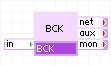
Exposes a web interface (GUI) for backup and restore. All other network traffic not directed to the GUI is passed-through aux without modification. |
|
net |
out |
Any |
Output for accessing the grid to facilitate application backup and restore. |
|
aux |
out |
Any |
Auxiliary output. Incoming traffic that is not directed to the GUI is sent through this terminal without modification. This terminal can be left unconnected. |
|
mon |
out |
CCE |
Used for performance and resource usage statistics. |
|
Volume |
Description |
|
config |
Read/write volume for configuration data. |
The volume is used to store a private key file which provides authentication as a normal user on the grid controller. See Preparing for Backup and Restore for information about setting up the config volume.
Properties in the table below configure BCK for use with a specific service.
|
Name |
Type |
Description |
|
backup_service |
string |
S3, DynaVol_ftp, DynaVol_sftp, ftp, or sftp. Default: S3 |
|
backup_service_ip |
IP |
IP address of the remote storage service. Default: empty |
|
backup_user_id |
string |
User name or signature used to access the remote storage service. Default: empty |
|
backup_user_auth |
string |
User password or authentication string used to access the remote storage service. Default: empty |
|
backup_app_key |
string |
For Nirvanix this is the application key. This property is not required for other backup services. Default: empty |
|
backup_app_name |
string |
For Nirvanix this is the application name. This property is not required for other backup services. Default: empty |
|
backup_container_id |
string |
Identifier of the container on the remote storage service used to hold backups. Default: empty |
Properties in the table below configure BCK to automatically perform scheduled backups.
|
name |
type |
description |
|
schedule_period |
string |
none, daily, weekly, monthly. Default: none |
|
schedule_day |
integer |
1-28. Default: 1 |
|
schedule_time |
string |
Time of day to perform a scheduled backup in the format hour(0-23):minute(0-59). Default: 0:0 |
|
schedule_retain |
integer |
Number of backups to retain. After a new backup is created, existing backups above this number are deleted (oldest first). Default: 3 |
Properties in the table below configure the BCK GUI.
|
Name |
Type |
Description |
|
gui_ip |
IP |
IP address of the containing application used to access the GUI. Default: empty |
|
gui_port_no |
integer |
Port for accessing the web interface. The GUI is accessed through gui_ip and this port. Default: 8080. |
|
gui_username |
string |
User name for web-based authentication. If empty, no authentication is performed. Default: empty |
|
gui_password |
string |
Password for web-based authentication. This property is not used if gui_username is empty. Default: empty |
Properties in the table below configure BCK to operate on the grid. The two IP's, grid_ip1 and grid_ip2 are available application IP's that are reserved for use by BCK.
|
Name |
Type |
Description |
|
grid_ctl_ip |
IP |
IP address of the grid controller on which the application is running. Default: empty |
|
grid_ip1 |
IP |
IP address for use during backup and restore. Defaullt: empty |
|
grid_ip2 |
IP |
IP address for use during backup and restore. Default: empty |
|
grid_netmask |
IP |
Netmask for the grid on which the application is running. Default: 255.255.255.0 |
|
grid_gateway |
IP |
Address of IP gateway used to route traffic. This property must be specified to provide access to hosts outside of the IP network on which the application is running. Default: empty |
|
grid_dns1 |
IP |
Primary DNS server for the grid. Default: empty |
|
grid_dns2 |
IP |
Secondary DNS server for the grid. Default: empty |
The following messages may appear in either the appliance log file or the system log of the grid controller when the appliance fails to start:
BCK exposes a web interface which can be used to manually backup or restore the containing application, or manually delete existing backups. This GUI is accessed using the application IP on the configured port gui_port_no.
Above is an example of the GUI progress monitor during backup. This page contains two monitors:
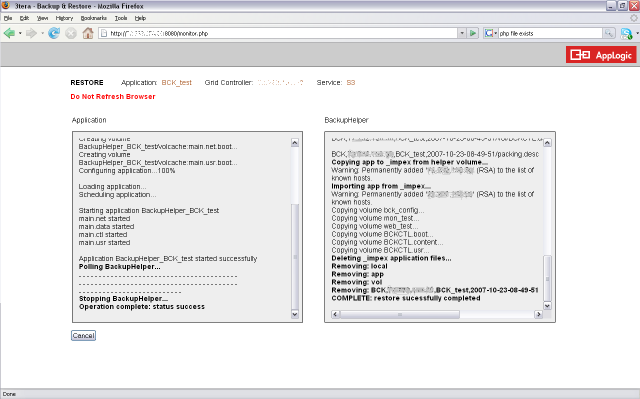
Above is an example of the GUI progress monitor during restore. This page contains two monitors:
These steps must be taken before BCK can be used to backup or restore an application. A step-by-step example is provided here.
Important! BCK should start after the NET appliance in the application. In the NET appliance 'Attributes' tab, assign 'Start Order' to 10 and ensure that the 'Start Order' of BCK appliance is more than this value.
LampX4
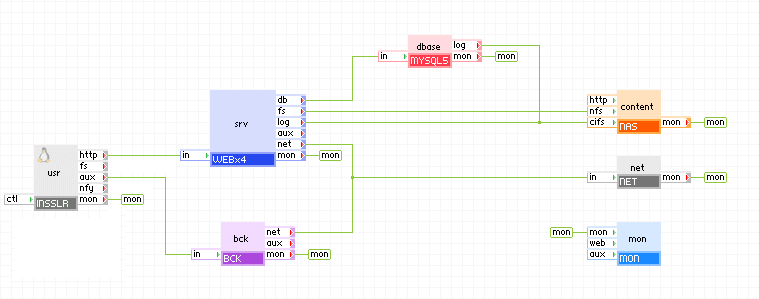
The diagram below shows how BCK can be connected to the LampX4 reference application. The INSSLR gateway properties are set to forward tcp traffic on port 8080 to the aux terminal. Pointing a browser at port 8080 of the application IP or resolvable domain name brings up the web interface for BCK.
Note: The BCK appliance should not be connected directly between an IN gateway and the rest of the application, but rather to the aux terminal of an INSSLR gateway.
A step-by-step example for setting up the LampX4 use case is provided here.
It is good practice to set the gui_username and gui_password properties of BCK to prevent unauthorized users from performing backup or restore.
Notes:
Open source and 3rd party software used inside of the appliance
BCK is a compound appliance comprised of PS8 and BCKCTL. BCKCTL uses the following 3rd party open source packages in addition to the 3rd party open source packages used by its base class WEB5.
|
Software |
Version |
Modified |
License |
Notes |
|
Nirvanix API PHP functions |
N/A |
Yes |
Nirvanix Public License |
homepage |
|
phps3tk S3 PHP functions |
N/A |
Yes |
GNU GPL v3 |
homepage |
|
PEAR.php |
1.6.2 |
No |
PHP license v3.0 |
PEAR package from PEAR |
|
HMAC.php |
1.0.1 |
No |
PHP license v3.0 |
Crypt_HMAC package from PEAR |
|
Request.php |
1.4.1 |
No |
BSD |
Request package from PEAR |
|
Socket.php |
1.0.8 |
No |
PHP license v2.02 |
Net_Socket package from PEAR |
|
URL.php |
1.0.15 |
No |
BSD |
Net_URL package from PEAR |
|
Copyright © 2012 CA.
All rights reserved.
|
|