

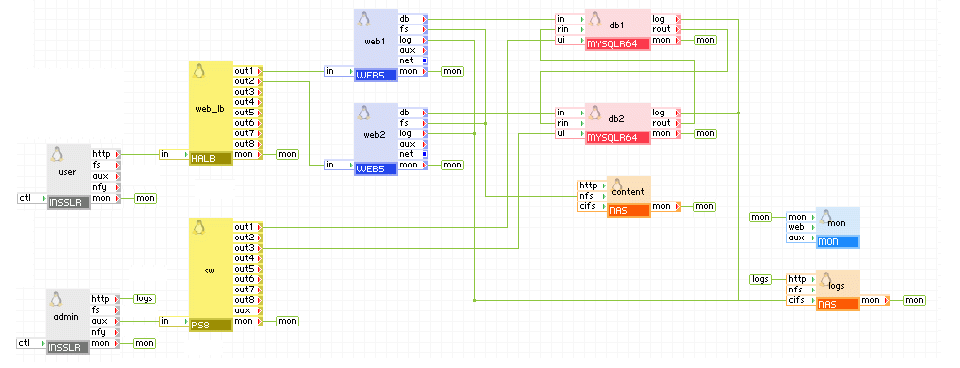
The following diagram shows a typical usage of the MYSQLR64 appliance in a web application in which the database is replicated to two servers in a master-master replication scenario. In this use case, the application uses both WEB and MYSQLR64 servers during operation for load-balancing. Also, in the case where one of the WEB/MYSQLR64 instances fails, the other WEB/MYSQLR64 instance can be used to prevent application downtime.
Appliances in use:
Client request arrives on the user gateway. The gateway forwards the requests to the web_lb load balancer, which directs the request to one of the web servers web1 and web2. web1 uses the db1 database appliance, web2 uses the db2 database appliance. db1 and db2 are connected to replicate the updates that the web servers do to the database. Each MYSQLR64 appliance uses an offset (equal to its server_id) for its auto_increment columns so that no duplicate entries occur.
Web access to db1 and db2 is available via admin gateway on port 8080 and 8081.
The db1, db2, web1 and web2 appliances are configured to store their log files within the root directory of the share exposed by logs. In addition, an administrator can view log files through the admin gateway.
Example property configuration (properties that are not listed should be left to their default values):
db1
|
Property name |
Value |
Notes |
|
auto_create |
1 |
Create the database if the volumes are empty. |
|
error_log_filename |
db1.error |
Name of error log file that is to be stored on the logs data volume. |
|
error_log_level |
error |
Error logging level |
|
server_id |
1 |
Master server (not mandatory to be 1, should be different from server_id on the slave) |
|
rpl_mode |
master_and_slave |
master and slave |
db2
|
Property name |
Value |
Notes |
|
auto_create |
1 |
Create the database if the volumes are empty. |
|
error_log_filename |
db2.error |
Name of error log file that is to be stored on the logs data volume. |
|
error_log_level |
error |
Error logging level |
|
server_id |
2 |
Master server (not mandatory to be 1, should be different from server_id on the slave) |
|
rpl_mode |
master_and_slave |
master and slave |
Notes:
|
Copyright © 2012 CA.
All rights reserved.
|
|