

The ability to easily capture structures of appliances and instantiate them on demand enables CA AppLogic® to define a new type of appliances which we call composite appliances , or assemblies . An assembly is an appliance that consists of a boundary and an interior. The boundary of the assembly is defined in a manner similar to the boundary of a virtual appliance, and its interior consists of a structure of virtual appliances.
The web switch is a useful appliance that accepts HTTP requests on its in input and forwards each request to one of its five HTTP outputs, namely img, out1, out2, out3, and out4. It also has an output named log through which it generates messages that need to be logged in a system log.
The web switch has three main functions:
To build an appliance like this the old-fashioned way, you have to install and configure properly at least three software packages on a server, write some scripts to glue them together, and test the resulting image. Depending on the complexity of the software, your familiarity with the specific packages and the thoroughness of your testing, this process will take from a few days to 2+ weeks of work. Worse, you will have to do most of the work again every time you upgrade one or more of the software packages.
With CA AppLogic®, there is a better way.
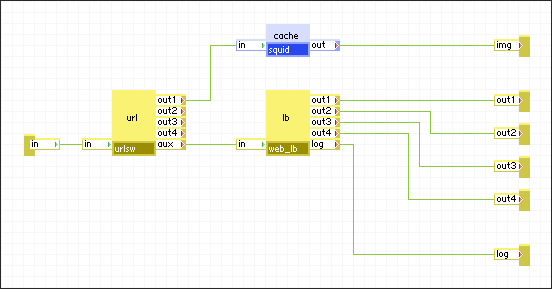
The figure above shows the same web switch built as an assembly of appliances. More specifically, the figure shows the interior of the assembly as the CA AppLogic® editor will visualize it. Each terminal defined on the boundary of the assembly is represented by a "terminal object" that carries the name of the respective terminal (for example, in, img, log, and so on).
The web switch is assembled from three appliances - a URL switch url of class urlsw, an HTTP load balancer lb of class web_lb, and a content caching appliance cache of class squid.
Tip: To make the design of structures easier to understand, we recommend that each instance in a structure is given a name that identifies the instance's role within the given structure.
The URL switch is a simple appliance. It can be configured with up to four regular expressions which it applies to the URLs included in all incoming HTTP requests received on its in terminal. If the URL matches one of the expressions, the switch forwards the whole request through the respective output out1 ... out4. If there is no mach, the request is forwarded through the aux terminal.
The load balancer accepts HTTP requests on its in input and forwards them in a load-balanced fashion through its out1 ... out4 outputs. In addition, it has a log output through which it generates log messages that can be collected in a systemwide log.
The cache is a content cache in memory. It accepts incoming HTTP requests on in and tries to satisfy them from the cache. If the requested object is not found in the cache, the appliance forwards the request through its out terminal and optionally caches the object when the request completes.
In the web switch appliance, the URL switch is configured to recognize the path for static images within incoming URLs, and forward those requests on out1 which is connected to the input of the cache. All other HTTP requests leave url through the aux output and are fed into the load balancer. The rest of the web switch behavior should be fairly obvious.
|
Copyright © 2012 CA.
All rights reserved.
|
|