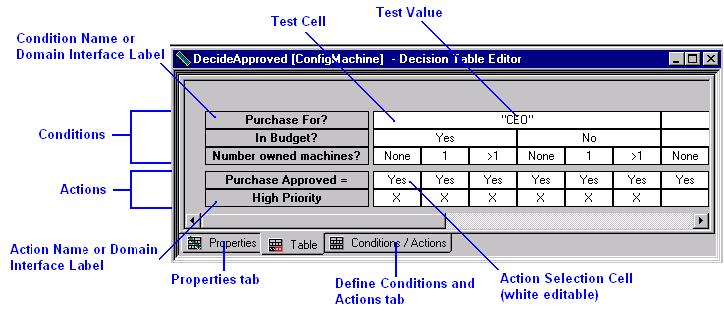
A decision table is a tabular rule that evaluates a set of conditions and executes a set of actions based on that evaluation. The Decision Table Editor uses a graphical display to show the order and flow of the logic and the actions that can result.
A decision table is similar to a collection of IFRULEs with related premises and actions (see the section Rephrasing IFRULEs as Decision Tables in this chapter). Like IFRULEs, decision tables can use attributes and methods, and can be used in forward or backward chaining. However, decision tables do not match over instances of one or more classes like an IFMATCH rule.
Through the use of domain interfaces, decision tables have the capability of being dynamic. (For more information about domain interfaces and dynamic rules, see the chapter "System Considerations for Supporting Business Rules" in the User Guide.) In particular, this means that decision tables can be stored outside the Aion IDE and maintained by domain experts. For more information about rule management by domain experts, see Maintaining the Dynamic Rulebase. The section Dynamic Decision Tables discusses handling dynamic decision tables in the Aion knowledge base.
|
This section contains the following topics: Benefits of Using Decision Tables How to Create and Open Decision Tables How to View and Modify Decision Table Properties Customizing the Decision Table Editor |
| Copyright © 2009 CA. All rights reserved. | Send E-mail to CA about this topic |