Compression is an edit-time feature concerned with making optimal use of screen real estate when displaying a decision table. Values are suppressed when those values are not relevant for distinguishing between different actions. Compression makes the Decision Table easier to understand by hiding irrelevant parts of the Decision Table and combining redundant parts.
To compress the decision table:
Or:
From the View menu, select Show Compressed.
A rectangular marker appears in the upper left corner of the Table page to show that you are in compressed view.
There are three kinds of compression used by the Decision Table Editor. These can be accessed from Decision Table Options (see Customizing the Decision Table Editor).
The following examples demonstrate each kind of compression using a Condition row with three possible values, "CEO", "VP", and "ELSE", and an Action row with two possible outcomes, Approved and Rejected.
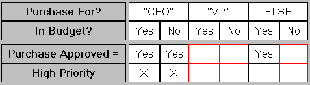
In the first example, the uncompressed Decision Table shows no actions are executed for the "VP" column:
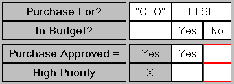
When you compress the Decision Table, the "VP" column is removed from the display:
In the second example, values "CEO" and "VP" always result in the same action.
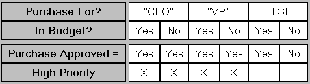
A compressed Decision Table combines those cells into a cell that reads "CEO [OR] VP" as shown in the following table:
![This diagram shows that a compressed Decision Table combines those cells into a cell that reads "CEO [OR] VP".](957.gif)
If a cell has the same action as an "ELSE" cell, the cell value is conceptually OR'd with the ELSE cell but the value is not shown with the "ELSE" cell. For example, if the Condition cells with a common action were "VP" and "ELSE", the Condition row would have two cells that read "CEO" and "ELSE."
Note: Actions of compressed subtables are not editable.
| Copyright © 2009 CA. All rights reserved. | Send E-mail to CA about this topic |