

|
|
|
You can create tasks from the following pages:
You can create a task on the Backlog page.
Follow these steps:
The New Task page appears.
See the Sprint Backlog & Charts procedure for more information.
You can create a task on the Sprint Backlog & Charts page.
Follow these steps:
The Create/Edit Task pop-up appears.
You can create tasks from the User Story Detail page.
Follow these steps:
The Task Edit page appears.
Defines the name of the task.
Required: Yes
Specifies the current state of the task.
Values:
Default: Planned
Defines the purpose of the task and provides additional relevant information.
Specifies the team member responsible for completing the task.
Default: The assignee for the user story, if specified.
Defines the task type.
Values:
Default: None
Defines the number of hours estimated to complete the task. This includes hours already logged for the task.
Displays all the hours logged for the task.
Specifies the scrum team assigned to complete the task.
Default: The scrum team assigned to the user story, if specified.
The Task Detail page appears. From this page, you can edit task properties or can delete the task.
The task is created and the fields on the Task Edit page clear.
You can create new tasks on the virtual wall.
Follow these steps:
A new task card is added to the user story.
The Task Detail page appears.
Defines the name of the task.
Required: Yes
Specifies the current state of the task.
Default: Planned
Defines the purpose of the task and provides additional relevant information.
Specifies the team member responsible for completing the task.
Defines the task type.
Defines the number of hours estimated to complete the task. This includes any hours already logged.
Displays the number of hours already logged for the task.
Defines the task type.
Values:
You can create a task in place on the Virtual Wall.
This procedure enables you to quickly add a task without leaving the Virtual Wall.
Follow these steps:
A new task card is added to the user story.
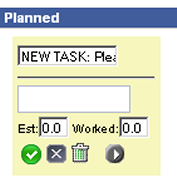
The task card redisplays with fields that can be edited.
| Copyright © 2012 CA. All rights reserved. | Tell Technical Publications how we can improve this information |