

CA Risk Authentication Windows Installation Guide › How to Deploy CA Risk Authentication on Distributed System
How to Deploy CA Risk Authentication on Distributed System
Use the CA Risk Authentication 8.0 InstallAnywhere Wizard to install the CA Risk Authentication components. This Wizard supports Complete and Custom installation types. To install and configure CA Risk Authentication in a distributed environment, use the Custom option when you run the installer.
The following illustration shows the tasks to perform for installing CA Risk Authentication 8.0:
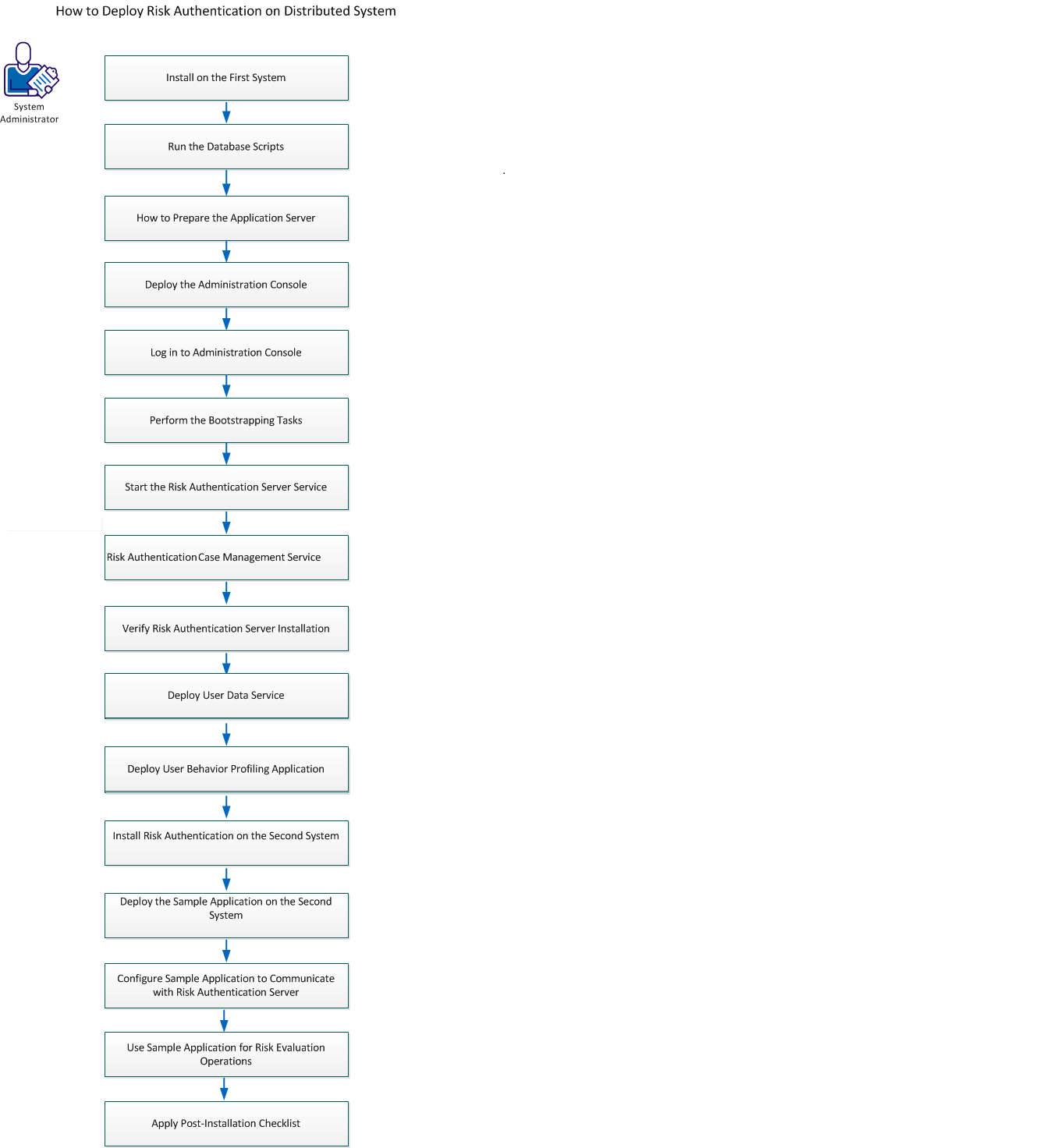
Perform the following tasks:
- Install on the First System
- Run the Database Scripts
- How to Prepare the Application Server
- Deploy the Administration Console
- Log in to Administration Console
- Perform the Bootstrapping Tasks
- Start CA Risk Authentication Server Service
- Start CA Risk Authentication Case Management Service
- Verify CA Risk Authentication Server Installation
- Deploy User Data Service
- Deploy User Behavior Profiling Application
- Install CA Risk Authentication on the Second System
- Deploy the Sample Application on the Second System
- Configure Sample Application to Communicate with CA Risk Authentication Server
- Use Sample Application for Risk Evaluation Operations
- Apply Post-Installation Checklist
Important!
Keep the following points in mind while installing CA Risk Authentication on a single system or in a distributed environment:
- Ensure that the <install_location> does not contain any special characters, such as ~ ! @ # $ % ^ & * ( ) _ + = { }[ ] ’ ".
- The MySQL database name should not contain dot(.) characters.
- Currently, you cannot modify or repair the CA Risk Authentication components by using the installer. You must uninstall the component and then re-install it.
- Do not close the installer window, if the installation is in progress. If at any time during the installation (especially during the last stages), you click the Cancel button to abort the installation, then the installer may not remove all the directories that it has created so far. You must manually clean up the installation directory, <install_location>\Arcot Systems\, and its subdirectories.
- If you run the installer on a system that already contains an instance of an existing ARCOT_HOME, then:
- You are not prompted for an installation directory.
- You are not prompted for the database setup. The installer uses the existing database.
- You are not prompted to set up encryption.
This section contains the following topics:
Install on the First System
Run the Database Scripts
How to Prepare the Application Server
Copyright © 2014 CA Technologies.
All rights reserved.
|
|