

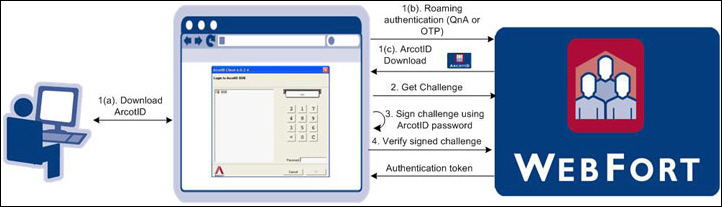
Authentication using CA Auth ID is a PKI-based challenge-response mechanism. The client obtains an authentication token by providing the private key of the user. The client-server interactions during authentication are as follows:
Your application or the resource that is protected by CA Strong Authentication obtains the user credentials. For example, if the user’s CA Auth ID is not available on the system.
Your application request for a challenge.
CA Strong Authentication Server prepares a unique challenge and sends it to your application to authenticate the user.
The user enters the correct CA Auth ID password to uncover the CA Auth ID. The client signs this challenge with the user’s private key that is available as a result of uncover. The challenge can either be pre-loaded on the client machine or downloaded from the server.
The signed challenge is sent to the CA Strong Authentication Server for verification. If the signature is verified successfully, the user can login or access your protected resource. For every successful transaction, CA Strong Authentication also returns an authentication token for a user.
The following figure illustrates the CA Auth ID authentication flow.
|
Copyright © 2014 CA Technologies.
All rights reserved.
|
|