CA Risk Authentication Windows Installation Guide › Introduction › System Architecture
System Architecture
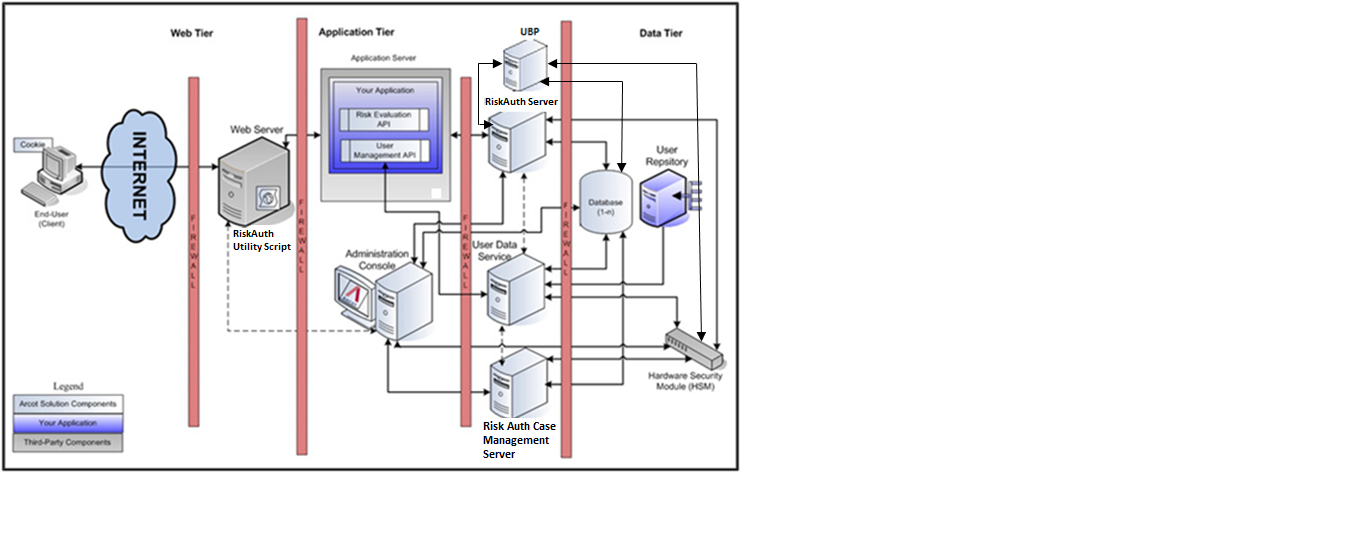
You can install CA Risk Authentication on a single system or you can distribute its components across multiple systems. However to ensure maximum security and integrity of data and transactions, the the three-tier architecture in the following illustration:
Use Web Tier for Network or Internet
This layer comprises the HTML content and interacts directly with the user over a network or the Internet.
The CA AuthMinder Utility Script (ArcotDeviceDNA.js), which is a client-side Java script must be included in your application. This is served to the end-user browser, through the web servers that reside in this layer. This script enables you to do the following:
- Sets the Device ID on the end-user device
- Collects the Machine FingerPrint (MFP), DeviceDNA, and Device ID information.
Note: To use the utility script, see Collecting Device ID and DeviceDNA in CA Risk Authentication Java Developer’s Guide.
Application Tier for Application Server
This layer constitutes all application server components in the system, such as CA Risk Authentication Server, UDS, Administration Console and the CA Risk Authentication SDKs. The following list explains the work of each server component:
Note: All components in this layer can be installed on one system or can be distributed across multiple systems.
- CA Risk Authentication Server: This server component processes risk evaluation requests from your application through CA Risk Authentication SDKs.
- Case Management Queuing Server: This server component schedules and dispatches cases to Customer Support Representatives (CSRs), and then manages the life-cycle of these cases.
- Administration Console: The web-based console is used for configuring server instances like, communication mode between CA Risk Authentication components, business rules and the corresponding data; and for managing organizations, administrators, and users.
- User Data Service: The abstraction layer provides access to user and organization-related data from different types of user repositories like, relational databases (RDBMSs) and directory servers (LDAPs).
- Risk Evaluation SDK: This server component looks into APIs and web services that your application can invoke risk-analysis requests to CA Risk Authentication Server.
- Risk Evaluation Web Service: This web-based interface enables interaction over a network between CA Risk Authentication Server and your application. It consists of the web services that can be invoked by your web application to perform risk evaluation.
- User Management Web Service: These Web services can be invoked by your application to forward requests to User Data Service for enrolling users, and for managing user details in CA Risk Authentication.
- Sample Application: Sample Application demonstrates the usage of CA Risk Authentication Java APIs and how your application can be integrated with CA Risk Authentication. Sample Application can also be used to verify if CA Risk Authentication is installed successfully; and if it is able to perform risk-evaluation operations.
- User Behavior Profiling Application: The User Behavioral Profiling model measures the similarity or dissimilarity of the current transaction to prior access by the same user, or that of their peer group in cases of insufficient data.
Data Tier for Storage
This layer comprises the instances of relational databases that store the configuration, user, and historical data that is used by CA Risk Authentication to analyze each transaction. In addition, this layer also constitutes all directory servers (LDAPs) that you have configured for storing user details.
If you use any Hardware Security Modules (HSMs) for encrypting sensitive user data, the HSM is also a part of this layer.
Copyright © 2014 CA Technologies.
All rights reserved.
|
|