

CA Risk Authentication Java Developer's Guide › CA Risk Authentication Sample Application › Understanding the Sample Application › Sample Application Components
Sample Application Components
Sample Application constitutes the following:
- Servlets: Platform-independent server-side modules that can be used to add new functionality to a Web server. (Servlets are an equivalent of an applets, however, unlike applets, they do not have a user interface. They just enable you to access the existing business logic by the help of user interface provided by JSPs.
- Helpers: Classes that provide the extra functionality that is not a part of the class that makes use of them. As a result, helper classes help making the code maintainable and reusable.
For example, if a class needs to display the value of a number, it could just display it raw, or alternately format it neatly (comma-separated format, for example). To do the formatting instead, the class can make use of another class, which is referred to as a helper class.
- JSPs: Java Server Pages (JSPs) that enable you to create and serve dynamic Web content that is server- and platform-independent.
These Sample Application components are organized in a model-view-controller (MVC) framework, which separates the user interface of your application from the underlying business logic. As a result, it is much easier to modify either the user interface of the application or the business rules or both without affecting the other.
The following figure illustrates the interaction between the components of Sample Application (after a user is successfully authenticated by your application.)
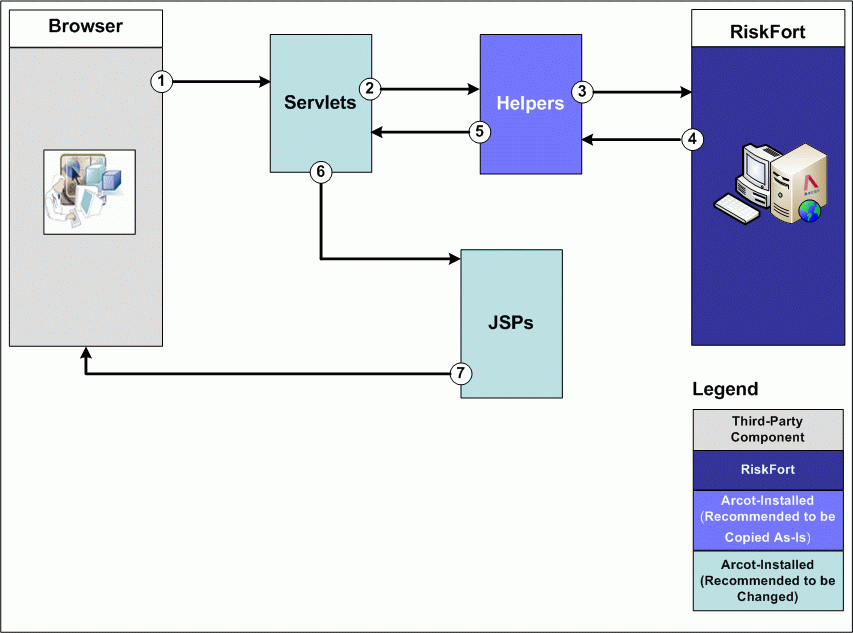
As illustrated in the preceding figure, the flow of information between the various components of Sample Application is as follows:
- User initiates a transaction using the browser window.
Note: This step assumes that the end user is already successfully logged in after being authenticated by your application.
- The servlet processes the request and invokes the corresponding helper function so that it can, in turn, invoke the required RiskMinder SDK.
- The helper function calls the appropriate API to interact with RiskMinder Server by passing the inputs forwarded by the servlet in the preceding step.
- RiskMinder Server assesses the input and returns a risk score and an advice. In each case, an object of the relevant type is returned.
If the assessment failed, an exception is generated.
- The helper function returns the object created by RiskMinder SDK along with the response to the corresponding servlet.
In case of a failure, the helper function catches all exceptions and displays a meaningful error message.
- The servlet receives the response from the helper function, sets the corresponding values in request attribute, and forwards it to a JSP.
- The JSP parses the request attribute set by the servlet, generates an HTTP response, and forwards it to the browser.
This response is then displayed to the user.
Copyright © 2014 CA Technologies.
All rights reserved.
|
|