

Using Arcserve UDP, you can copy or move selected source files to a destination (disk or shared folder). The source file must be from the same volume that you have already backed up. For example, you have backed up the entire D volume of your source node. Now you want to copy a specific file from the D volume of the source node. After you copy the file, you want to delete that file from the source node. You can create a file copy plan to perform this operation.
File Copy can be used for copying critical data to secondary locations and can also be used as an archiving solution. File Copy allows you to safely and securely delete the source data after it has been copied to an off-site or secondary storage repository.
The advantages of copying files are:
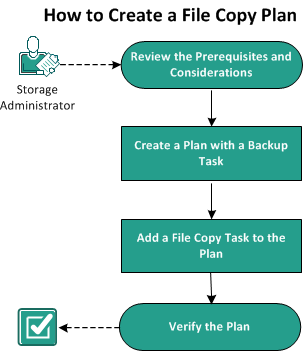
The following diagram illustrates the process to create a file copy:
What To Do Next?
|
Copyright © 2015 Arcserve.
All rights reserved.
|
|