

Managing Tape Backup and Restore › How to Back up a Deduplication Data Store to a Tape › Data Store Folders are Local to the Backup Server on Multiple Volumes
Data Store Folders are Local to the Backup Server on Multiple Volumes
When the deduplication data store folders are on the same machine as the Arcserve Backup server but reside on multiple volumes, then use this method to back up deduplication data stores to a tape.
Follow these steps:
- Add the local agent.
- From the Quick Start pane, click Backup.
- On the right pane, click the Source tab.
- From the Group view, right click Client Agent, Add Machine/Object.
The Add Agent dialog opens.
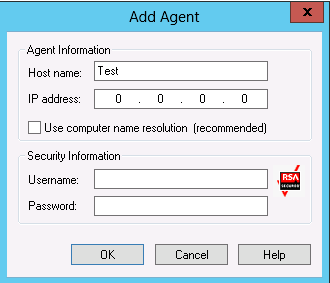
- Specify a dummy host name.
- Clear Use computer name resolution.
- Specify the IP address of the backup server.
- Specify the credentials.
- Click OK.
- Select the source data folders. From the Group view on the left, navigate to the dummy host name and select the data store folders from the appropriate volumes.
- Submit the backup job.
- From the toolbar, click Options.
The Global Options dialog opens.
- Click the Volume Shadow Copy Service tab.
- Select Use VSS and clear Revert to traditional backup if VSS fails.
- Click OK.
- Submit the backup job. For more information on submitting a backup job, see Submit a Backup Job in the Arcserve Backup Administration Guide.
Note: When data store folders reside on a single volume, a single backup session is created on the Arcserve Tape media. Similarly, when data store folders reside on multiple volumes, then as many multiple sessions are created on the Arcserve Tape media.
How to Restore a Deduplication Data Store From a Tape
If you have previously backed up a deduplication data store from a recovery point server (RPS) to a tape device, you can restore the data store. For this procedure, Arcserve Backup and Arcserve UDP are used in conjunction with each other to restore a deduplication data store from a tape. Arcserve Backup is used to restore it from the tape to a specified destination, and then Arcserve UDP is used to import it to an RPS.
The following two processes are involved in the restore procedure:
- The first process uses Arcserve Backup to restore the sessions from the tape media to a volume. It is recommended to restore the sessions to an alternate location.
- The second process uses Arcserve UDP to import the restored data store to the RPS.
Note: You will need to provide the Backup Destination Folder path of the deduplication data store when you browse the location during import.
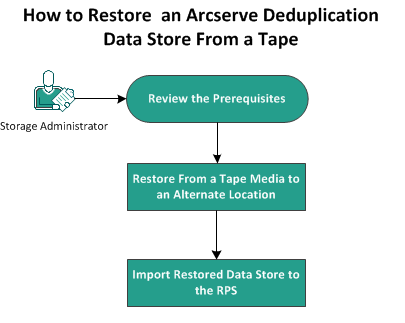
The following diagram illustrates how to restore AN Arcserve deduplication data store from a tape:
What To Do Next?
- Review the Prerequisites
- Restore From a Tape Media to an Alternate Location
- Import Restored Data Store to the RPS
Copyright © 2015 Arcserve.
All rights reserved.
|
|