

Arcserve RHA lets you protect multiple backup files that are created by Arcserve D2D. To protect multiple backup files, you need the Arcserve Central Host-Based VM Backup server.
In the following setup, the Arcserve Central Host-Based VM Backup server works with Arcserve D2D to back up multiple virtual machines. These backup files are stored on the D2D hosts. To protect these backup files, the RHA Control Service connects with the Central Host-Based VM Backup server and gets the D2D host details. The D2D host stores the backup files. You can then select backup files that you want to protect and create a scenario to replicate these D2D backup files.
The following diagram illustrates an installation setup having RHA, D2D, and Central Host-Based VM Backup.
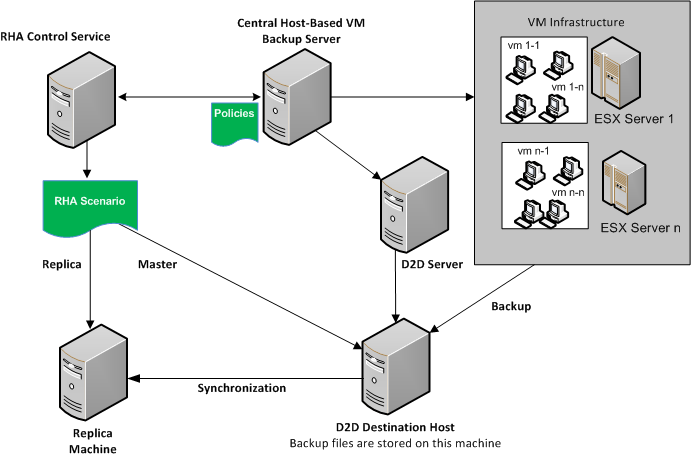
To protect multiple backup files (these files are created by Arcserve D2D), you create a Central Host-Based VM Backup scenario. Specify the Arcserve Host-Based VM Backup server credentials and select virtual machines from the D2D host server.
The following diagram illustrates the process to create a Arcserve Central Host-Based Backup scenario.
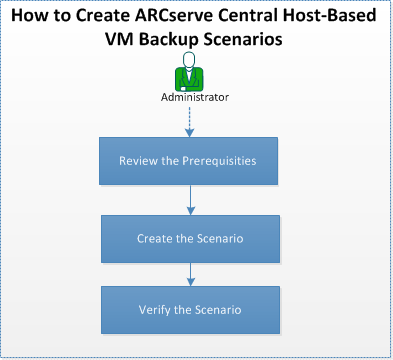
Perform the following tasks to create a Arcserve Central Host-Based Backup scenario.
|
Copyright © 2014 Arcserve.
All rights reserved.
|
|