

|
|
|
From the Email Settings dialog you can specify email settings such as the mail server, subject title, who the email is coming from, the email recipients, and enabling and defining your proxy settings. These settings will apply to all email alert notifications and can be modified at any time.
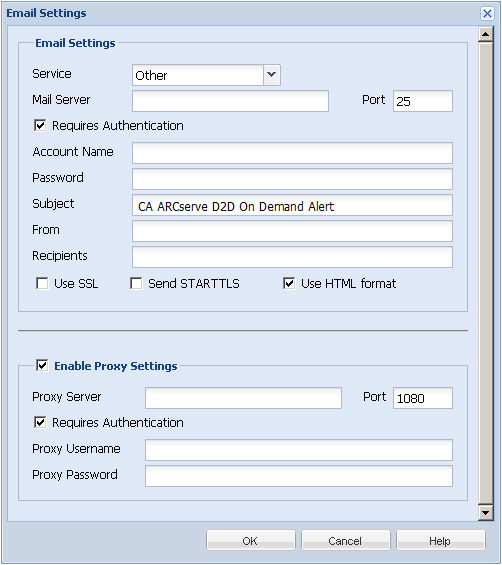
The email provider service to use for sending the alert notifications. The available options are Google Mail, Yahoo Mail, Live Mail, and Other.
Default: Other
The host name of the SMTP mail server that CA ARCserve D2D On Demand can use to send the email alerts.
The output port number for the mail server.
Specifies if this mail server requires authentication when attempting to send an email by way of the Internet. When this option is selected, provide the corresponding user Account Name and Password.
Subject description for the email alert notifications that CA ARCserve D2D On Demand sends.
Default: "CA ARCserve D2D On Demand Alert"
The email address that CA ARCserve D2D On Demand uses to send the email alert notifications.
Email address for the recipients of the email alert notifications sent.
Note: To enter multiple email addresses, separate each address with a semi-colon character.
Email server requires an SSL (Secure Sockets Layer) connection to transmit data securely by way of the Internet.
Email server requires a STARTTLS (Start TLS extension) command that is issued to initiate a secure SMTP connection between servers.
Email alert notifications are sent as HTML. If this option is not selected, the alerts are sent as plain text. By default, this option is selected.
Specifies if you want to connect to a proxy server for sending your email alert notifications. When this option is selected, provide the corresponding name of the proxy server and port number.
| Copyright © 2012 CA. All rights reserved. | Tell Technical Publications how we can improve this information |