

|
|
|
CA ARCserve D2D On Demand lets you specify the schedule settings for your recovery points to be copied (and exported if necessary). For a better understanding about how the options on this dialog can be used to configure your recovery point copy schedule, see Copy Recovery Points - Example Scenarios.
Note: The recovery point copy process is a copy and paste operation only and not a cut and paste operation. As a result, whenever a scheduled copy recovery point job is performed CA ARCserve D2D On Demand creates an additional copy of the recovery point to the specified copy destination, while still retaining the original copy of the recovery point at the backup destination that was specified in Backup Settings.
Specify the recovery point copy schedule
The Copy Recovery Points dialog opens.
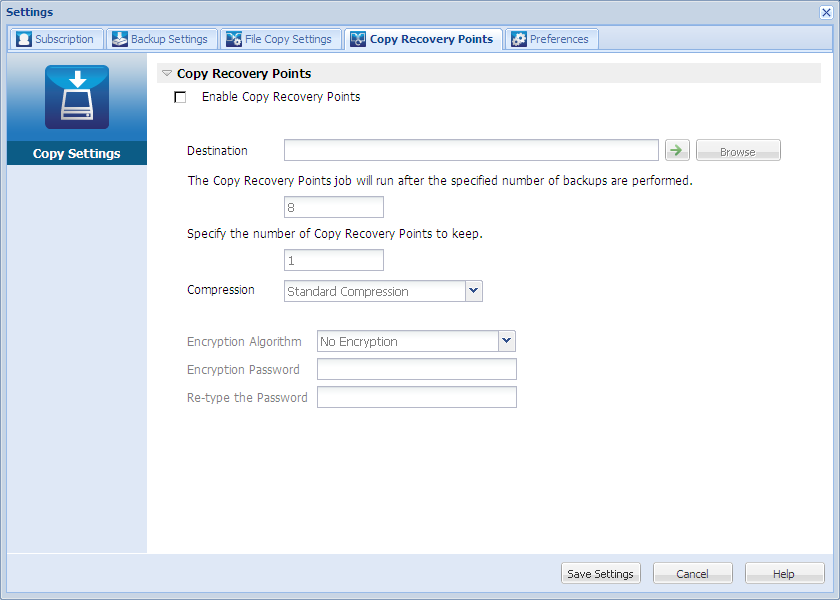
Enables the scheduled copying of recovery points after the specified number of backups. If this option is not selected, no scheduled copying of recovery points is performed.
Specifies the location (destination) for the copy of the recovery points or you can browse to a copy location. You can click the green arrow icon button to verify the connection to the specified location.
Note: The maximum length for the specified destination path is 158 characters.
Specifies when the scheduled recovery point copy process is automatically launched.
The recovery point copy process will be launched automatically after the specified number of successful backups (Full, Incremental, and Verify) and will be based on your selected copy policies.
You can use this setting to control how many times a recovery point copy process is triggered each day. For example, if you specify to run a backup job every 15 minutes, then if you specify to copy the recovery points run after every 4 backups, there will be 24 recovery point copy jobs performed each day (1 each hour).
By default, the schedule for performing recovery point copy jobs is after every eight backup jobs. (The minimum number of backups that can be specified is 1 and the maximum number is 1344).
Important! If you schedule backup and copy jobs to run at regular intervals and if the copy job is currently running (in active state) when the scheduled time for the backup job time arrives, the backup job fails. (The next backup job will run as scheduled and should be successful if it does not conflict with another copy job). Because the copy operation takes almost same amount of time as performing a full backup, the best practice is not to set a frequent schedule for your recovery point copy jobs.
Specifies the number of recovery points that are retained and stored at the specified copy destination. After this number is exceeded, the earliest (oldest) recovery point will be discarded. This cycle of discarding the oldest recovery points repeats as newer recovery points are added to the destination, allowing you to maintain the specified number of stored recovery points.
Note: If your destination does not have sufficient free space, you can consider reducing the number of saved recovery points.
By default the retention count is set to 1 recovery point.
Note: The maximum number of recovery points is 1344.
Specifies the type of compression that is used for recovery point copies.
Compression is typically performed to decrease your disk space usage, but also has an inverse impact on your backup speed due to the increased CPU usage.
The available options are:
Note: If your backup image contains uncompressible data (such as JPG images or ZIP files), additional storage space can be allocated to handle such data. As a result, if you select any compression option and you have uncompressible data in your backup, it can actually result in an increase in your disk space usage.
Specify the type of encryption algorithm that is used for the recovery point copies.
Data encryption is the translation of data into a form that is unintelligible without a deciphering mechanism. CA ARCserve D2D On Demand data protection uses secure, AES (Advanced Encryption Standard) encryption algorithms to achieve maximum security and privacy of your specified data.
The available format options are No Encryption, AES-128, AES-192, and AES-256. (To disable encryption, select No Encryption).
Specify and confirm the encryption password being used to encrypt the destination session.
Your recovery point copy settings are saved.
| Copyright © 2012 CA. All rights reserved. | Tell Technical Publications how we can improve this information |