

|
|
|
The goal of running a successful restore job is to quickly identify the data you need and to retrieve it from the appropriate backup location. CA ARCserve D2D On Demand provides a variety of methods to identify and locate the backed up data and allow you to restore it. Regardless of which restore method you select, CA ARCserve D2D On Demand uses visual indicators (restore markers) of the objects that are or are not selected for restore. For more information, see Restore Markers.
Note: CA ARCserve D2D On Demand only allows one restore job to run at the same time. If you attempt to manually launch a restore job now and during that time another restore job is currently running, an alert message opens informing you that another job is running and requesting that you try again at a later time.
Restore data
The restore methods selection dialog opens.
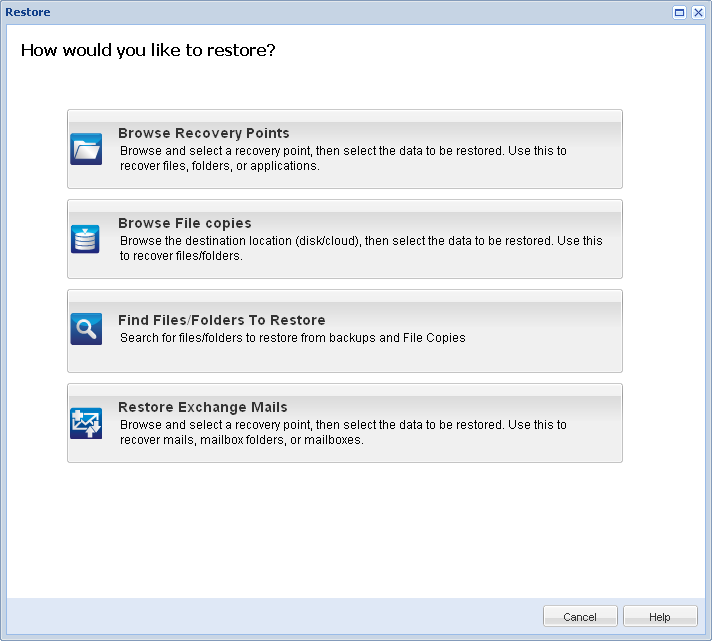
The available options are Browse Recovery Points, Browse File Copies, Find Files/Folders to Restore, and Restore Exchange Mails.
Note: You must use the Browse Recovery Points if you want to restore any applications.
Lets you browse the available recovery points (successful backups) from a calendar view. The calendar dates that contain valid recovery points are highlighted in green. When you select a recovery date, all the associated recovery points for that date are displayed. You can then browse and select the backup content (including applications) to be restored. For more information, see Restore by Recovery Points.
Lets you browse the available File Copy locations (local disk/network drive or cloud) to locate the specific file/folder to be restored. For more information, see Restore from File Copies.
Lets you search for a file name pattern in a specific location and/or the file version to be restored. For more information, see Restore by Find File/Folder.
Lets you browse and select individual objects within an Exchange database to perform a granular-level restore. For more information, see Restore Exchange Mails.
| Copyright © 2012 CA. All rights reserved. | Tell Technical Publications how we can improve this information |