

可以使用以下方法卸载 CA ARCserve Central Protection Manager:
最佳做法是,卸载应用程序之前,从策略所分配到的节点取消分配所有策略。 建议使用该方法,因为在将 CA ARCserve Central Protection Manager 策略分配给节点后,无法在节点上指定 CA ARCserve D2D 备份设置。 此外,在卸载应用程序之后,无法从节点取消分配策略。 CA ARCserve D2D 提供了一个命令行实用工具,允许您在卸载应用程序之后,从节点取消分配策略。
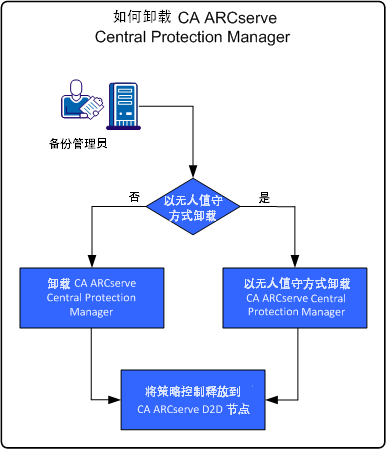
下图说明了如何卸载应用程序:
|
任务 |
参阅主题 |
|---|---|
|
使用 Windows 控制面板执行标准卸载。 |
|
|
使用 Windows 命令行执行无人值守卸载。 |
|
|
卸载 CA ARCserve Central Protection Manager 之后从节点取消分配策略。 |
|
版权所有 © 2013 CA。
保留所有权利。
|
|