Using CA ARCserve Central Reporting › CA ARCserve Central Reporting Types › Data Trend Reports › Backup Size Trend Report › Backup Size Trend Drill Down Report
Backup Size Trend Drill Down Report
The Backup Size Trend Report can be further expanded to display more detailed information. You can click a sample point on the line chart to show the details of that time period.
Note: For immediate results on specific nodes, you must submit an SRM Probe Job from CA ARCserve Central Protection Manager so that the backup size data is calculated for CA ARCserve Backup and CA ARCserve D2D. If you do not submit an SRM Probe Job manually, then the backup size data is calculated after the scheduled SRM Probe Job is executed. For more details on how to submit SRM Probe Jobs, see the Configure SRM Schedules section in the CA ARCserve Central Protection Manager User Guide.
The following sample contains detailed information for the Backup Size Trend Report:
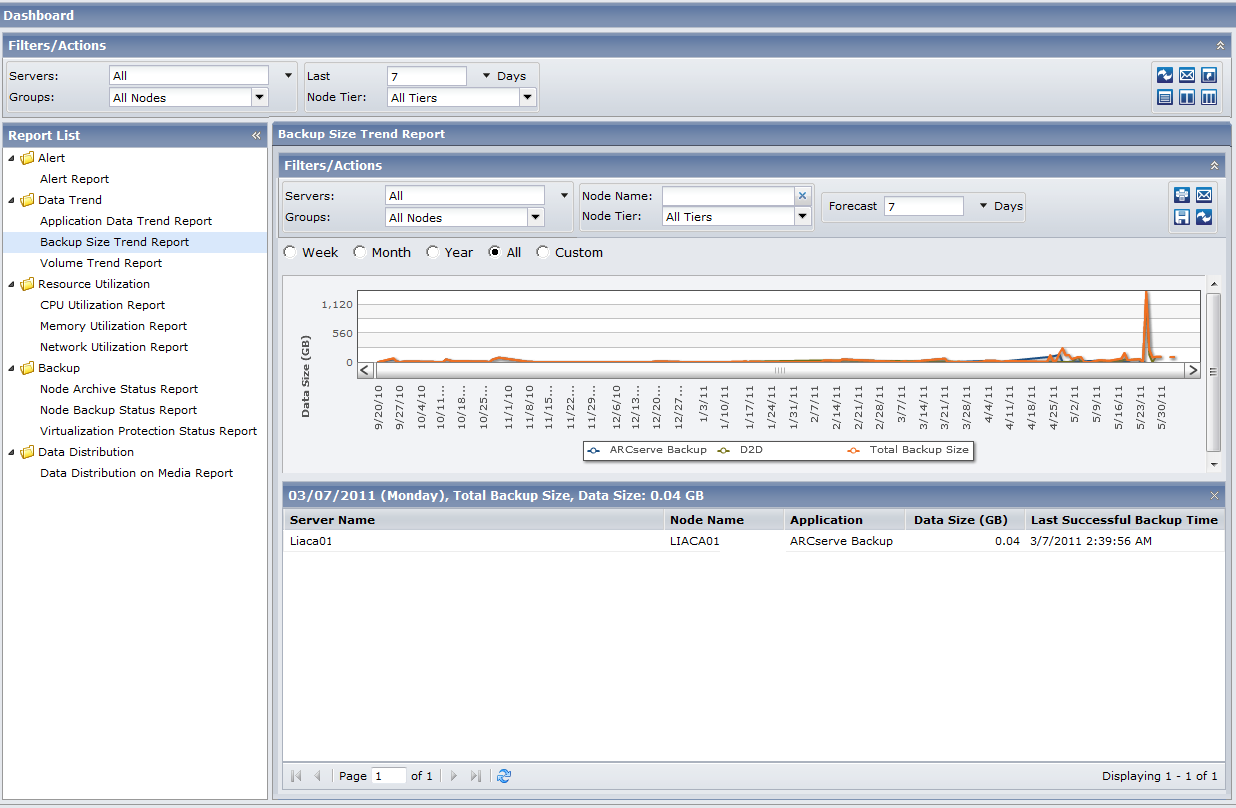
This drill-down report includes the following data for each application:
- Server Name--Displays one of the following server names, based on the backup performed:
- For CA ARCserve Backup nodes, the Server Name field displays the name of the CA ARCserve Backup primary server, standalone server, or central primary server (of a Global Dashboard) where the node is protected.
- For CA ARCserve D2D nodes, the Server Name field displays the host name of the CA ARCserve D2D node where CA ARCserve D2D backup and file copy is performed.
- Node Name--Indicates the name of the agent node or the member server for CA ARCserve Backup or the name of the CA ARCserve D2D node.
- Application--Indicates only the installed applications protected by CA ARCserve Backup or CA ARCserve D2D.
- Data Size (GB)--Indicates the overall data size of the application.
- Last Successful Backup Time--Indicates the date and time of the last successful backup.
Note: You can drill into each column name to sort in ascending or descending order and view any of the columns on the screen. All columns are enabled by default.
|
Copyright © 2012 CA.
All rights reserved.
|
|

