

Arcserve Backup lets you restore SAP for Oracle backup data to alternative nodes.
The following steps describe the tasks that you must perform to prepare the alternative node for the restore operation. You perform the restore operation using SAP tools.
To restore SAP for Oracle data to alternative nodes
Note: The backup node is the node where the SAP for Oracle database resides and the server where you backed up the database.
Note: When running pfilesetup, specify the name of the server that executed the backup for the SAP for Oracle database, as illustrated by the following screen:
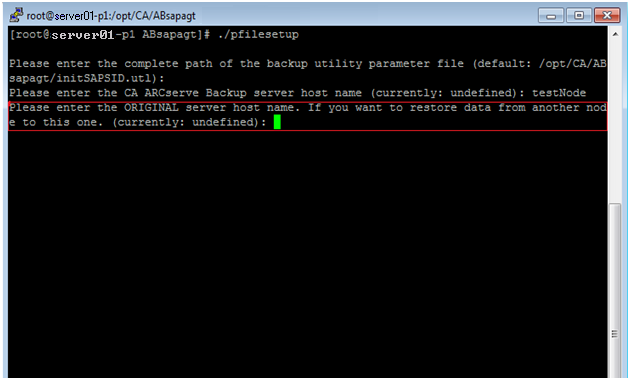
The SAP backup log files are stored in the folder named sapbackup, which is subordinate to the SAP for Oracle data file folder for the SAP instance.
Example:
The following example illustrates the path to the SAP backup log files.
$ORACLE_HOME/CER/sapbackup
For all SAP for Oracle backups, the backint utility creates unique backup IDs that identify a backup. You can identify all backup content based on backup IDs. In addition, BR*Tools save backup IDs in backup log files.
If you know the name of the backup ID that you need to perform the restore, copy only the specific backup log files that you need to the alternative node. If you do not know the name of the backup ID, copy all backup log files stored in the sapbackup directory to the alternative node.
Note: Optionally, you can run the backint utility on the target node to restore the backup log files. If you chose this approach, you should identify the backup ID that was used to back up the backup log files, and then prepare for the input file content for the restore operation. For more information about using the backint utility, see the SAP for Oracle documentation.
For more information, see SAPDBA and BR* Tools You Can Use to Administer SAP Databases.
|
Copyright © 2014 Arcserve.
All rights reserved.
|
|