

Symptom:
The Agent for Oracle does not back up parameter files that are not default, including parameters files which reside on the shared disk in the RAC (Real Application Clusters) and OFS (Oracle Fail Safe) environment.
Solution:
The Agent for Oracle can back up parameter files. However, it backs up only the following default parameter files under the directory %ORACLE_HOME%\dbs and %ORACLE_HOME%\database.
You can use the Agent for Oracle to add additional parameter files. Perform the following steps to add additional parameter files.
To add additional parameter files
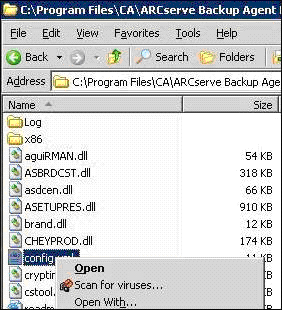
The XML file opens.
For example, if you want to add
C:\Addtional Parameter File.ora
you can replace the text
<ParameterfilePath></ParameterfilePath> using <ParameterfilePath> C:\Addtional Parameter File.ora </ParameterfilePath>
Note: If you have more than one additional parameter files that you want to back up, append another <ParameterfilePath></ParameterfilePath> after the original one.
For example, if you want to add another Parameter File
C:\Another Parameter File.ora
you can replace the text <ParameterfilePath></ParameterfilePath> using
<ParameterfilePath> C:\Addtional Parameter File.ora </ParameterfilePath><ParameterfilePath> C:\Another Parameter File.ora </ParameterfilePath>
Submit the parameter files backup job to test whether the additional parameter files have been backed up.
|
Copyright © 2014 Arcserve.
All rights reserved.
|
|