

Introducing Arcserve Backup Agents and Options › Using Agents › Agent for Oracle › Using the Agent in RMAN Mode › Backup Using the Agent for Oracle in RMAN Mode › Back Up in an Oracle Fail Safe Environment in RMAN Mode
Back Up in an Oracle Fail Safe Environment in RMAN Mode
You can back up data in an Oracle Fail Safe environment. To know more about OFS, see the Oracle documentation.
To back up data in an Oracle Fail Safe environment
- Verify that the Oracle Fail Safe group is running in your Microsoft Cluster environment.
- Start Arcserve Backup and start the Backup Manager.
- On the Source tab, browse the Microsoft Network or the preferred shares to locate the Oracle Fail Safe groups.
- Select the appropriate Oracle server from its Oracle Fail Safe group.
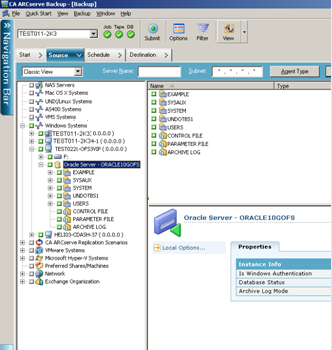
- To set backup options, select the Source tab and then right-click to select Local Options.
The Oracle Backup Options dialog opens.
- On the Agent for Oracle Options dialog, select Back up Oracle database with RMAN mode.
- Double-click the Oracle server to display and select tablespaces for this instance.
- Click the Destination tab and select a backup destination.
- Click the Schedule tab and select the scheduling options you want to assign to this backup job.
- Click Submit on the toolbar.
The Submit Job dialog opens.
- Enter the user name and password of the Oracle Fail Safe group. To enter or change security information for the Oracle Fail Safe group, select the Oracle Fail Safe group and click Security.
Click OK.
The job is submitted.
Note: Although you can browse all Oracle databases from any Oracle Fail Safe group, you can only achieve a successful backup by selecting the Oracle databases from its corresponding Oracle Fail Safe group. If the node on which the Oracle Fail Safe group is currently running enters failover mode during a backup job, the back up job is incomplete and must be resubmitted.
Copyright © 2014 Arcserve.
All rights reserved.
|
|