

Valid on UNIX and Linux platforms.
Symptom:
UNIX and Linux Data Mover is installed on the data mover server. The following message appears in the Command Line window when you try to register the data mover server using the regtool utility:
regtool: error while loading shared libraries: libetpki2.so: cannot open shared object file: No such file or directory
Solution:
The above error occurs when you are logged in to the data mover server using the same login session that was used to install UNIX and Linux Data Mover. Using the same login session prevents you from updating various environment variables (for example, LD_LIBRARY_PATH) that were changed when Setup installed UNIX and Linux Data Mover.
To remedy this problem, log out of the current session and then log in to the data mover server. You should then be able to register the data mover server using the regtool utility.
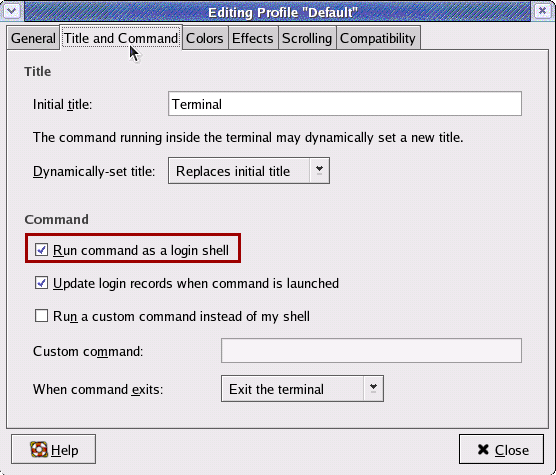
If you cannot register the data mover server after you log out and log in, X Window Terminal may not be configured to inherit the environment variables for the current login session. To remedy this problem, enable the Run command as login shell option as illustrated by the following screen:
Note: The following diagram illustrates the X Window Terminal on a Redhat AS 4 operating system.
Optionally, you can set the environment variables buy executing the following command on the data mover server:
. /etc/profile.CA
regtool register
|
Copyright © 2014 Arcserve.
All rights reserved.
|
|