

Using Dashboard › Dashboard Reports › Node Archive Status Report › Node Archive Status Report - Drill Down Reports
Node Archive Status Report - Drill Down Reports
The Node Archive Status Report can be further expanded from the Pie chart view to display more detailed information. You can click on any status category (from either the pie chart view or the bar chart view) to drill down from a report of summary information to a more focused and detailed report about that particular category.
Be aware of the following:
- From the bar chart view, you can also drill down to display a filtered list of nodes for a status category on a single day.
- You can select the node name and right-click the mouse button to display a pop-up window with all related node information for the selected node. For more information, see Node Information.
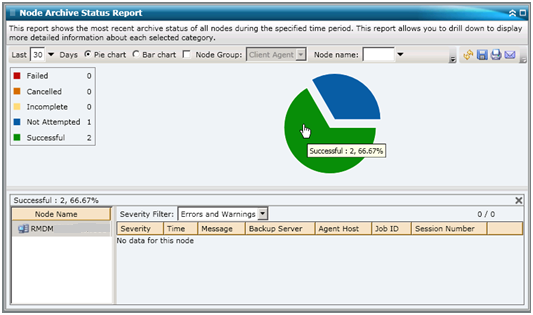
You can then drill down further in this report by clicking on the name of an individual node to display a listing of all log messages associated with that node. You can also filter the list by specifying the severity of the messages displayed (Errors and Warnings, Errors, Warnings, Information, or All).
Be aware of the following:
- Dashboard uses pagination to display the first 100 log messages. You can click on the Next page button to view further messages.
- From this drill down report, you can click on any listed error or warning message to display the related troubleshooting help topic with the corresponding reason and corrective action.
Copyright © 2014 Arcserve.
All rights reserved.
|
|