

Using Dashboard › Dashboard Reports › Job Archive Status Report › Job Archive Status Report - Drill Down Reports
Job Archive Status Report - Drill Down Reports
The Job Archive Status Report can be further expanded to display more detailed information. You can double-click on any status category (from either the pie chart view or the bar chart view) to drill down from a report of summary information to a more focused and detailed report about that particular category. For example, if you click on the Incomplete category, the report summary changes to display a filtered list of just the archive jobs that were not completed during the specified time period.
In addition, this report displays the status of any associated makeup job. The makeup job status can be one of the following:
- Created--A makeup job has been created and is ready in the job queue, but has not been run yet.
- Not Created--After the initial archive job failed, there was no attempt to create a makeup job. You should verify that the job was properly configured to create a makeup job in case of failure. This column can be ignored for successful, incomplete, or canceled archive jobs.
- Active--A makeup job has been created and is running. The status of the makeup job is unknown yet.
- Finished--After the initial archive job failed, the makeup job has been completed and is finished running. From the Most Recent Status column, you can view the corresponding final status of the makeup job, with the possible results being Finished, Incomplete, or Failed.
Note: From the bar chart view, you can also drill down to display a filtered list of jobs for a status category on a single day.
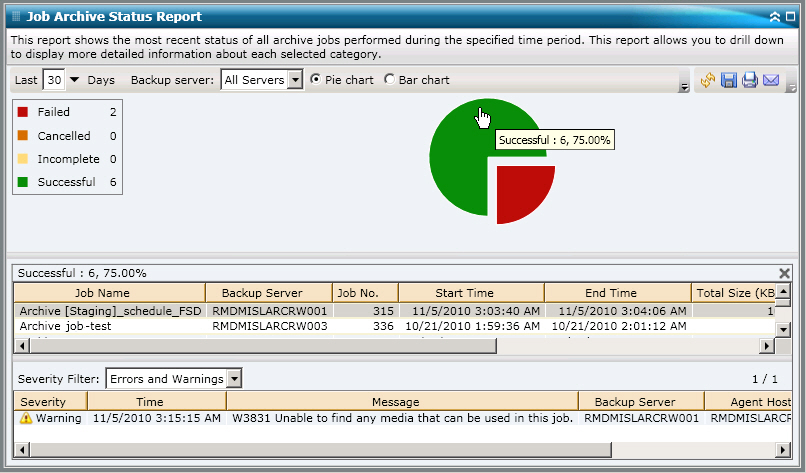
You can drill down further in this report by clicking on the name of an individual job to display a more detailed listing of all log messages associated with that job. You can also filter the list by specifying the severity of the messages displayed (Errors and Warnings, Errors, Warnings, Information, or All).
Be aware of the following:
- Dashboard uses pagination to display the first 100 log messages. You can click on the Next page button to view further messages.
- From this drill down report, you can click on any listed error or warning message to display the related troubleshooting help topic with the corresponding reason and corrective acton.
More information:
Job Backup Status Report - Report View
Job Backup Status Report - Report Benefits
Job Backup Status Report
Copyright © 2014 Arcserve.
All rights reserved.
|
|