Introducing CA ARCserve Backup Agents and Options › Using Options › Enterprise Option for SAP R/3 for Oracle › Introducing the Option › Option Integration with SAP R/3 for Oracle › How SAPDBA Backs Up Data
How SAPDBA Backs Up Data
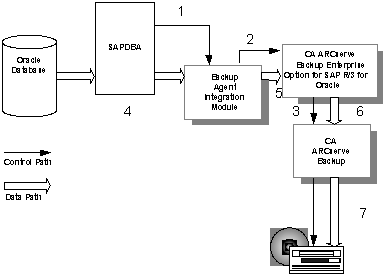
The option performs backups with SAPDBA using the following steps:
- A user issues a backup command from the SAPDBA user interface.
SAPDBA directs the request to the backup option integration module.
- The backup option integration module receives the backup request and passes it to the option.
- The option passes the backup request to CA ARCserve Backup.
- SAPDBA begins copying backup data from the database and passes it to the backup option integration module.
- The backup option integration module passes the backup data to the option.
- The option passes the backup data to CA ARCserve Backup.
- CA ARCserve Backup saves the data to a storage medium.