

|
|
|
The Inventory Slots option checks the library slots and reads the media header. It then associates the media header with the slot in which it was found (called the home slot). In this way, the Tape Engine can track changes made to media in the library. For example, media added or removed from a magazine or moved to a different slot.
Be aware of the following considerations when using the Inventory Slots option to inventory media:
To inventory slots
The Inventory/Offline Slots dialog opens.
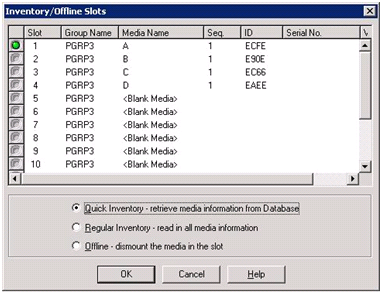
Note: You can also click and drag the light icon to select multiple contiguous media.
Note: This method is also known as a Manual Inventory.
CA ARCserve Backup inventories the slots.
| Copyright © 2012 CA. All rights reserved. | Tell Technical Publications how we can improve this information |