

|
|
|
CA ARCserve Backup lets you back up CA ARCserve D2D data dynamically. Dynamic packaging means that the content of your selection is determined when the job runs.
For example, if you choose to back up a source group or a server, and the nodes or volumes listed on that source group or server change between the time you scheduled the job and the time the job runs, the nodes and volumes changed from the time the job actually runs are backed up.
To submit dynamic backup jobs containing CA ARCserve D2D data
The backup types appear.
Click the Source tab.
The Source directory tree appears.
Expand the CA ARCserve D2D Proxy Servers object and browse proxy server containing the CA ARCserve D2D servers that you want to back up.
Click the check box next to the D2D proxy server containing the CA ARCserve D2D servers that you want to back up.
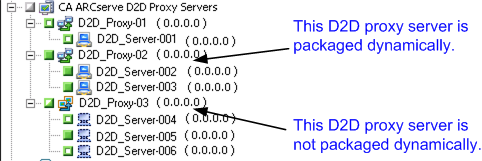
Note: You can apply the dynamic packaging approach to CA ARCserve D2D proxy servers and CA ARCserve D2D VMware vSphere proxy servers.
Note: For more information, see Rotation Schemes and Custom Schedules.
The Destination groups directory tree appears.
The storage group is applied.
The Options dialog opens.
Note: For more information, see Global Backup Options.
Click OK.
The backup options are applied.
Select a drive or volume contained in the computer.
Repeat the previous two steps to apply backup options to the specified drive or volume.
(Optional) Repeat this step for all drives or volumes in the computer.
The Submit Job dialog opens.
The job is submitted.
| Copyright © 2012 CA. All rights reserved. | Tell Technical Publications how we can improve this information |