

In DB2, you can also use views to restrict a user’s access to a table. A view can be one or more selected columns and rows from a table. It can also be two or more tables that are joined. For example, users with the SELECT privilege on a view can see only the information that you define. You can limit access to the field level.
You can use a view to limit users’ accesses to a table based on the contents of its data. For example, you can give Tom access to payroll information about employees only if their last names begin with D.
Another example shows how two views might be defined from the PERSONEL.EMPLPAY table. The first view is defined based on the EMP_NO and EMP_NAME columns. The second view is defined based on the SALARY column and the contents of the EMP_NAME column. Only employees whose last names begin with D are selected for the view.
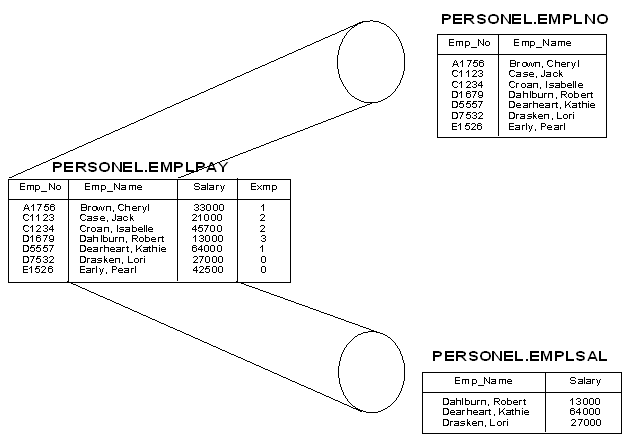
CA ACF2 Option for DB2 supports the use of views just as it supports the use of tables. Rules written for views are almost identical to rules written for tables. Use the resource type code of TBL to identify both table and view types of DB2 resources. For example, the following rule protects a view defined as a subset of the PERSONEL.EMPLPAY table.
$KEY(PERSONEL.EMPLSAL)
$TYPE(TBL)
$SYSID(****)
 UID(*****USER01) SERVICE(SELECT) LOG
Rules written for views, however, can include a keyword not used by tables. The CREATE keyword on the SERVICE parameter is checked by CA ACF2 Option for DB2 during the creation or dropping of a view. For more information about how CA ACF2 Option for DB2 handles authorization checking when views are created, See Creating Views in the “Processing Security Information” section.
|
Copyright © 2011 CA Technologies.
All rights reserved.
|
|