

Latest version: 2.0.2-1
|
At a Glance |
|
|
Catalog |
System |
|
Category |
Switches |
|
User volumes |
no |
|
Min. memory |
96M |
|
OS |
Linux |
|
Constraints |
no |
|
Questions/Comments |
|
URLSW is a switch which distributes HTTP requests to different outputs based on matching the request URI or request headers against rules, defined as regular expressions, on the appliance boundary. URLSW is used in applications that have more then one web or application server appliances to flexibly distribute HTTP requests among them. URLSW operates similar to it's counterpart PS8, but on a higher level - it analyzes HTTP requests instead of tcp/udp ports.
URLSW also has an embedded heath checker. Health checker periodically polls connected out terminals and determines whether the servers are ready to process requests. If any of checked servers becomes non-functional, URLSW automatically disables request flow for this server by redirecting request to other most appropriate live server. When previously non-operational server comes back alive it will be automatically detected by health checker and continues to receive requests.
The switch is cascadable; incoming traffic that does not match any defined regular expression is forwarded through the aux terminal without any modification. All incoming traffic received on the outX and aux terminals is forwarded back through the in terminal.
URLSW is typically used to route incoming traffic to different appliances within an application.
Resources
|
Resource |
Minimum |
Maximum |
Default |
Tested |
|
CPU |
0.1 |
2 |
0.1 |
2 |
|
Memory |
96 MB |
160 MB |
96 MB |
128MB |
|
Bandwidth |
1 Mbps |
2 Gbps |
250 Mbps |
1800 Mbps |
Terminals
|
name |
dir |
prot. |
description |
|
in |
in |
HTTP |
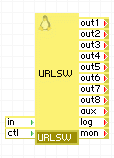
Common input. Traffic sent to in is directed to one of the outputs based on matching the URL or headers against defined regular expressions. |
|
ctl |
in |
HTTP |
Control terminal used for setting regular expressions, enabling/disabling the outputs and retrieving output terminal settings and state. |
|
out1-out8 |
out |
HTTP |
Configured outputs. Requests are forwarded through a particular output based on the outX_type and outX_value properties. Any and all of these outputs can be left unconnected; requests directed to unconnected outputs are discarded. |
|
aux |
out |
HTTP |
Cascade output. Incoming requests not directed to any of the out1-out8 outputs are sent through this terminal. This terminal can be left unconnected. |
|
log |
out |
Any |
Access to a CIFS-based network file system for storing logs (that is, for debugging). The connected server must allow anonymous logins and have a read-write share named share. This terminal may be left unconnected if it is not used. |
|
mon |
out |
CCE |
Sends performance and resource usage statistics. This terminal may be left unconnected if not used. |
General Properties
|
name |
type |
description |
|
outX_type |
string |
Defines the criteria against which the incoming request is matched.There are 4 choices for this property: Hostname, cookie, url and file type.
Default: hostname |
|
outX_value |
string |
Regular expressions to match against. A definition of regular expression is available here. Examples:
Default: (empty) |
Health check properties
|
name |
type |
description |
|
healthcheck_url |
String |
The URL used to perform the health check of the backend web servers in http_get and http_head health check methods. It may be specified as a complete URL (http://host.name/file/to/check/for.php) or as a relative path (/file/to/check/for.php). If specified as a URL, the health check uses the HTTP/1.1 protocol while performing the health check using the hostname extracted from the URL in its a Host: header. This allows for the use of virtual hosts. If specified as a relative path, the health check uses the HTTP/1.0 protocol and checks for the document specified by this property. If this property is empty, the health check checks for the default root '/' using the HTTP/1.0 protocol. |
|
healthcheck_agent |
String |
The string used as an agent identifier for http_get and http_head health check methods. If empty, URLSW-health-check is used. |
|
healthcheck_method |
String |
The method used for the health check of the backend web servers.
Default: tcp_connect. |
|
healthcheck_regexp |
String |
A test string used with the http_get health check mode. Short or common values (eg. OK) will likely cause false positive matches. This string is a perl regular expression; more details about perl regular expressions are available here. |
|
healthcheck_interval |
Int |
Interval between health checks of the backend web servers specified in seconds. |
Timeout properties
|
name |
type |
description |
|
keepalive_timeout |
Int |
Timeout for keep-alive connections. Sets the timeout, during which the keep-alive connection with the client will not be closed by the server. |
|
client_header_timeout |
Int |
Timeout for client to send header of request. If after this time the client does not receive full header, an error is returned. |
|
client_body_timeout |
Int |
Timeout for client to send body of request. This timeout is set not to transfer the entire body of the request, but only between the two operations of reading. If client does not transmit any data in this time period an error is returned. |
|
send_timeout |
Int |
Timeout for client to receive data. If the client does not respond in this interval the connection is closed. This timeout is set not to transfer the entire response, but only between the two operations of writing. |
|
server_timeout |
Int |
Timeout in seconds for establishing a tcp connection to backend servers. This includes the health check. |
Control interface properties
|
name |
type |
description |
|
ctl_port |
Int |
Port used to access the web service control interface through the ctl terminal. |
Logging properties
|
name |
type |
description |
|
enable_access_log |
String |
Enables or disables access log. Default: no |
|
access_log_filename |
String |
Filename for the access log. Default: access.log |
Custom Counters
The URLSW appliance reports the following custom counters through the mon terminal.
|
Counter name |
Description |
|
Active connections |
Number of active connections |
|
Accepted connections |
Number of accepted connections |
|
Handled connections |
Number of handled connections |
|
Handled requests |
Number of handled requests |
|
Active reading connections |
Number of active reading connections |
|
Active writing connections |
Number of active writing connections |
|
Active waiting connections |
Number of active waiting connections |
Performance
Request Rate
URLSW routes no fewer than 3000 transactions (request/response pairs) per second, subject to document size and network bandwidth availability.
Data Throughput
URLSW routes no less than 25 MBytes/second
Concurrent Connections
URLSW supports no fewer than 1000 concurrent requests. In testing, URLSW has supported more than 10,000 simultaneous active transfers.
Error Messages
In case of appliance startup failure, the following errors may be logged to the system log:
|
Error message |
Description |
|
Error: failed to initialize ctl terminal, please contact CA Technologies support. |
A system error occurred while initializing ctl terminal, please contact CA Technologies support. |
|
Error: access log is enabled, but log terminal is not connected. |
log terminal isn't connected, but enable_access_log is set to yes. |
|
Error: failed to initialize external health checker, please contact CA Technologies support. |
An system error occurred while starting external health checker, please contact CA Technologies technical support. |
|
Error: failed to initialize statistics reporting, please contact CA Technologies support. |
A system error occurred while initializing statistics reporting, please contact CA Technologies support. |
Overview
A control web service interface is exposed on the ctl terminal on the configured port ctl_port which allows:
Protocol
Programmatic control of the output terminals uses the GET HTTP method which provides only read functionality. Thus, every supported type of protocol request can be defined by means of its URI and output structure. Characters that are considered special for the URI should be escaped via the standard %-encoding.
Below is a description of all supported URIs.
Control Calls
Following control calls can be invoked:
Clean regular expression list of specified output terminal
The following diagram shows a typical usage of the URLSW appliance with 4 web servers and database.
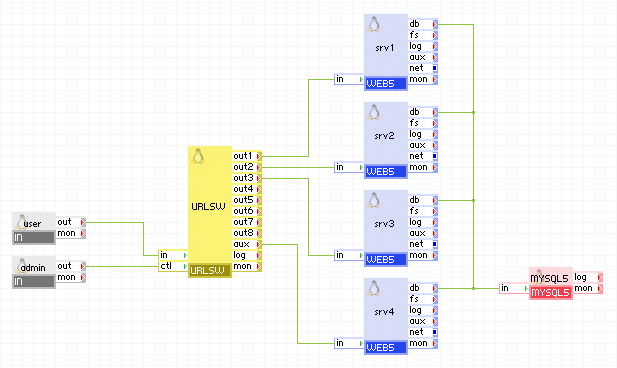
Appliances in use:
Example property configuration:
|
Property name |
Value |
Notes |
|
out1_type |
hostname |
Requests for srv1 are matched by hostname |
|
out1_value |
static.server.com, images.server.com |
Requests for hosts static.server.com and images.server.com are served by srv1 |
|
out2_type |
file type |
Requests for srv2 are matched by file type |
|
out2_value |
|
PDF documents are served by srv2 |
|
out3_type |
file type |
Requests for srv3 are matched by file type |
|
out3_value |
*.php |
PHP scripts are served by srv3 |
All other request served by srv4 as it is connected to aux terminal.
Client request arrive on the user gateway. The gateway forwards the requests to the URLSW server, which distributes it between 4 web servers depending of rules defined in appliance properties or added dynamically by ctl terminal. ctl terminal is accessible by admin gateway.
Open source and 3rd party software used inside of the appliance
URLSW uses the following 3rd party open source packages in addition to the 3rd party open source packages used by its base class LUX5.
|
Software |
Version |
Modified |
License |
Notes |
|
nginx-stable |
0.8.53 |
No |
GPLv2 |
N/A |
|
samba-client |
3.0.28-0.el5.8 |
No |
GPLv2 |
N/A |
|
samba-common |
3.0.28-0.el5.8 |
No |
GPLv2 |
N/A |
|
thttpd |
2.25b |
No |
BSD |
homepage |
|
Copyright © 2011 CA.
All rights reserved.
|
|