

Latest version: 2.0.2-1
|
At a Glance |
|
|
Catalog |
System |
|
Category |
Misc. Appliances |
|
User volumes |
yes |
|
Min. memory |
160 MB |
|
OS |
Linux |
|
Constraints |
no |
|
Questions/Comments |
|
The NASR appliance is a shared file storage appliance. It provides file storage accessible over HTTP, NFS, and CIFS file protocols and web interface for managing files. Additionally, two NASR appliances can be configured in a master-slave synchronization mode so that content on the master is replicated to the slave.
The NASR appliance serves files contained within a configured (pluggable) data volume thus providing the ability for the content served by the appliance to be changed easily and the ability for the volume to have varied sizes. For example, if NASR is being used to store log files, the data volume does not need to be as large as what may be needed to store content for an Apache server.
The root directory of the volume is shared and the HTTP, NFS, and CIFS (samba) servers see the same volume, at the same root. The NFS server exposes the volume as a shared named /mnt/data. The CIFS server exposes the volume as a share named share. The root directory of the volume is accessible for read-only access by the HTTP server and for read/write access by the NFS and CIFS (samba) server.
The CIFS access is anonymous. It is assumed that only appliances that are allowed to access the volume are connected to the cifs terminal. This eliminates the need to configure complex security settings on the client and server and makes it possible to simply connect appliances that need file access to the cifs input.
In its default configuration, NASR serves as a regular NAS appliance. When configured, two NASR appliances can run in master-slave replication so that data on the master is kept replicated on the slave. Replication is one way only, any changes on the slave are not replicated to the master. The replication is asynchronous and is triggered by file changes on the master's data volume. Data is replicated using rsync over its native protocol.
There are several key use cases for the NASR appliance:
NASR provides GUI access to its data volume which allows easy management of the content while the appliance is running.
Important! The current version of NASR is verified to work with up to 20000 files on the data volume. This is a kernel limitation of the file notification system. See the Notes section for details.
Resources
|
Resource |
Minimum |
Maximum |
Default |
|
CPU |
0.1 |
16 |
.2 |
|
Memory |
160 MB |
32 GB |
256 MB |
|
Bandwidth |
1 Mbps |
2 Gbps |
250 Mbps |
Terminals
|
Name |
Dir |
Protocol |
Description |
|
http |
in |
HTTP |
Terminal on which HTTP requests are received. This terminal is used to access NASR's data volume using the HTTP/1.1 protocol. HTTP requests are served by HTTPD server version - 2.2.3. |
|
nfs |
in |
NFS |
Terminal on which NFS requests are received. This terminal is used to access NASR's data volume using the NFS/3.0 protocol. |
|
cifs |
in |
CIFS |
Terminal on which CIFS requests are received. This terminal is used to access NASR's data volume using the CIFS/1.0 protocol. CIFS requests are served by Samba server version 3.0.33. |
|
rin |
in |
Any |
Terminal on which data from the remote NASR appliance is received. Data is transmitted over rsync native protocol (tcp/873). This terminal must be connected if the appliance is configured to run in slave mode (repl_mode is slave) or it will fail to start. The appliance will also fail to start if this terminal is connected but the appliance is not configured to run in slave mode. |
|
rout |
out |
Any |
Terminal on which data to the remote NASR appliance is sent. Data is transmitted over rsync native protocol (tcp/873). This terminal must be connected if the appliance is configured to run in master mode (repl_mode is master) or it will fail to start. The appliance will also fail to start if this terminal is connected but the appliance is not configured to run in master mode. |
|
mon |
out |
CCE |
Sends performance and resource usage statistics. |
The default interface is enabled. This provides the SSH access to the appliance using the 3t ssh comp command to perform maintenance or to troubleshoot problems. The default interface can also be used to access the web-based file browser, which allows management of the content on the data volume while the appliance is running.
User Volumes
|
Volume |
Description |
|
data |
Read/write volume providing storage for the files to be served by the appliance |
The following file may reside within the root directory on the volume:
|
File |
Description |
|
.htpasswd |
HTTP Password File to be used when http_sec_mode is htpasswd. If present, this file is inaccessible from the http interface but will be accessible through the cifs/nfs interface (so that new users can be added/passwords changed) |
Properties
|
Property name |
Type |
Description |
|
http_url_prefix |
String |
Root path (URL) at which the web server should expose the file system. Default: / |
|
http_dir_enabled |
String |
Enable/disable displaying of directory listing when a directory does not contain an index.html file (yes or no). Default: no |
|
http_sec_mode |
String |
HTTP security mode (none, single, or htpasswd). None allows access to everyone. Single allows access to only one username, as configured by the http_user and http_pwd properties. htpasswd honors the .htpasswd file in the root dir of the data volume. If set to .htpasswd and the /mnt/data/.htpasswd file is not present, the appliance will fail to start. Default: none |
|
http_sec_realm |
String |
HTTP security realm in case http_sec_mode is single or htpasswd. Default: Restricted Area |
|
http_user |
String |
User name for HTTP access in case http_sec_mode is single. Default: (empty) |
|
http_pwd |
String |
Password for HTTP access in case http_sec_mode is single. This property may be left empty (no password) in the case when http_user is set to a valid user. Default: (empty) |
|
cifs_read_only |
String |
Restrict CIFS access to read-only (yes or no). Default: no |
|
cifs_case_sensitive |
String |
Enable/disable case sensitive file paths (yes or no). Default: no |
|
nfs_read_only |
String |
Restrict NFS access to read-only (yes or no). Default: no |
|
log_dir |
String |
Directory beginning from the root directory of the data volume where the http and samba server log files are to be stored. For example, if this property is set to /, the log files will be stored within the root directory of the data volume. If this property is empty then only httpd error log is written in the root directory of the data volume. Default: / |
|
timezone |
String |
Specifies the time zone used in the appliance. If this property is empty, the timezone is not modified and left as-is. A list of supported time zones is available here. The timezone property did not exist prior to CA 3Tera AppLogic 2.4.7. Default: empty |
|
rpl_mode |
String |
Configure replication to a remote NASR appliance. Accepted values: |
|
rpl_pwd |
String |
Password for the replication, when running in master or slave mode. If left empty, no password will be required. If this is set on the slave NASR appliance, the same password must be specified on the master, otherwise it will fail to connect to the slave. Default: empty |
Error Messages
The following messages may appear in either the appliance log file or the system log of the grid controller when the appliance fails to start:
|
Error message |
Description |
|
Failed to set timezone! |
Failed to set the appliance timezone as configured by the timezone property. |
|
Failed to mount data volume! |
Failed to mount data volume. |
|
Failed to set permissions on the root dir in data volume! |
Failed to set permissions to 777 on the root dir in data volume. |
|
Log dir [$log_dir] is not located on the data volume, please specify a valid value! |
The expanded path of $log_dir is not relative to the data, probably due to use of '..' in $log_dir. |
|
Failed to start samba! Error was: [$error]! |
Samba daemon failed to start. |
|
Failed to start nfs! Error was: [$error]! |
NFS daemon failed to start. |
|
Failed to start httpd! Error was: [$error]! |
HTTP daemon failed to start. |
|
Failed to start replication! Error was: [rpl_mode is set to master, but the rout terminal in not connected]! |
Replication mode is set to master but the rout terminal is not connected to a slave. |
|
Failed to start replication! Error was: [rpl_mode is set to slave, but the rin terminal in not connected]! |
Replication mode is set to slave but the rin terminal is not connected to a master. |
|
Failed to start replication! Error was: [rout terminal is connected but rpl_mode is not set to master]! |
Replication mode is set to none but the rout terminal is connected. |
|
Failed to start replication! Error was: [rin terminal is connected but rpl_mode is not set to slave]! |
Replication mode is set to none but the rin terminal is connected. |
|
Failed to start replication! Error was: [Invalid value for replication mode ${rpl_mode}]! |
Invalid value for replication mode. |
Additionally, the following errors may appear on the grid dashboard while the appliance is running:
|
Error message |
Description |
|
Free space on the data volume is running low, please check! |
Free space on the data volume is below 20%. |
|
Rsync daemon is not running, starting! |
The rsync daemon on an appliance configured as slave was not running and has been started. |
|
Replication process is not running, starting! |
The replication process on an appliance configured as master was not running and has been started. |
|
Replication does not appear to be alive and could not be stopped! Manual intervention may be required! |
The replication process on an appliance configured as master was running but not working properly. Additionally, the process could not be killed in order to be restarted. Manual intervention is required to kill the process. |
|
Replication does not appear to be alive, restarting! |
The replication process on an appliance configured as master was running but not working properly and was restarted. |
Two instances of NASR can be configured in master-slave replication so that data on the master is kept replicated on the slave. Replication is one way only, any changes on the slave are not replicated to the master.
The replication is asynchronous and is triggered by file changes on the master's data volume. Changes are kept in a buffer and every 5 seconds, all changes (if any) to files on the data volume on the master are replicated to the slave. No new synchronization is done until the current pass of transferring changes is completed. The content of the log_dir is not replicated to the slave server, if log_dir is empty or '/', only the samba and httpd log files (/mnt/data/cifs_log, mnt/data/http_access_log, /mnt/data/http_error_log) are excluded from the replication.
When the appliance is started, a full synchronization of the data volume is done. This is also done every time the replication is (re)started by the healthcheck cronjob (described below).
Data is replicated using rsync over its native protocol running on the default port (tcp 873).
Changes on the data volume are monitored using Gamin.
NASR runs a cronjob every minute that checks the following:
If any of the above is true, an error message is sent to the grid dashboard. If more than one test fails, a summary message with all errors will be posted on the grid dashboard. Each error will be sent only once per hour to the grid dashboard. No errors are reported in the first 5 minutes after the appliance start (to prevent from false alarms when the other node in the replication has not started).
NASR provides web GUI access to the filesystem of the data volume. This can be used while the appliance is running to modify the content on the volume. The GUI is available on the web console on the default interface. It uses the same file browser (eXtplorer) as the Filer appliance.
The reference for the Volume Browser GUI can be found in the Grid User Guide.
The eXtplorer licenses and the source to the original un-modified eXtplorer can be found on the NASR appliances in /usr/local/extplorer/monitor/.volume_browser/LICENSES/.
Content Server
The following diagram shows a typical usage of NASR for a simple web server application:
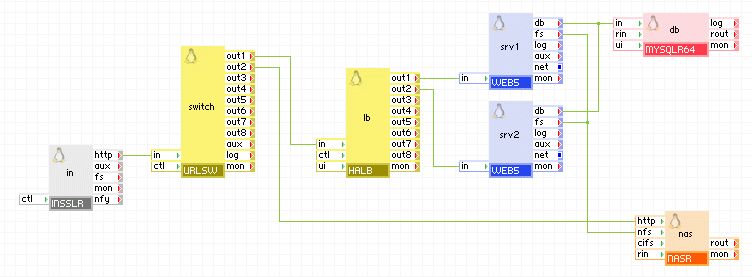
Appliances in use:
The nas appliance in this example is used to serve three functions:
HTTP Access:
in accepts HTTP requests coming to the application and passes them to switch through its http terminal. Switch sends HTTP file requests for dynamic content through its out1 terminal to be served by srv1 and srv2 (load balanced by lb). Urlsw forwards all other HTTP requests through its out2 terminal to be served by nas.
Example:
|
Property name |
Value |
Notes |
|
data |
mydata |
Data volume holding the files to be served by the web server |
|
http_url_prefix |
/images |
Root path at which the web server should expose the file system. |
|
http_dir_enabled |
no |
Directory listing is disabled. |
|
http_sec_mode |
none |
No security is enabled for HTTP access. |
|
cifs_read_only |
no |
The CIFS share is exposed for read/write access. |
|
cifs_case_sensitive |
yes |
Enable case sensitive file paths. |
|
nfs_read_only |
no |
Enable write access over NFS. |
|
rpl_mode |
none |
No replication is done. |
Log Server
The following diagram shows a typical usage of NASR as a log server.
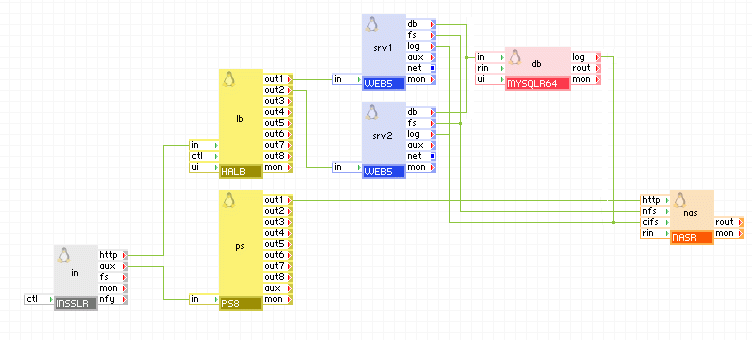
Appliances in use:
The nas appliance in this example is used to store the log files for the two web servers as well as the database server and makes those files available through its http terminal. The nas appliance also serves as shared storage for the two web servers as described in the previous example.
The log terminals for the web servers (web1 and web2) and the database server (dbase) are all connected to the cifs terminal of nas so that when they write to their log files, the files are stored on the data volume that is configured on nas.
When an administrator needs to inspect the log files, he connects using the in gateway on port 8080, which is connected to a port switch appliance that changes the port from 8080 to 80 and passes the requests to the http terminal of the nas appliance. He logs in with the configured administrator user name and password and is shown a listing of the root directory of the data volume from which the administrator is free to view the log files he is interested in.
Example:
|
Property name |
Value |
Notes |
|
data |
data |
Data volume holding the log files |
|
http_url_prefix |
/logs |
URL root path where log files can be accessed. |
|
http_dir_enabled |
yes |
Directory listing is enabled. |
|
http_sec_mode |
single |
HTTP security mode is single user. |
|
http_user |
admin |
User name for HTTP access. |
|
http_pwd |
admin123 |
User password for HTTP access. |
|
cifs_read_only |
no |
The CIFS share is exposed for read/write access. |
|
cifs_case_sensitive |
yes |
Enable case sensitive file paths. |
|
nfs_read_only |
no |
Enable write access over NFS. |
|
rpl_mode |
none |
No replication is done. |
Replicated Shared Storage in Master-Slave Configuration
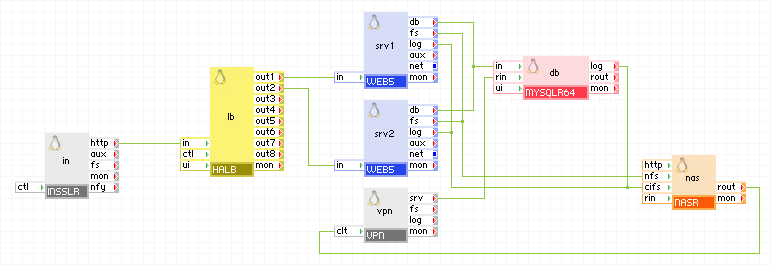
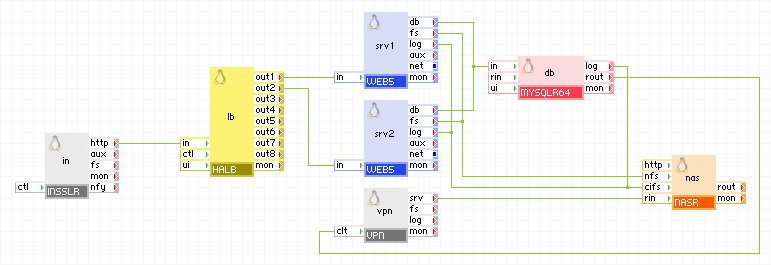
The following diagram shows a typical usage of NASR in a redundant application, where two copies of the same application run in master-slave mode with the database and file storage being replicated.
Master application:
Slave application:
Appliances in use:
The nas appliance in this example is used as shared storage for srv1 and srv2. It is also used as a log server for srv1, srv2 and db.
The data on content volume of the nas appliance in the master application is kept replicated to the nas appliance on the slave replication. The rout terminal of the master nas is connected to the ctl terminal which provides an encrypted tunnel to the slave replication, where the traffic is sent to the rin terminal of the slave nas. On the slave application the rout terminal of the db appliance is connected to the ctl of the vpn appliance, so that the slave mysql server can connect to the db appliance in the master application to run mysql replication.
On both applications srv1, srv2 and db are configured to log to the same dir on the nas appliance ("/logs"), which is also used for local nas logs and is also excluded from the replication so each instance of nas keeps the logs for the application that is serves.
Example:
Master nas
|
Property name |
Value |
Notes |
|
data |
data |
Data volume holding the log files. |
|
log_dir |
/logs |
Directory on the data volume where NASR logs are stored. |
|
cifs_read_only |
no |
The CIFS share is exposed for read/write access. |
|
cifs_case_sensitive |
yes |
Enable case sensitive file paths. |
|
nfs_read_only |
no |
Enable write access over NFS. |
|
rpl_mode |
master |
No replication is done. |
Master vpn
|
Property name |
Value |
Notes |
|
mode |
both |
Operate as a client and server. |
|
tunnel |
certificates |
Using SSH key files. |
|
auth_path |
"client1" |
Path to the SSH key file. |
|
tcp_ports |
3306,22 |
Allow ports needed by MYSQLR64. |
|
ip_addr |
master_vpn_ip |
IP address of the VPN in the master application. |
|
remote_host |
slave_vpn_ip |
IP address of the VPN in the slave application. |
Slave nas
|
Property name |
Value |
Notes |
|
data |
data |
Data volume holding the log files. |
|
log_dir |
/logs |
Directory on the data volume where NASR logs are stored. |
|
cifs_read_only |
no |
The CIFS share is exposed for read/write access. |
|
cifs_case_sensitive |
yes |
Enable case sensitive file paths. |
|
nfs_read_only |
no |
Enable write access over NFS. |
|
rpl_mode |
slave |
No replication is done. |
Slave vpn
|
Property name |
Value |
Notes |
|
mode |
both |
Operate as a client and server. |
|
tunnel |
certificates |
Using SSH key files. |
|
auth_path |
"client1" |
Path to the SSH key file. |
|
tcp_ports |
873 |
Allow ports needed by NASR. |
|
ip_addr |
slave_vpn_ip |
IP address of the VPN in the slave application. |
|
remote_host |
master_vpn_ip |
IP address of the VPN in the master application. |
Important! The slave nas can be configured to allow read-only access on the nfs terminal so that no writes are done from the local application servers. Such changes would not be replicated to the master nas as the replication is one way only.
Be aware of the following:
NASR uses a custom kernel (2.6.24-26-xen) which is different from the default kernel for catalog appliances and includes fixes for some nfs related problems. Future versions of NASR may use the standard CA 3Tera AppLogic kernel when it is upgraded to a more recent version that includes the nfs fixes.
The following open source 3rd party software is used in addition to that software found on the appliance base class (LUX64 is the base class of PGSQL64).
|
Software |
Version |
Modified |
License |
Notes |
|
libgcrypt |
1.4.4-5.el5 |
No |
GPLv2 |
N/A |
|
libgpg-error |
1.4-2 |
No |
GPLv2 |
N/A |
|
libxslt |
1.1.17-2.el5_2.2 |
No |
GPLv2 |
N/A |
|
postgresql |
9.0.1-1PGDG |
No |
BSD |
N/A |
|
postgresql-libs |
9.0.1-1PGDG |
No |
BSD |
N/A |
|
postgresql-server |
9.0.1-1PGDG |
No |
BSD |
N/A |
|
postgresql-test |
9.0.1-1PGDG |
No |
BSD |
N/A |
|
samba-client |
3.0.28-1.el5_2.1 |
No |
GPLv3 |
N/A |
|
samba-common |
3.0.28-1.el5_2.1 |
No |
GPLv3 |
N/A |
NASR uses the following 3rd party open source packages in addition to the 3rd party open source packages used by its base class LUX5.
|
Software |
Version |
Modified |
License |
Notes |
|
apr |
1.2.7-11 |
No |
Apache 2.0 |
N/A |
|
apr-util |
1.2.7-11 |
No |
Apache 2.0 |
N/A |
|
aspell |
0.60.3-7.1 |
No |
LGPLv2.1 |
N/A |
|
aspell-en |
6.0-2.1 |
No |
LGPLv2.1 |
N/A |
|
cups-libs |
1.3.7-18 |
No |
GPLv2 |
N/A |
|
curl |
7.15.5-9 |
No |
MIT |
N/A |
|
gamin |
0.1.7-8 |
No |
LGPLv2.0 |
N/A |
|
gmp |
4.1.4-10 |
No |
LGPLv2.1 |
N/A |
|
gnutls |
1.4.1-3 |
No |
LGPLv2.1 |
N/A |
|
libgcrypt |
1.4.4-5 |
No |
LGPLv2.1 |
N/A |
|
libgpg-error |
1.4-2 |
No |
LGPLv2.1 |
N/A |
|
libidn |
0.6.5-1.1 |
No |
LGPLv2.1 |
N/A |
|
libjpeg |
6b-37 |
No |
Distributable |
N/A |
|
libpng |
1.2.10-7.1 |
No |
zlib |
N/A |
|
libsmbclient |
3.0.33-3.29 |
No |
GPLv2 |
N/A |
|
libtiff |
3.8.2-7 |
No |
MIT |
N/A |
|
mailcap |
2.1.23-1 |
No |
ISC |
N/A |
|
perl-Convert-ASN1 |
0.20-1.1 |
No |
Artistic |
N/A |
|
php |
5.1.6-27 |
No |
PHPv3.01 |
N/A |
|
php-cli |
5.1.6-27 |
No |
PHPv3.01 |
N/A |
|
php-common |
5.1.6-27 |
No |
PHPv3.01 |
N/A |
|
postgresql-libs |
8.1.22-1 |
No |
ISC |
N/A |
|
quota |
3.13-1.2.5 |
No |
BSD |
N/A |
|
rsync |
2.6.8-3.1 |
NO |
GPLv2 |
N/A |
|
samba |
3.0.33-3.29 |
No |
GPLv2 |
N/A |
|
samba-client |
3.0.33-3.29 |
No |
GPLv2 |
N/A |
|
samba-common |
3.0.33-3.29 |
No |
GPLv2 |
N/A |
|
perl-Sys-Gamin |
0.1-1 |
Yes |
Artistic |
N/A |
|
httpd |
2.2.3-31 |
Yes |
Apache 2.0 |
N/A |
|
extplorer |
2.0.0_RC1-17 |
Yes |
GPLv2 |
N/A |
|
Copyright © 2011 CA.
All rights reserved.
|
|